
Alagambe Font – Free Download (OTF, TTF, SVG)

About Alagambe
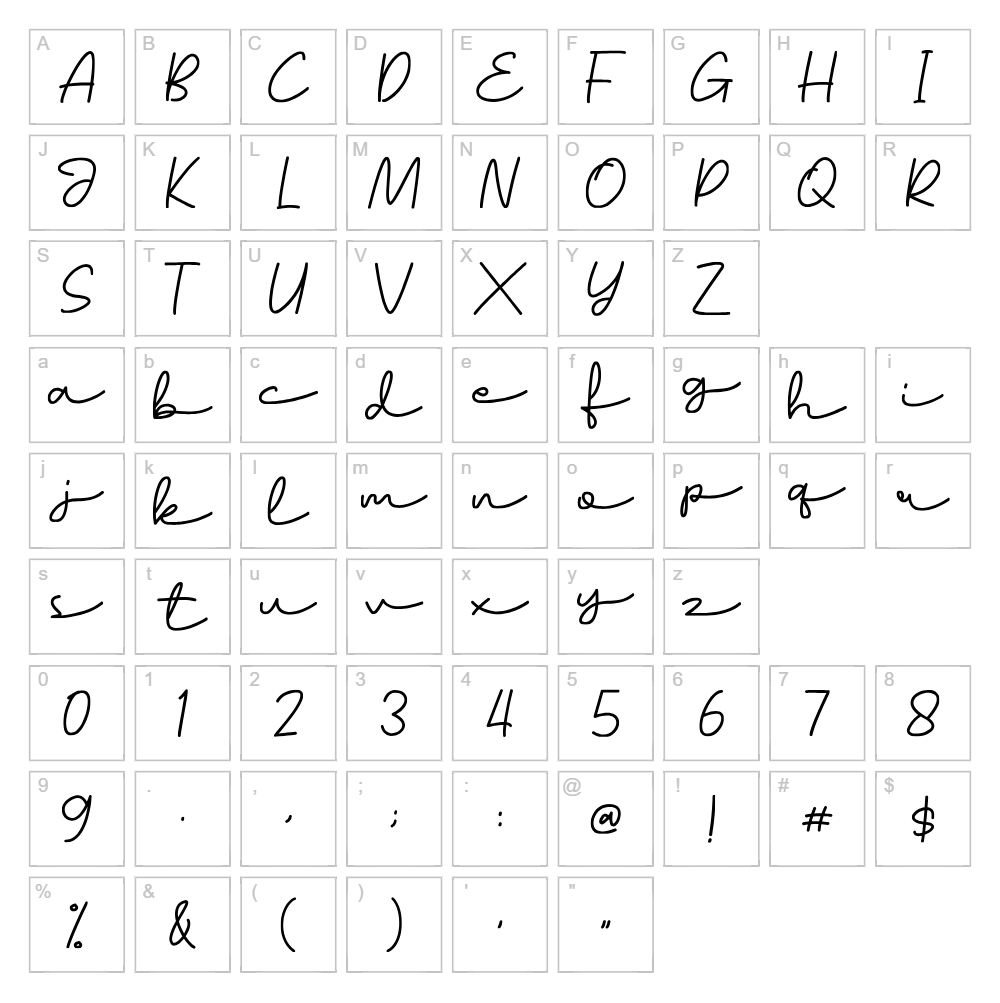
Alagambe is a flowing handwritten script font created by Zuzulgo Studio that captures the organic beauty of natural pen strokes and casual letterforms. With its smooth, connected characters and elegant curves, this typeface radiates a friendly yet sophisticated personality perfect for contemporary design work. The font's relaxed rhythm and organic proportions give it a distinctly personal touch that stands out in crowded design landscapes. Whether you're crafting something playful or polished, Alagambe delivers authentic handwritten charm without sacrificing legibility.
Best Uses for Alagambe
Alagambe excels in branding, logo design, and packaging where a personal, human touch matters. It's ideal for Cricut vinyl decal projects, custom t-shirt designs, social media graphics, and greeting card layouts. The font also works beautifully for editorial headers, invitation designs, and signage that needs to communicate warmth and authenticity.
What Fonts Pair Well With Alagambe?
Alagambe pairs wonderfully with clean, minimalist sans-serif fonts like Poppins or Montserrat for modern brand applications where script and sans-serif contrast creates visual hierarchy. For a more traditional aesthetic, pair it with Merriweather, a sophisticated serif that balances Alagambe's casual energy with editorial polish.
License & Commercial Use
Alagambe is 100% free for commercial use, meaning you can use it in logo designs, branded print materials, digital publications, website projects, mobile apps, merchandise, and e-commerce applications without restriction. You may use the font for client work, product packaging, and advertising campaigns. The only restriction is that you cannot resell or redistribute the font files themselves. We ask that you credit Zuzulgo Studio when possible, though it is not legally required.
Frequently Asked Questions
Is Alagambe free for commercial use?
Yes, Alagambe is 100% free for commercial use. You can use it in logos, print materials, digital designs, merchandise, web projects, and client work without paying licensing fees or requesting permission from Zuzulgo Studio.
What file formats does Alagambe come in?
Alagambe is available in standard font file formats including TTF (TrueType) and OTF (OpenType), making it compatible with all major design software, operating systems, and applications like Adobe Creative Suite, Cricut Design Space, and Canva.
What fonts pair well with Alagambe?
Alagambe pairs beautifully with modern sans-serifs like Poppins and Montserrat for contemporary designs, or with the serif font Merriweather for more sophisticated, editorial applications. The contrast between script and geometric typefaces creates strong visual hierarchy.
Can I use Alagambe for Cricut projects?
Absolutely. Alagambe works perfectly with Cricut Design Space and other cutting software for vinyl decals, t-shirt designs, paper crafts, and custom signage. Its smooth letterforms cut cleanly and maintain excellent detail even at smaller sizes.
How to Install Alagambe
- Download the Alagambe font file from VectorDad.com to your computer.
- Unzip the downloaded folder to access the font file(s).
- Double-click the TTF or OTF font file to open the font preview window.
- Click the Install button to add Alagambe to your system fonts.
- Restart your design applications and Alagambe will be available in all font menus and dropdowns.
Use Alagambe With VectorDad Tools
Create custom word art and decorative text effects using the VectorDad Word Art Generator, which lets you instantly design with Alagambe and export as SVG files for Cricut projects. Take your designs further with the Curved Text Generator to bend, arc, and customize Alagambe text along any path for stunning vinyl decals and craft projects.


