
Pigeon Scribble Font – Free Download (OTF, TTF, SVG)

About Pigeon Scribble
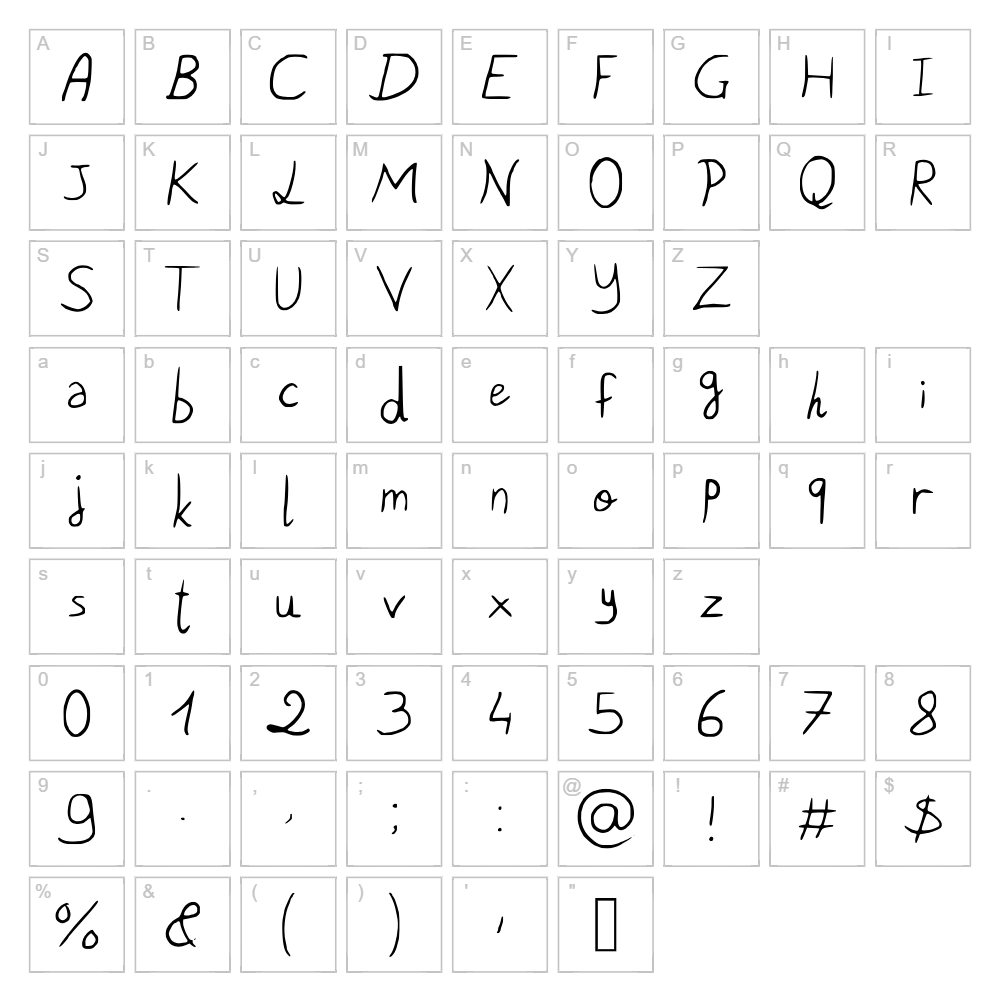
Pigeon Scribble is a playful, energetic handwritten script font designed by Loïc Jeannin that captures the spontaneous feel of pen-on-paper sketching. With its organic, loose letterforms and natural stroke variations, this font radiates creativity and approachability without sacrificing legibility. The irregular baseline and flowing curves give Pigeon Scribble a distinctly human quality, making it perfect for projects that need personality and warmth. Its casual yet refined character bridges the gap between sketchy doodles and polished design work.
Best Uses for Pigeon Scribble
Pigeon Scribble excels in branding, logo design, greeting cards, and packaging where a personal touch is valued. It's ideal for Cricut vinyl decals, t-shirt designs, handmade product labels, and social media graphics that need to stand out with authentic handwritten charm. This font also works beautifully for editorial headings, invitation design, and any creative project where informal elegance is the goal.
What Fonts Pair Well With Pigeon Scribble?
Pigeon Scribble pairs beautifully with clean, minimalist sans-serif fonts like Inter or Poppins (both free on Google Fonts) to balance its playful energy with modern simplicity. For a softer, more feminine aesthetic, combine it with Lora, a graceful serif font that complements handwritten styles without competing for attention.
License & Commercial Use
Pigeon Scribble is 100% free for commercial use, meaning you can use it in logos, branding materials, print publications, digital products, web design, mobile apps, merchandise, and any other commercial project without restriction. You may embed the font in websites, use it for client work, and create commercial products featuring this typeface. We ask only that you credit designer Loïc Jeannin when possible. However, you may not resell or redistribute the font files themselves.
Frequently Asked Questions
Is Pigeon Scribble free for commercial use?
Yes! Pigeon Scribble is completely free for commercial use. You can use it for logos, branding, merchandise, print materials, websites, apps, and any business project without licensing fees or restrictions.
What file formats does Pigeon Scribble come in?
Pigeon Scribble is available in standard font formats including TTF (TrueType) and OTF (OpenType), compatible with Windows, Mac, and Linux systems as well as design software like Adobe Creative Suite, Cricut Design Space, and Silhouette Studio.
What fonts pair well with Pigeon Scribble?
Pigeon Scribble pairs well with minimalist sans-serifs like Inter or Poppins for modern contrast, and with serifs like Lora for elegant balance. The key is choosing fonts with different weights and formality to let each typeface shine.
Can I use Pigeon Scribble for Cricut and vinyl cutting projects?
Absolutely! Pigeon Scribble works great for Cricut designs, vinyl decals, and heat transfer projects. Its clear letterforms cut cleanly, and the playful style makes it perfect for personalized crafts, custom apparel, and home décor projects.
How to Install Pigeon Scribble
- Download the Pigeon Scribble font file from VectorDad.com
- Unzip the downloaded file to reveal the font file(s)
- Double-click the TTF or OTF font file to open the font preview window
- Click the "Install" button to add Pigeon Scribble to your system fonts
- Restart your design software, and Pigeon Scribble will be available in your font list
Use Pigeon Scribble With VectorDad Tools
Take your Pigeon Scribble designs further with the VectorDad Word Art Generator, which lets you create stunning text effects and convert your designs into SVG files perfect for Cricut projects. You can also use the Curved Text Generator to bend Pigeon Scribble along custom paths, adding dimension and creativity to your vinyl decal and t-shirt designs.


