
Gothic Font – Free Download (OTF, TTF, SVG)

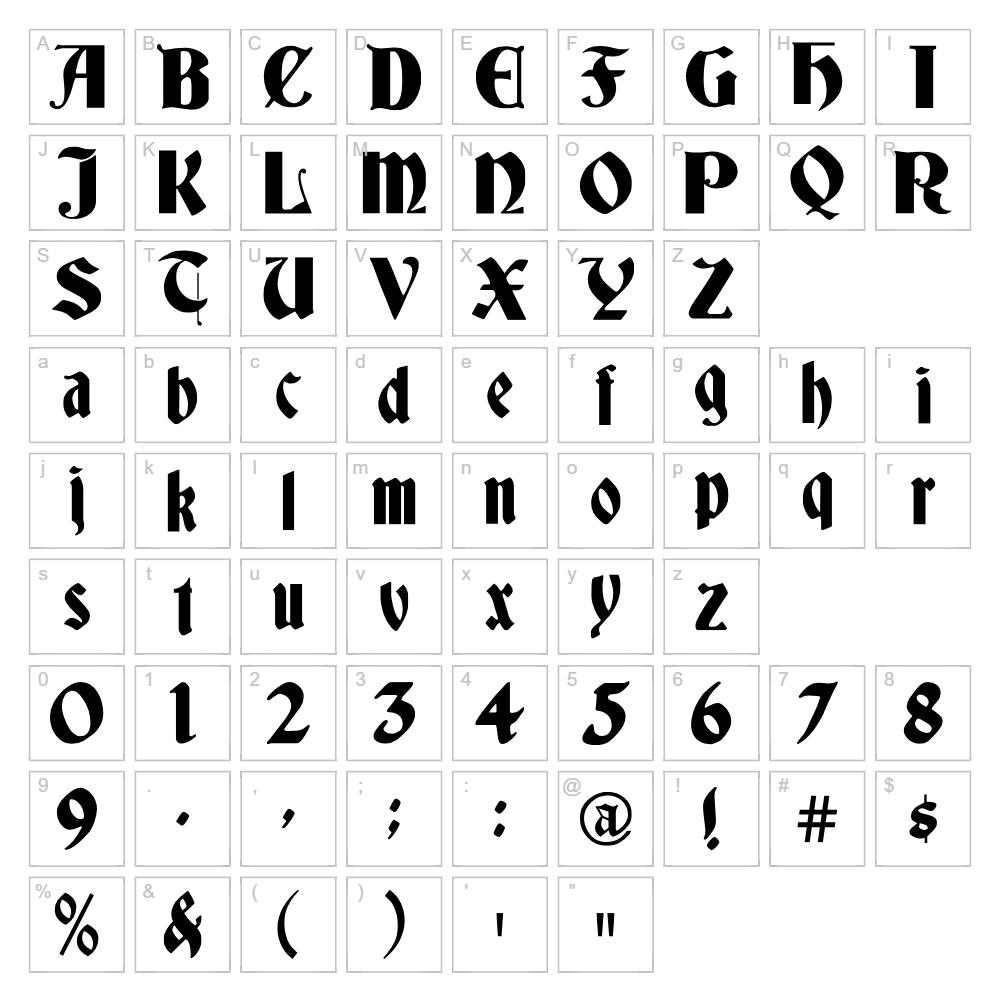
Character Map
Download Gothic Font
Downloads as a ZIP file. Check the license notes on this page before commercial use.
Font Files
- Deutsch.ttf
Font Details
- License:Free for personal use
- Author:
About Gothic
Gothic is a striking medieval-inspired typeface designed by James Fordyce that captures the architectural drama of classic blackletter lettering. With bold, angular strokes and sharp serifs, this font delivers an authentic gothic aesthetic that commands attention without sacrificing readability. The design balances ornamental character with clean letterforms, making it versatile enough for both traditional and contemporary design applications. Whether you're channeling dark academia or creating period-authentic signage, Gothic brings instant gravitas to any project.
Best Uses for Gothic
Gothic excels in dramatic branding, logo design, and packaging where a bold medieval or vintage aesthetic enhances the brand narrative. It's ideal for Cricut vinyl decals, t-shirt designs, poster art, and theatrical signage that demands visual impact. This font also works beautifully for editorial headers, book covers, game design, and Halloween-themed projects where a gothic mood is essential.
What Fonts Pair Well With Gothic?
Gothic pairs naturally with elegant serif fonts like Playfair Display for luxury branding, or with minimal sans-serifs like Montserrat to balance its ornamental weight. For a cohesive medieval aesthetic, consider pairing it with Crimson Text, a classic serif that complements gothic letterforms without competing for attention.
License & Commercial Use
Gothic is 100% free for commercial use. You may use this font for logo design, print materials, digital projects, websites, mobile applications, merchandise production, and any other commercial venture without paying licensing fees. Credit to designer James Fordyce is appreciated but not required. However, you may not resell, redistribute, or repackage the font file itself for profit.
Frequently Asked Questions
Is Gothic free for commercial use?
Yes, Gothic is completely free for commercial use. You can use it in logos, marketing materials, merchandise, digital products, and any paid or commercial project without restriction or additional licensing fees.
What file formats does Gothic come in?
Gothic is available in standard font formats including TTF (TrueType) and OTF (OpenType), ensuring compatibility with Windows, Mac, and web applications. Both formats can be installed on your system and used in design software like Adobe Creative Suite, Canva, Cricut Design Space, and more.
What fonts pair well with Gothic?
See our Font Pairing section above for detailed recommendations. We suggest Playfair Display for elegance, Montserrat for contrast, and Crimson Text for a unified medieval look.
Can I use Gothic for Cricut projects?
Yes. Gothic works wonderfully with Cricut Design Space for vinyl decals, heat transfer designs, and engraving projects. For best results, use our VectorDad Word Art Generator to create outlined SVG files that cut cleanly on your Cricut machine.
How to Install Gothic
- Download the Gothic font file from VectorDad.com and save it to your computer.
- Unzip the file if it's in a compressed folder using your system's extraction tool.
- Double-click the font file (.ttf or .otf) to open the font preview window.
- Click "Install" to add Gothic to your system fonts (Windows, Mac, or Linux).
- Restart your design software if it's already open, and Gothic will appear in your font list in all applications.
Use Gothic With VectorDad Tools
Transform your Gothic text into custom SVG files perfect for Cricut cutting with our VectorDad Word Art Generator, which converts typed text into outlined vector designs. Explore the Curved Text Generator to bend Gothic lettering along circular or custom paths, creating eye-catching designs for vinyl decals, t-shirts, and craft projects.
Make Your Own Font
Like the look of Gothic but want letters in your own style? Draw or trace each character as an SVG, then turn the set into an installable .ttf font with our SVG to TTF font maker. It runs in your browser, with no signup.
Similar Fonts
If you like Gothic, you may also like these free fonts:


