
The Wedding Signature Font – Free Download (OTF, TTF, SVG)

Character Map
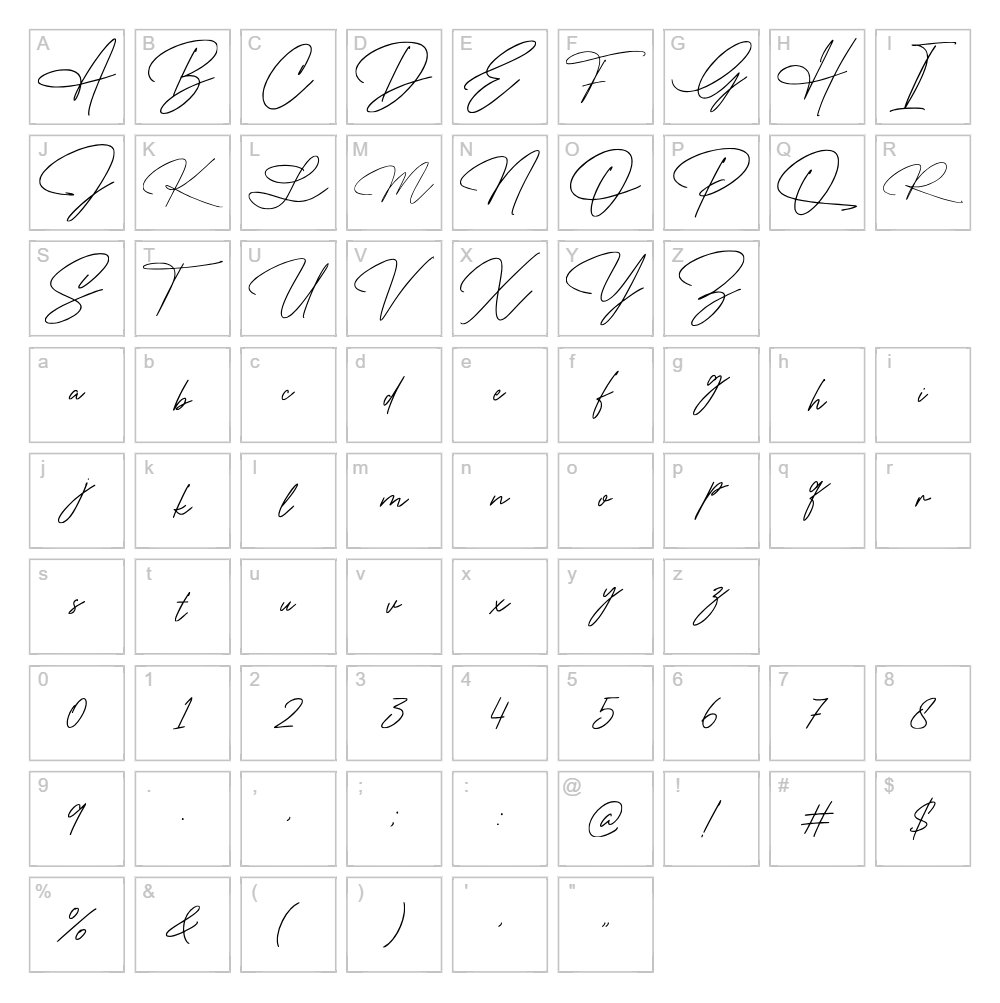
Download The Wedding Signature Font
Downloads as a ZIP file. Check the license notes on this page before commercial use.
Font Files
- TheWeddingSignature-Regular.ttf
- TheWeddingSignature-Regular.woff
Font Details
- License:Free for personal use
- Author:
About The Wedding Signature
The Wedding Signature is an elegant handwritten script font designed by Nirmana Visual that captures the flowing grace and personal touch of formal calligraphy. With smooth, connected letterforms and refined stroke work, this typeface evokes sophistication and romance, making it ideal for designs that demand a genuine, intimate aesthetic. The natural rhythm of each character reflects authentic pen-to-paper craftsmanship while maintaining excellent readability across various sizes. Perfect for designers seeking authentic personality without sacrificing elegance, The Wedding Signature brings warmth and sincerity to any creative project.
Best Uses for The Wedding Signature
The Wedding Signature excels in wedding invitations, greeting cards, and formal event branding where a personal, heartfelt touch enhances the message. It's equally suited for logo design, luxury product packaging, vinyl decal projects for Cricut machines, and social media graphics that benefit from organic, handcrafted appeal. This font also works beautifully for editorial headers, wall art, and any design where sophisticated elegance meets genuine human connection.
What Fonts Pair Well With The Wedding Signature?
The Wedding Signature pairs beautifully with Montserrat, a clean geometric sans-serif that provides modern balance to the script's elegance. For a more traditional approach, consider Lora, a serif font that complements handwritten scripts with refined sophistication. Open Sans is another excellent pairing, offering approachable readability while letting The Wedding Signature shine as the design's focal point.
License & Commercial Use
The Wedding Signature is licensed for free personal use, allowing you to create designs for non-commercial projects at no cost. For commercial applications—including logos, printed materials, digital publications, web design, mobile apps, merchandise, and client work—you are permitted to use this font provided proper credit is given to designer Nirmana Visual. Commercial use encompasses any project where payment is involved or the work is produced for business purposes. Font file resale or redistribution is strictly prohibited under all circumstances. Always review the complete license terms before deploying this font in professional or commercial settings.
Frequently Asked Questions
Is The Wedding Signature free for commercial use?
The Wedding Signature is designated as free for personal use only. Commercial applications require verification of the designer's extended license terms. Check with Nirmana Visual directly for commercial licensing options and requirements.
What file formats does The Wedding Signature come in?
The Wedding Signature is available in standard font formats including TTF (TrueType) and OTF (OpenType), ensuring compatibility with Windows, macOS, and most design applications including Adobe Creative Suite and Cricut Design Space.
What fonts pair well with The Wedding Signature?
The Wedding Signature pairs exceptionally well with sans-serif fonts like Montserrat and Open Sans for contemporary designs, or with serif fonts like Lora for more traditional applications. These combinations balance the script's elegance with clean, readable supporting text.
Can I use The Wedding Signature for Cricut vinyl decal projects?
Yes, The Wedding Signature works beautifully for Cricut vinyl decals and personal craft projects. Its flowing letterforms create stunning cut designs for home décor, personalized gifts, and decorative wall art, though commercial resale of finished decal products may require proper licensing confirmation.
How to Install The Wedding Signature
- Download The Wedding Signature font file from VectorDad.com to your computer.
- Unzip the downloaded folder to extract the font file (usually a .ttf or .otf file).
- Double-click the font file to open the font preview window on your system.
- Click Install to add The Wedding Signature to your system fonts folder permanently.
- Restart your design applications and The Wedding Signature will appear in your font list, ready to use in all programs.
Use The Wedding Signature With VectorDad Tools
Transform The Wedding Signature into custom word art and decorative text using the VectorDad Word Art Generator, perfect for creating unique Cricut cutting files and print-ready designs. Enhance your creative projects further with the Curved Text Generator, which lets you bend and warp The Wedding Signature along custom paths for dynamic, professional-quality SVG files.
Make Your Own Font
Like the look of The Wedding Signature but want letters in your own style? Draw or trace each character as an SVG, then turn the set into an installable .ttf font with our free font creator. It runs in your browser, with no signup.


