
Lumie Font – Free Download (OTF, TTF, SVG)

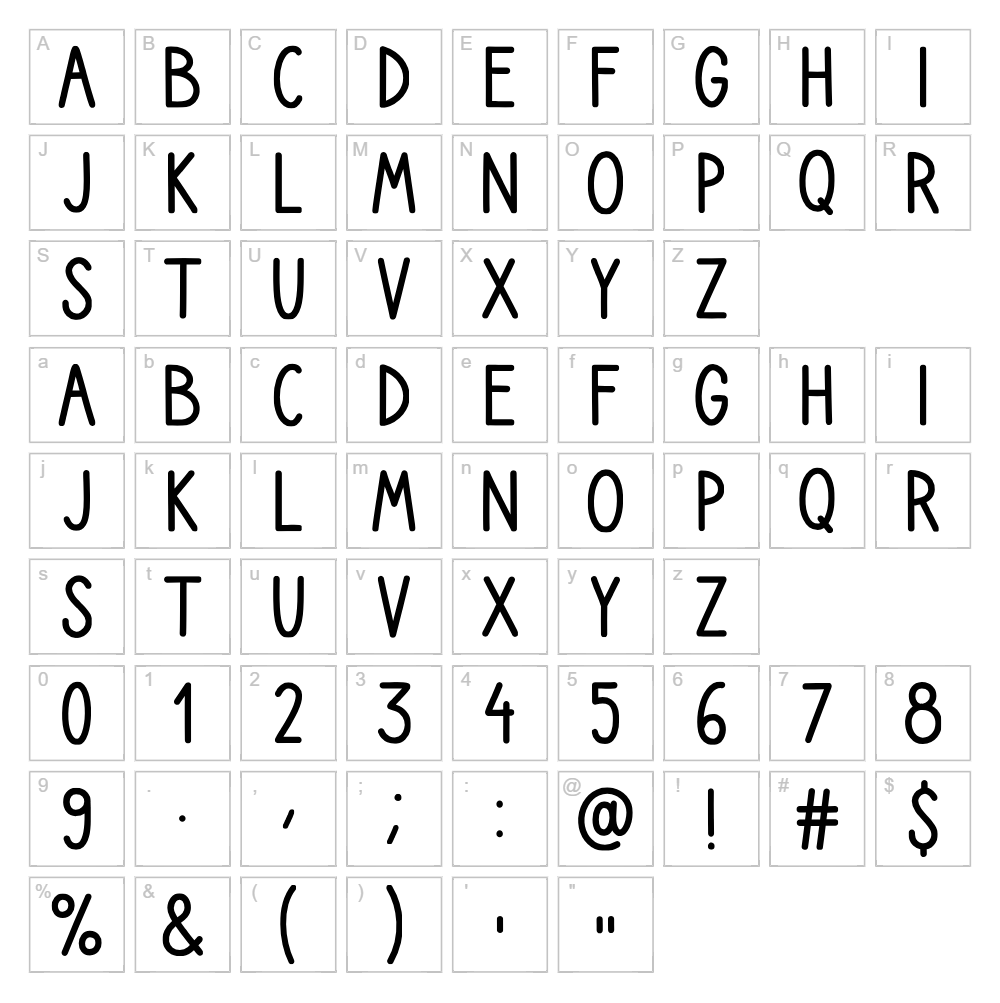
Character Map
Download Lumie Font
Downloads as a ZIP file. Check the license notes on this page before commercial use.
Font Files
- Lumie.ttf
Font Details
- License:Free for personal use
- Author:
About Lumie
Lumie is a beautifully flowing handwritten script font designed by Roberta Stanić that captures the organic, natural feel of pen-on-paper lettering. With its smooth, connected strokes and graceful letterforms, Lumie exudes an elegant yet approachable charm that works equally well for personal and professional projects. The font's balanced weight and consistent baseline make it highly legible while maintaining the authentic character of handwritten typography. What sets Lumie apart is its versatility—delicate enough for wedding invitations, yet sturdy enough for branding applications.
Best Uses for Lumie
Lumie excels in design projects that call for warmth and personality, making it ideal for logo design, branding packages, greeting cards, and social media graphics. Its handwritten nature makes it perfect for Cricut cutting projects, vinyl decals, t-shirt designs, and personalized merchandise. Lumie also works beautifully in editorial layouts, signage, wedding stationery, and any creative project where a human touch elevates the visual impact.
What Fonts Pair Well With Lumie?
Lumie pairs beautifully with clean, geometric sans-serif fonts that provide visual balance. Consider pairing it with Poppins (Google Fonts) for a modern, friendly contrast, Lato (Google Fonts) for a professional yet approachable look, or Playfair Display (Google Fonts) for an elegant serif option that complements Lumie's flowing curves.
License & Commercial Use
Lumie is 100% free for commercial use, meaning you can use it to create logos, branded materials, printed products, digital designs, websites, applications, merchandise, and any other commercial project without restriction. You may use Lumie in client work, business branding, product packaging, promotional materials, and for resale of design services built around this font. Attribution to designer Roberta Stanić is appreciated but not required. The only restriction is that you may not resell or redistribute the font file itself.
Frequently Asked Questions
Is Lumie free for commercial use?
Yes! Lumie is 100% free for all commercial applications, including logo design, branding, print products, digital media, websites, apps, and merchandise. You can use it for client projects and business work without any licensing fees.
What file formats does Lumie come in?
Lumie is available in standard font formats including TrueType (.ttf), OpenType (.otf), and web formats (.woff, .woff2) to ensure compatibility across all design software, operating systems, and web browsers.
What fonts pair well with Lumie?
Lumie pairs well with clean sans-serifs like Poppins and Lato for a modern contrast, or with serif fonts like Playfair Display for an elegant combination. The key is balancing Lumie's flowing script with fonts that have clear, structured letterforms.
Can I use Lumie for Cricut projects?
Absolutely! Lumie works perfectly for Cricut cutting projects including vinyl decals, heat transfer designs, paper crafts, and personalized gifts. Its smooth strokes and consistent weight make it ideal for cutting without losing detail.
How to Install Lumie
- Download the Lumie font file from VectorDad.com to your computer.
- Unzip the downloaded folder to access the font files.
- Double-click the font file (.ttf or .otf) to open the font preview window.
- Click the "Install" button to add Lumie to your system fonts.
- Restart your design applications, and Lumie will be available in all your font menus.
Use Lumie With VectorDad Tools
Maximize Lumie's potential with the VectorDad Word Art Generator, which lets you create stunning word art designs instantly using Lumie for Cricut SVG projects. Take your designs further with the Curved Text Generator to bend Lumie's elegant letters along custom curves and paths for truly unique creative projects.
Make Your Own Font
Like the look of Lumie but want letters in your own style? Draw or trace each character as an SVG, then turn the set into an installable .ttf font with our free font creator. It runs in your browser, with no signup.


