
James Stroker Font – Free Download (OTF, TTF, SVG)

About James Stroker
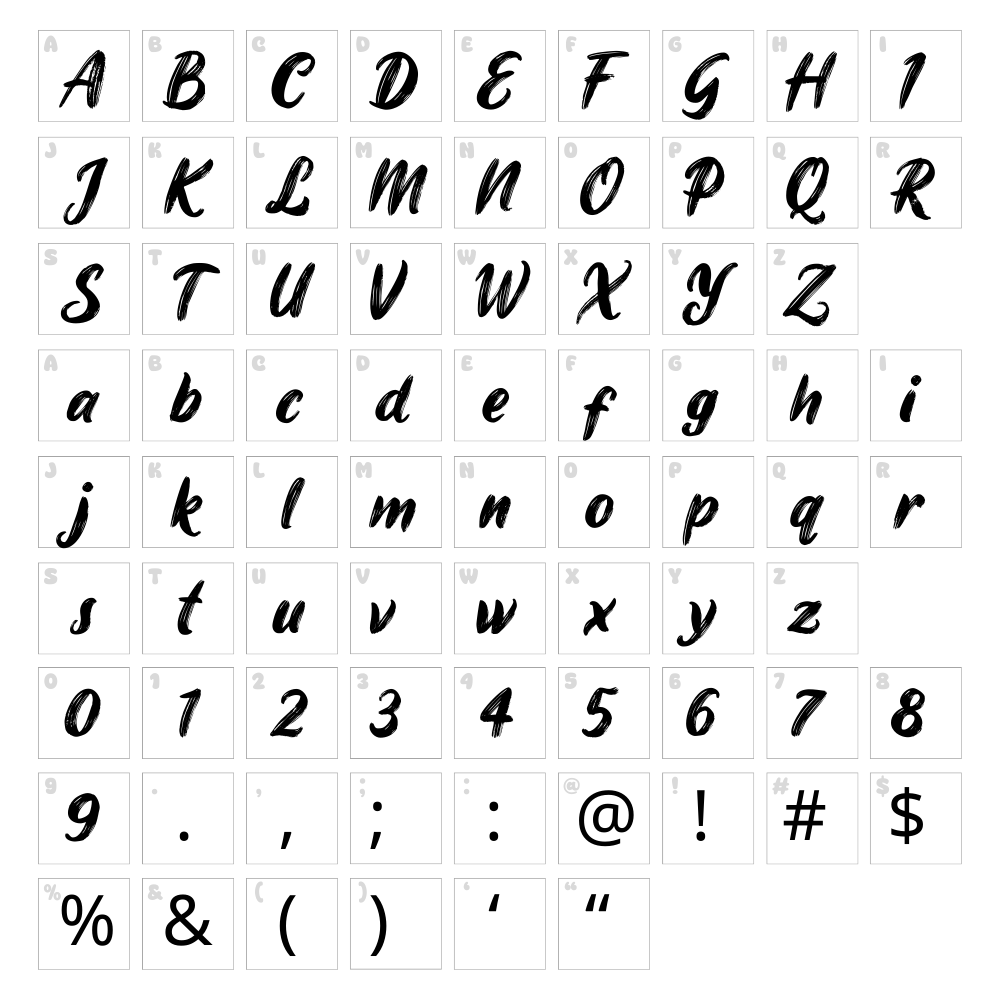
James Stroker is a bold, energetic brush script font designed by cove703 that combines organic hand-drawn strokes with confident letterforms. The font features thick, expressive brush marks that create a dynamic and contemporary aesthetic, perfect for designs that need personality and movement. Its flowing style captures the essence of authentic hand-lettering while maintaining excellent readability across various sizes. Whether used for headlines or decorative elements, James Stroker brings an artistic, modern flair to any creative project.
Best Uses for James Stroker
James Stroker excels in branding, logo design, and packaging where bold personality is an asset. The font is ideal for vinyl decals, t-shirt designs, Cricut projects, and poster artwork that demands visual impact. It also works beautifully for social media graphics, greeting cards, and editorial headers where a contemporary brush aesthetic enhances the overall design.
What Fonts Pair Well With James Stroker?
James Stroker pairs excellently with clean, minimalist sans-serif fonts to balance its boldness. Consider pairing it with Roboto or Open Sans from Google Fonts for body text and secondary headers. For a more elegant contrast, Playfair Display works as a sophisticated serif companion that complements the script's artistic energy.
License & Commercial Use
James Stroker is 100% free for commercial use, including logo design, branding, packaging, print materials, digital publications, websites, mobile applications, and merchandise production. You are permitted to use this font in client projects, business applications, and products sold for profit without requesting additional permission or purchasing a commercial license.
When using James Stroker, attribution to designer cove703 is appreciated but not required. However, you may not resell, redistribute, or repackage the font files themselves. Modification of the font files is also not permitted without explicit authorization from the designer.
Frequently Asked Questions
Is James Stroker free for commercial use?
Yes, James Stroker is completely free for commercial use. You can use it in logos, branding, merchandise, print materials, digital products, and any other commercial application without paying licensing fees or requesting permission from the designer.
What file formats does James Stroker come in?
James Stroker is available in standard font file formats including TTF (TrueType) and OTF (OpenType), ensuring compatibility with Windows, Mac, and design software across all platforms and applications.
What fonts pair well with James Stroker?
James Stroker pairs well with minimalist sans-serif fonts like Roboto and Open Sans for balanced contrast. For a more sophisticated look, try pairing it with Playfair Display, a serif font that complements the script's artistic nature without overwhelming the design.
Can I use James Stroker in Cricut Design Space?
Yes, James Stroker can be installed on your computer and used directly in Cricut Design Space once the font is installed on your system. You can also use the VectorDad Word Art Generator to create pre-made SVG designs with James Stroker that are ready to cut immediately.
How to Install James Stroker
- Download the James Stroker font file from VectorDad.com
- Unzip the downloaded folder to access the font files
- Double-click the TTF or OTF font file to open the font preview window
- Click the "Install" button to add the font to your system
- Restart your design applications and James Stroker will appear in your font list, ready to use in all programs
Use James Stroker With VectorDad Tools
Create stunning word art and custom designs with the VectorDad Word Art Generator, which lets you instantly visualize James Stroker in decorative layouts perfect for Cricut projects. Take your designs further with the Curved Text Generator to bend James Stroker text along circular or custom paths, adding dynamic curves to vinyl decals, signage, and craft projects.


