
Digital16 Font – Free Download (OTF, TTF, SVG)

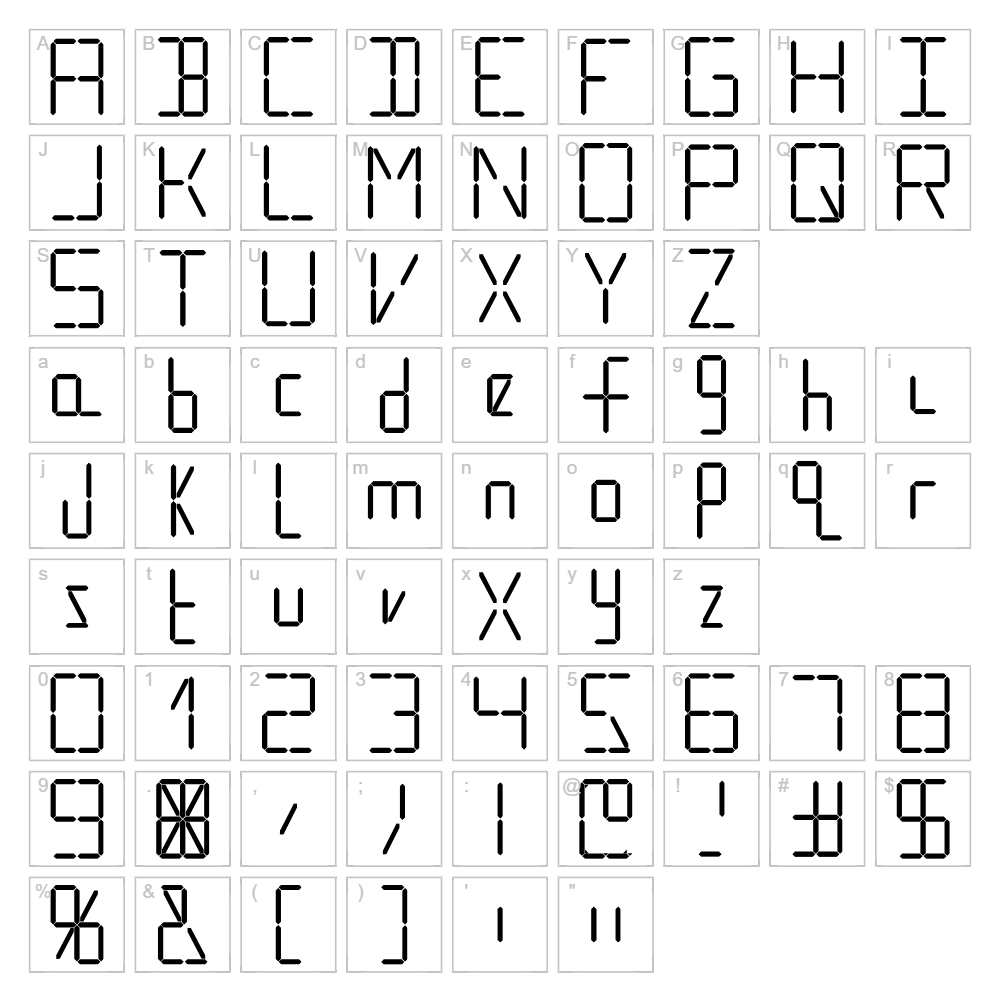
About Digital16
Digital16 is a bold, geometric LCD-style typeface designed by Gary Pettie that evokes the aesthetic of classic digital displays and retro electronic devices. With its crisp, angular letterforms and precise stroke weight, this font captures the essence of 1980s technology and pixelated screens. The clean, technical design makes it instantly recognizable while maintaining excellent legibility across various sizes. Digital16 is perfect for designers seeking an authentic techno or sci-fi vibe with nostalgic appeal.
Best Uses for Digital16
Digital16 excels in tech-forward branding, futuristic logo design, and electronic product packaging where a digital or retro-electronic aesthetic is desired. It's ideal for Cricut vinyl decals, t-shirt designs, gaming graphics, and signage that demands attention and a cutting-edge feel. This font also works beautifully in poster design, album artwork, and digital displays where a bold, technical presence is essential.
What Fonts Pair Well With Digital16?
Digital16 pairs exceptionally well with clean, minimal sans-serif fonts like Roboto or Inter, which complement its geometric precision without competing for visual dominance. For a more sophisticated contrast, consider pairing it with Playfair Display, a classic serif font that balances Digital16's technical edge with timeless elegance. Each combination creates a distinct visual hierarchy suitable for modern branding and editorial layouts.
License & Commercial Use
Digital16 is free for full commercial use, allowing you to create logos, branded materials, print projects, digital designs, web applications, and merchandise without licensing restrictions. You may use Digital16 in client work, product packaging, apparel, signage, and digital media. Attribution to designer Gary Pettie is appreciated but not required. However, redistributing or reselling the font files themselves is strictly prohibited—always direct users to VectorDad.com for free downloads.
Frequently Asked Questions
Is Digital16 free for commercial use?
Yes, Digital16 is completely free for commercial use. You can use it in logos, branding, merchandise, print materials, web projects, and client work without any licensing fees or restrictions.
What file formats does Digital16 come in?
Digital16 is available in standard font formats including TTF (TrueType) and OTF (OpenType), which are compatible with Windows, Mac, and most creative software applications.
What fonts pair well with Digital16?
Digital16 pairs beautifully with minimalist sans-serifs like Roboto and Inter for modern designs, or with Playfair Display for a sophisticated serif contrast that adds elegance to technical aesthetics.
Can I use Digital16 for Cricut projects?
Absolutely. Digital16 works perfectly with Cricut Design Space and other cutting software for creating vinyl decals, t-shirt designs, and custom signage with a bold, retro-digital aesthetic.
How to Install Digital16
- Download the Digital16 font file from VectorDad.com
- Unzip the downloaded folder to access the font file
- Double-click the font file (.ttf or .otf) to open the font preview window
- Click the Install button to complete installation on your system
- Restart your creative software, and Digital16 will appear in your font menu, ready to use
Use Digital16 With VectorDad Tools
Create stunning word art and custom text designs with the VectorDad Word Art Generator, which lets you style Digital16 with colors, effects, and shapes perfect for Cricut cutting. Take your designs further with the Curved Text Generator to bend and arc Digital16 along custom paths, creating professional-grade SVG files for cutting machines and digital projects.


