
NFS Font – Free Download (OTF, TTF, SVG)

About NFS
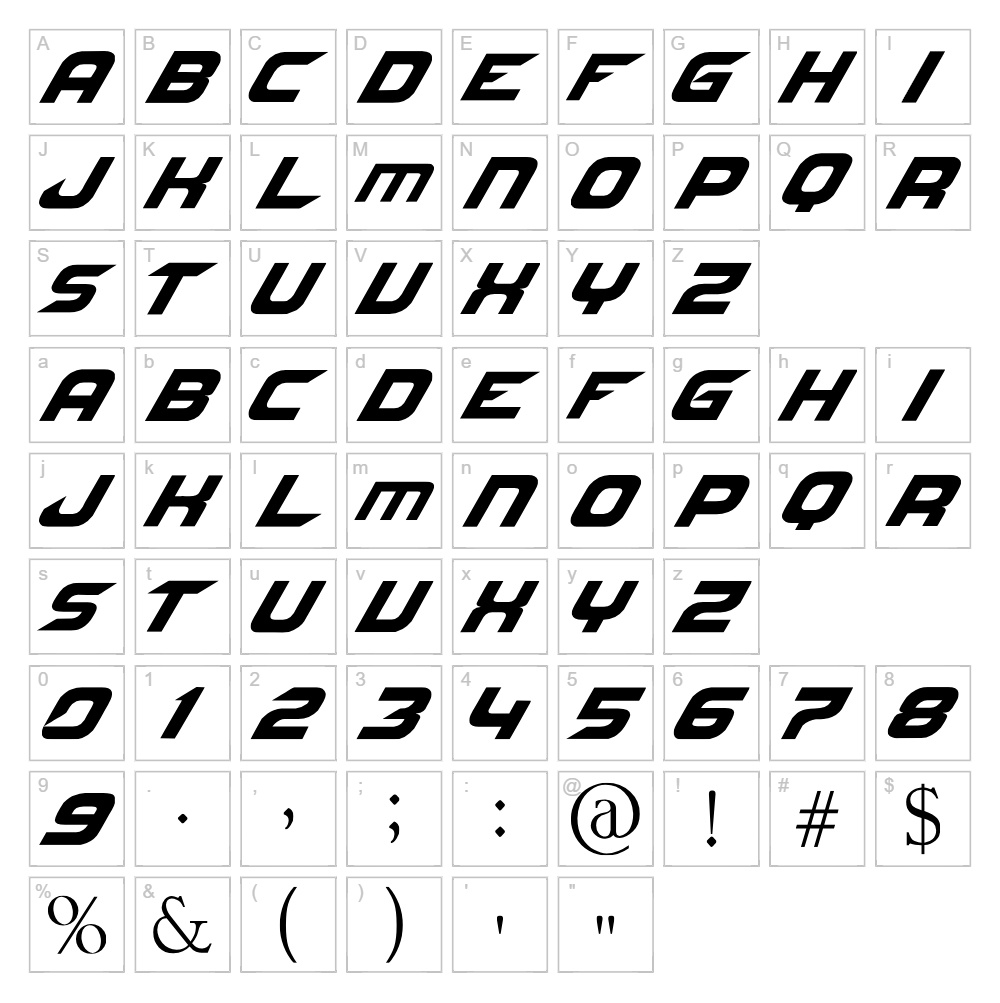
NFS is a bold, geometric sans-serif font designed by Jltv that captures a futuristic aesthetic with sharp angles and clean lines. The typeface features a distinctly sci-fi personality, making it ideal for projects that demand a tech-forward or dystopian edge. Each character is crafted with precision, delivering maximum impact in headlines and display applications. The condensed proportions and striking letterforms make NFS instantly recognizable while maintaining excellent readability.
Best Uses for NFS
NFS excels in sci-fi branding, tech startup logos, and futuristic poster design where a bold, modern statement is essential. The font works beautifully for vinyl decals, Cricut cutting projects, merchandise design, and digital displays that require high contrast and visual punch. It's also perfect for gaming graphics, tech editorials, and any creative project seeking a cutting-edge, techno aesthetic.
What Fonts Pair Well With NFS?
For complementary pairings, consider pairing NFS with Roboto Mono for a cohesive tech-focused design, Courier Prime for a retro-futuristic contrast, or Lato for softer body copy that balances NFS's geometric intensity. Each of these fonts is available free on Google Fonts and works harmoniously with NFS's modern, techno aesthetic.
License & Commercial Use
NFS is 100% free for commercial use, including logo design, print materials, digital marketing, web design, mobile applications, and merchandise production. You may use NFS for client projects, business branding, e-commerce products, and any commercial venture without licensing fees. Proper credit to designer Jltv is appreciated. However, you may not resell, redistribute, or repackage the font files themselves as a product or service.
Frequently Asked Questions
Is NFS free for commercial use?
Yes, NFS is completely free for commercial use. You can use it for logos, branding, print projects, web design, merchandise, and any business application without purchasing a license.
What file formats does NFS come in?
NFS is typically available in standard font formats including TTF (TrueType) and OTF (OpenType), compatible with Windows, Mac, and most design software including Cricut Design Space.
What fonts pair well with NFS?
NFS pairs well with geometric sans-serifs like Roboto Mono, classic monospace fonts like Courier Prime, and humanist sans-serifs like Lato. These combinations balance NFS's bold techno style with complementary typography.
Can I use NFS for Cricut cutting projects?
Absolutely. NFS works excellently for Cricut projects, vinyl decals, and cutting machines. Its clean letterforms and geometric design cut sharply and maintain clarity even at smaller sizes, making it ideal for personalized crafts and merchandise.
How to Install NFS
- Download the NFS font file from VectorDad in your preferred format (TTF or OTF).
- Unzip the downloaded file to access the font files.
- Double-click the font file to open the font preview window.
- Click the Install button to add NFS to your system fonts.
- Restart your design applications, and NFS will be available in all font menus and creative software.
Use NFS With VectorDad Tools
Maximize NFS's potential with the VectorDad Word Art Generator, which instantly converts your text into custom SVG designs ready for Cricut cutting and vinyl application. Transform your typography further using the Curved Text Generator to bend and shape NFS along custom paths, perfect for creating circular logos, badge designs, and eye-catching Cricut projects.


