
Hybrid Font – Free Download (OTF, TTF, SVG)

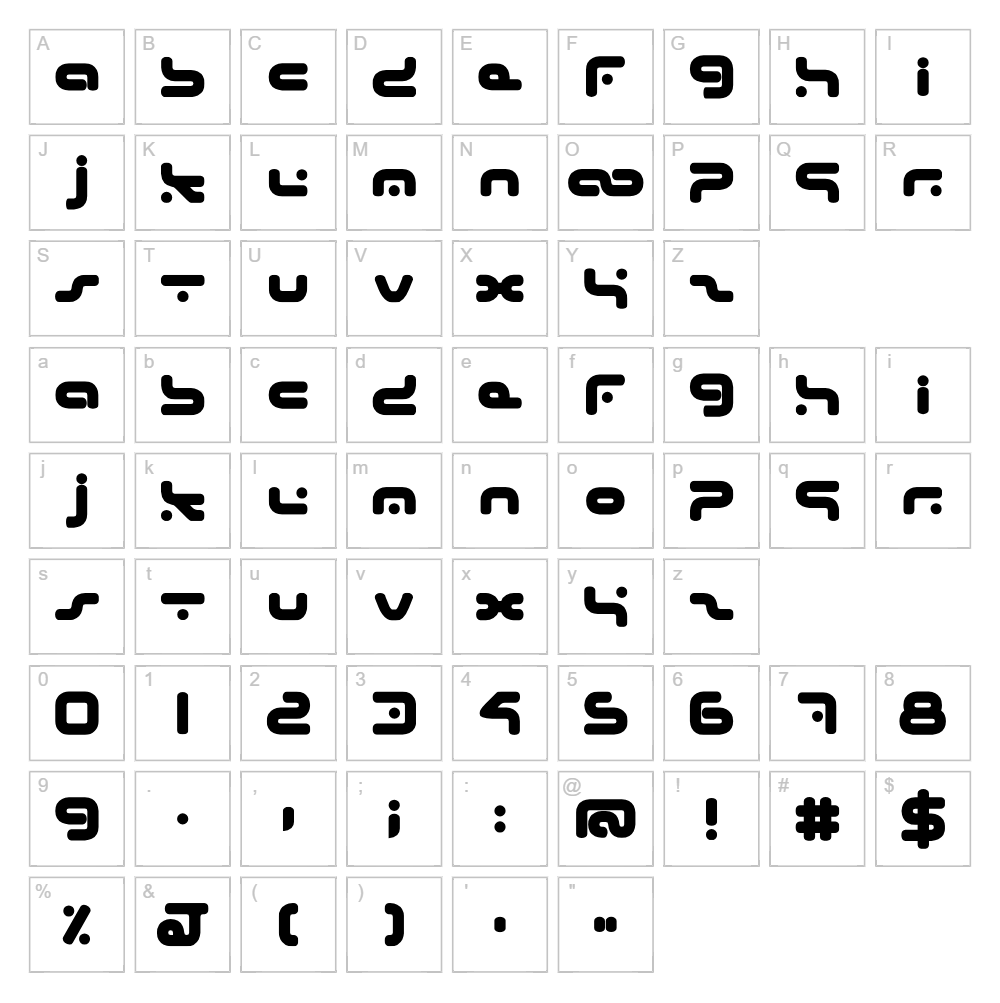
About Hybrid
Hybrid is a bold, geometric sans-serif font that blends futuristic aesthetics with industrial precision. Designed by Beyond Design, this typeface features clean lines and sharp angles that evoke a sci-fi and techno sensibility, making it instantly recognizable and contemporary. The letters maintain excellent clarity at any size while delivering a distinctly modern, high-tech personality. Hybrid's versatility makes it suitable for both striking headlines and functional body text in digital and print applications.
Best Uses for Hybrid
Hybrid excels in logo design, branding projects, and tech-forward marketing materials where a futuristic edge is essential. It's ideal for vinyl decals, Cricut cut-out projects, t-shirt designs, and signage that demands visual impact and modern appeal. The font also works beautifully in editorial design, gaming interfaces, and any creative project seeking a bold, sci-fi aesthetic.
What Fonts Pair Well With Hybrid?
Hybrid pairs exceptionally well with Roboto, a clean sans-serif that complements its geometric precision without competing for attention. For a contrasting serif pairing, consider Playfair Display, which adds elegance to Hybrid's boldness. Inter from Google Fonts is another excellent neutral companion that maintains Hybrid's modern, tech-focused tone.
License & Commercial Use
Hybrid is 100% free for commercial use, including logo design, print materials, digital publications, web projects, mobile applications, and merchandise production. You may use this font for client work, business branding, packaging, and any revenue-generating project without restriction. Attribution to Beyond Design is appreciated but not required. However, reselling or redistributing the font files themselves is strictly prohibited.
Frequently Asked Questions
Is Hybrid free for commercial use?
Yes, Hybrid is completely free for commercial use. You can use it in logos, print projects, digital designs, web applications, merchandise, and any client or business project without licensing fees.
What file formats does Hybrid come in?
Hybrid is available in standard font formats including TTF (TrueType) and OTF (OpenType), ensuring compatibility across Windows, macOS, and most creative software including Adobe Creative Suite and Cricut Design Space.
What fonts pair well with Hybrid?
Hybrid pairs well with Roboto for a cohesive tech aesthetic, Playfair Display for elegant contrast, and Inter for a complementary modern sans-serif look. All three maintain visual harmony while allowing Hybrid to remain the focal point.
Can I use Hybrid for video game design and UI elements?
Absolutely. Hybrid's geometric precision and sci-fi personality make it perfect for video game interfaces, HUD design, and futuristic UI elements. Its clarity at various sizes ensures legibility in interactive environments.
How to Install Hybrid
- Download the Hybrid font file from VectorDad.com to your computer.
- Unzip the downloaded folder to extract all font files.
- Double-click the font file (TTF or OTF) to open the font preview window.
- Click the Install button to add Hybrid to your system fonts.
- Restart your design application, and Hybrid will appear in your font menu, ready to use in all projects.
Use Hybrid With VectorDad Tools
Create stunning custom word art instantly using the VectorDad Word Art Generator, which lets you style Hybrid exactly how you need it for any project. Take your designs further with the Curved Text Generator to wrap Hybrid along paths and curves, perfect for creating professional Cricut SVG projects and vinyl decal designs.


