
Loxo Font – Free Download (OTF, TTF, SVG)

About Loxo
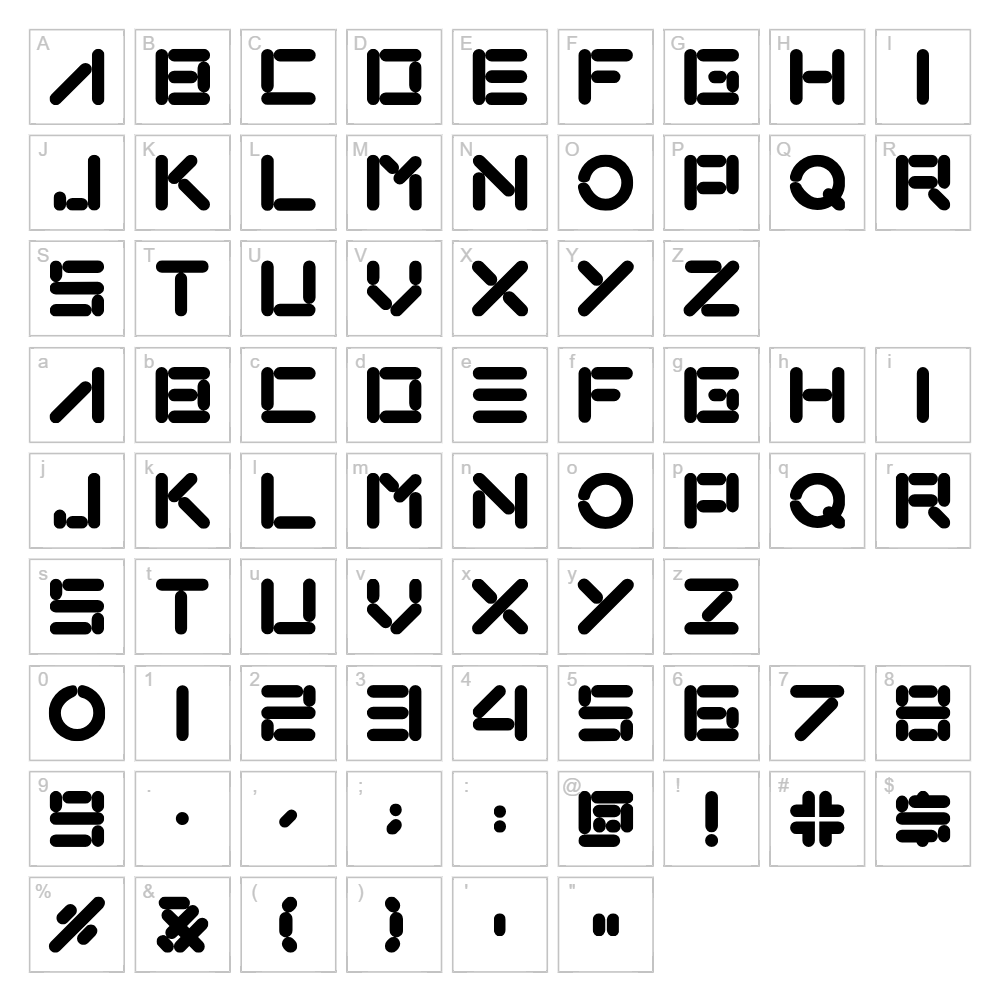
Loxo is a futuristic, geometric typeface designed by CJ Gong that brings a cutting-edge aesthetic to any project. With its clean, angular letterforms and precise stroke work, this font radiates a distinctly techno and sci-fi sensibility. The tight spacing and bold character construction give Loxo an authoritative presence that commands attention without sacrificing legibility. Perfect for designers seeking a modern, forward-thinking typeface with personality and purpose.
Best Uses for Loxo
Loxo excels in futuristic branding, sci-fi themed designs, and tech-forward logos where a bold, contemporary edge is essential. This font is ideal for vinyl decals, t-shirt designs, Cricut projects, digital interfaces, and gaming or app branding. Its strong geometric character also works beautifully for poster design, signage, and editorial layouts that demand visual impact.
What Fonts Pair Well With Loxo?
Loxo pairs excellently with Roboto, a clean, geometric sans-serif that shares its modern sensibility, and IBM Plex Mono, which complements its tech aesthetic. For contrast, consider pairing Loxo with Merriweather, a warm serif font that balances the typeface's cool, futuristic edge while maintaining overall design harmony.
License & Commercial Use
Loxo is 100% free for commercial use. You may use this font for logo design, branding projects, printed materials, digital marketing, web design, mobile applications, merchandise, and any other commercial application without licensing fees. You may modify the font for your own use, but redistribution or reselling of the original font files is not permitted. Please credit designer CJ Gong in your project when possible.
Frequently Asked Questions
Is Loxo free for commercial use?
Yes. Loxo is completely free for commercial use, including logos, branding, print, digital media, applications, and merchandise. No license purchase required.
What file formats does Loxo come in?
Loxo is available in standard font formats including OTF and TTF, compatible with Windows, Mac, and most design applications including Adobe Creative Suite, Cricut Design Space, and Silhouette Studio.
What fonts pair well with Loxo?
Loxo pairs beautifully with modern sans-serifs like Roboto and IBM Plex Mono for tech-forward designs, or with serif fonts like Merriweather for balanced editorial layouts that contrast its geometric intensity.
Can I use Loxo for sci-fi and gaming projects?
Absolutely. Loxo's futuristic geometric design makes it perfect for sci-fi branding, game interfaces, cyberpunk aesthetics, and any project requiring a bold, technologically advanced feel.
How to Install Loxo
- Download the Loxo font file from VectorDad.com to your computer.
- Unzip the downloaded folder to access the font files.
- Double-click the OTF or TTF font file to open the font preview window.
- Click the "Install" button to add Loxo to your system fonts.
- Restart your design application, and Loxo will be available in your font menu.
Use Loxo With VectorDad Tools
Create stunning word art designs with Loxo using the VectorDad Word Art Generator, perfect for Cricut cutting projects and custom decals. Take your designs further with the Curved Text Generator to bend and shape Loxo text along any path for dynamic, professional results.


