
TS Gaunt Font – Free Download (OTF, TTF, SVG)

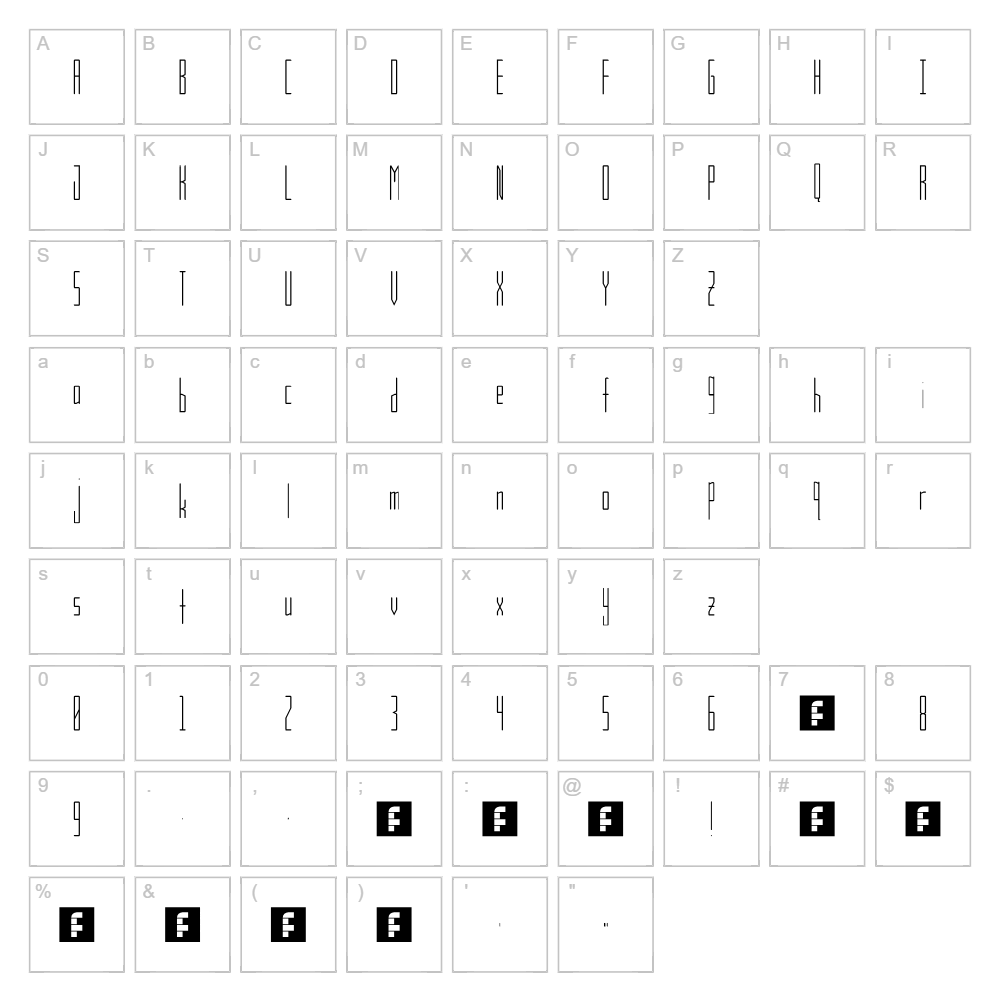
About TS Gaunt
TS Gaunt is a striking sans serif font created by designer thesock338, featuring clean lines and a distinctly modern aesthetic. The letterforms carry a geometric precision with subtle variations in stroke weight that give the typeface personality without sacrificing legibility. Its minimalist approach makes it ideal for contemporary design work that demands clarity and impact. TS Gaunt's no-nonsense character makes it a versatile choice for designers seeking a dependable, professional-grade typeface.
Best Uses for TS Gaunt
TS Gaunt excels in logo design, branding systems, and headline typography where a bold, clean aesthetic is essential. The font works beautifully for vinyl decals, Cricut projects, t-shirt designs, and print signage that need to command attention. Its straightforward letterforms also translate well to web design, digital interfaces, and editorial layouts where modern simplicity is valued.
What Fonts Pair Well With TS Gaunt?
TS Gaunt pairs excellently with Roboto (Google Fonts) for a contemporary sans serif combination, or with Lora (Google Fonts) to create contrast between geometric and traditional serif styles. For a minimalist pairing, consider Inter (Google Fonts), which shares TS Gaunt's modern sensibility while offering exceptional readability in body copy.
License & Commercial Use
TS Gaunt is 100% free for commercial use, meaning you can use this font for logo design, branding, print materials, digital products, web projects, mobile applications, merchandise, and packaging without restrictions. You're encouraged to credit thesock338 when possible, though not required. However, you may not resell, redistribute, or modify the font files themselves without explicit permission from the designer.
Frequently Asked Questions
Is TS Gaunt free for commercial use?
Yes, TS Gaunt is completely free for commercial use. You can use it for logos, websites, apps, print materials, merchandise, and any other commercial project without paying licensing fees or seeking permission.
What file formats does TS Gaunt come in?
TS Gaunt is available in standard font formats including TTF (TrueType) and OTF (OpenType), making it compatible with Mac, Windows, and design software like Adobe Creative Suite, Cricut Design Space, and Silhouette Studio.
What fonts pair well with TS Gaunt?
TS Gaunt pairs beautifully with geometric sans serifs like Roboto, traditional serifs like Lora for contrast, or minimalist fonts like Inter. The key is balancing its modern structure with complementary typefaces that enhance rather than compete with its clean aesthetic.
Can I use TS Gaunt for Cricut cutting projects?
Absolutely! TS Gaunt works great for Cricut cutting projects including vinyl decals, HTV designs, and SVG text art. You can import the font directly into Cricut Design Space or use it with our text generators to create ready-to-cut projects.
How to Install TS Gaunt
- Download the TS Gaunt font file from VectorDad.com or the designer's website
- Unzip the downloaded folder to access the font files
- Double-click the TTF or OTF font file to open the font preview window
- Click "Install" to add TS Gaunt to your system font library
- Restart your design application and TS Gaunt will appear in your font menu, ready to use
Use TS Gaunt With VectorDad Tools
Create stunning word art and text designs instantly with the VectorDad Word Art Generator, which lets you style TS Gaunt text in seconds and export as SVG for Cricut cutting. Take your designs further with the Curved Text Generator to bend and shape TS Gaunt lettering along custom paths for professional-grade vinyl and cutting projects.


