
Walkway Font – Free Download (OTF, TTF, SVG)

Character Map
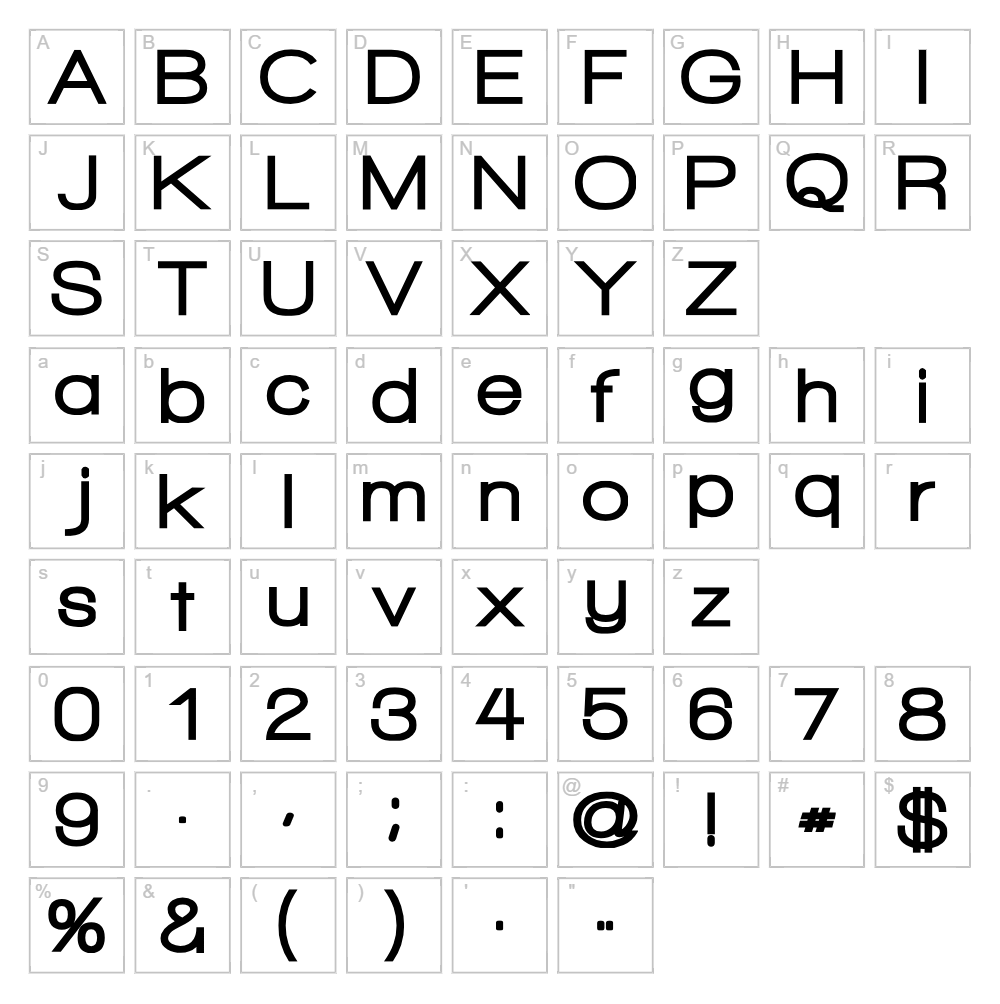
Download Walkway Font
Downloads as a ZIP file. Check the license notes on this page before commercial use.
Font Files
- Walkway UltraExpand.ttf
- Walkway Black RevOblique.ttf
- Walkway Black.ttf
- Walkway Bold RevOblique.ttf
- Walkway Bold.ttf
- Walkway Condensed Bold.ttf
- Walkway Condensed SemiBold.ttf
- Walkway Condensed.ttf
- Walkway Expand Black.ttf
- Walkway Expand Bold.ttf
- Walkway Expand RevOblique.ttf
- Walkway Expand SemiBold.ttf
- Walkway Expand UltraBold.ttf
- Walkway Expand.ttf
- Walkway Oblique Black.ttf
- Walkway Oblique Bold.ttf
- Walkway Oblique Expand.ttf
- Walkway Oblique SemiBold.ttf
- Walkway Oblique UltraBold.ttf
- Walkway Oblique.ttf
- Walkway RevOblique.ttf
- Walkway rounded.ttf
- Walkway SemiBold RevOblique.ttf
- Walkway SemiBold.ttf
- Walkway UltraBold RevOblique.ttf
- Walkway UltraBold.ttf
- Walkway UltraCondensed Bold.ttf
- Walkway UltraCondensed Semi.ttf
- Walkway UltraCondensed.ttf
- Walkway UltraExpand Bold.ttf
- Walkway UltraExpand SemiBold.ttf
Font Details
- License:Free for personal use
- Author:
About Walkway
Walkway is a modern geometric sans serif font with clean lines and consistent stroke widths that convey sophistication and approachability. Designed by GemFonts and distributed through Typotheticals, this typeface strikes a balance between minimalism and personality, making it equally at home in contemporary branding or editorial layouts. The font's uniform letterforms and precise spacing create a sense of stability and professionalism. Its versatile nature makes it an excellent choice for designers seeking a reliable, no-nonsense typeface without sacrificing visual interest.
Best Uses for Walkway
Walkway excels in logo design, corporate branding, and modern signage where clarity and contemporary aesthetics are priorities. It's also ideal for Cricut vinyl decal projects, t-shirt designs, and digital marketing materials where legibility across sizes matters. The font's clean geometry makes it perfect for web design, app interfaces, and product packaging that demands a professional, polished appearance.
What Fonts Pair Well With Walkway?
Walkway pairs beautifully with Lora, a classic serif font that provides elegant contrast while maintaining readability. For a modern sans serif combination, try pairing it with Inter, which complements its geometric sensibility. For a more expressive pairing, Playfair Display adds sophisticated contrast without overwhelming Walkway's clean aesthetic.
License & Commercial Use
Walkway is 100% free for commercial use, allowing you to create logos, print materials, digital designs, websites, mobile applications, and merchandise without licensing restrictions. You may use this font in any professional project, from corporate branding to product packaging and advertising campaigns. Attribution to GemFonts and Typotheticals is appreciated but not required. However, reselling or redistributing the font files themselves is strictly prohibited—always direct others to download from authorized sources like VectorDad.
Frequently Asked Questions
Is Walkway free for commercial use?
Yes, Walkway is completely free for commercial use. You can use it in logos, branding, print materials, web design, apps, merchandise, and any other commercial project without additional licensing fees.
What file formats does Walkway come in?
Walkway is available in standard font formats including TrueType (.ttf) and OpenType (.otf), ensuring compatibility with Windows, Mac, Adobe Creative Suite, and design software like Cricut Design Space.
What fonts pair well with Walkway?
Walkway pairs well with serif fonts like Lora for contrast, sans serifs like Inter for cohesion, and display fonts like Playfair Display for sophisticated layouts. Choose pairing fonts based on your hierarchy and design goals.
Can I use Walkway in Cricut projects?
Absolutely. Walkway works beautifully in Cricut Design Space for vinyl decals, iron-on designs, and engraving projects. For faster SVG creation with Walkway styling, use the VectorDad Word Art Generator to produce ready-to-cut files.
How to Install Walkway
- Download the Walkway font file from VectorDad to your computer.
- Unzip the downloaded folder to access the font files.
- Double-click the .ttf or .otf font file to open the font preview window.
- Click Install to add Walkway to your system's font library (Windows/Mac will handle this automatically).
- Verify that Walkway now appears in your design application's font menu and is ready to use across all your creative software.
Use Walkway With VectorDad Tools
Transform text in Walkway into editable SVG designs using the VectorDad Word Art Generator, perfect for creating Cricut-ready vinyl decals and custom designs. For even more dynamic effects, the Curved Text Generator lets you bend and arc Walkway text for professional signage, labels, and decorative projects.
Make Your Own Font
Like the look of Walkway but want letters in your own style? Draw or trace each character as an SVG, then turn the set into an installable .ttf font with our free font creator. It runs in your browser, with no signup.
Similar Fonts
If you like Walkway, you may also like these free fonts:


