
Komiko Font – Free Download (OTF, TTF, SVG)

About Komiko
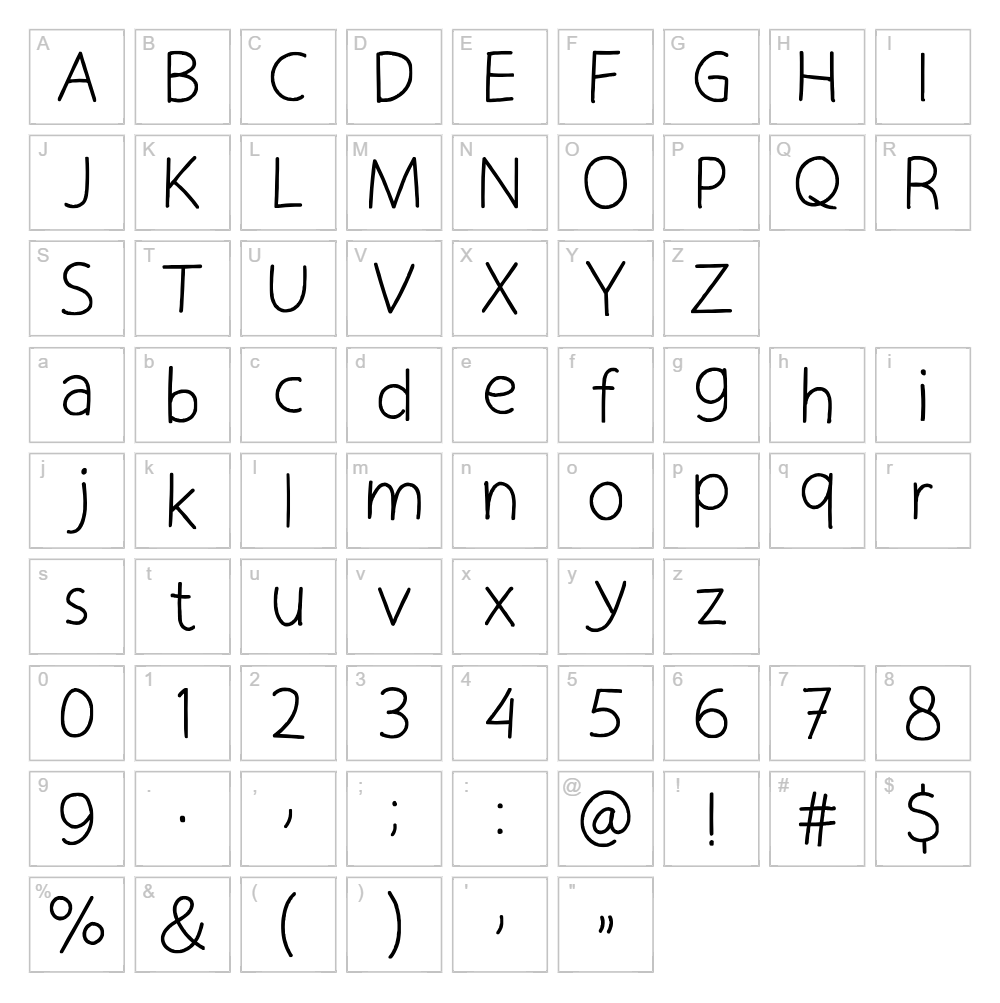
Komiko is a flowing handwritten script font designed by Mightyfire that captures the natural elegance of pen-drawn lettering. With smooth, connected strokes and organic character shapes, this typeface delivers authentic handwriting charm while maintaining excellent readability across various sizes. The font's relaxed yet refined personality makes it ideal for projects that need a personal touch without sacrificing professionalism. Komiko stands out for its balanced proportions and graceful curves that work beautifully in both digital and print applications.
Best Uses for Komiko
Komiko excels in branding, logo design, and creative packaging where a human touch matters. It's perfect for Cricut vinyl decal projects, personalized greeting cards, wedding invitations, and hand-lettered signage. The font also works exceptionally well for social media graphics, product labels, and any project where you want to convey warmth and authenticity.
What Fonts Pair Well With Komiko?
Komiko pairs beautifully with clean sans-serif fonts like Roboto or Open Sans for balanced contrast between script and text. For a more elegant combination, try pairing it with the serif font Lora, which complements Komiko's flowing style while adding sophistication to headings and body copy.
License & Commercial Use
Komiko is 100% free for commercial use, meaning you can use it for logo design, branding, print materials, digital projects, web design, mobile applications, merchandise, and product packaging without purchasing a license. You are required to credit the designer, Mightyfire, in your project documentation. However, you may not resell, redistribute, or sublicense the font files themselves—they must remain free for end users.
Frequently Asked Questions
Is Komiko free for commercial use?
Yes, Komiko is completely free for commercial use. You can use it in logos, branding, print projects, web design, apps, merchandise, and any other commercial application. Please credit Mightyfire as the designer.
What file formats does Komiko come in?
Komiko is available in standard font formats including TTF (TrueType) and OTF (OpenType), making it compatible with Windows, Mac, and most design software including Adobe Creative Suite, Canva, and Cricut Design Space.
What fonts pair well with Komiko?
Komiko pairs excellently with sans-serif fonts like Roboto and Open Sans for modern contrast, or with serif fonts like Lora for a more elegant, traditional look. The key is balancing Komiko's flowing script with a clean, straightforward typeface for body text.
Can I use Komiko for Cricut and vinyl cutting projects?
Absolutely! Komiko's smooth, connected letterforms are ideal for Cricut cutting machines and vinyl decal projects. Its readable design translates well to various sizes and maintains clarity even at smaller scales.
How to Install Komiko
- Download the Komiko font file from VectorDad.com and save it to your computer.
- Unzip the downloaded folder to extract the font files.
- Double-click the Komiko font file (TTF or OTF) to open the font preview window.
- Click the "Install" button to add Komiko to your system's font library.
- Restart your design applications and Komiko will be available in your font menu.
Use Komiko With VectorDad Tools
Create stunning custom designs with Komiko using the VectorDad Word Art Generator, which lets you instantly convert text into scalable SVG graphics perfect for Cricut projects. For curved and circular text effects, try the Curved Text Generator to bend Komiko's elegant letterforms along any path.


