
Circuit Mage Font – Free Download (OTF, TTF, SVG)

About Circuit Mage
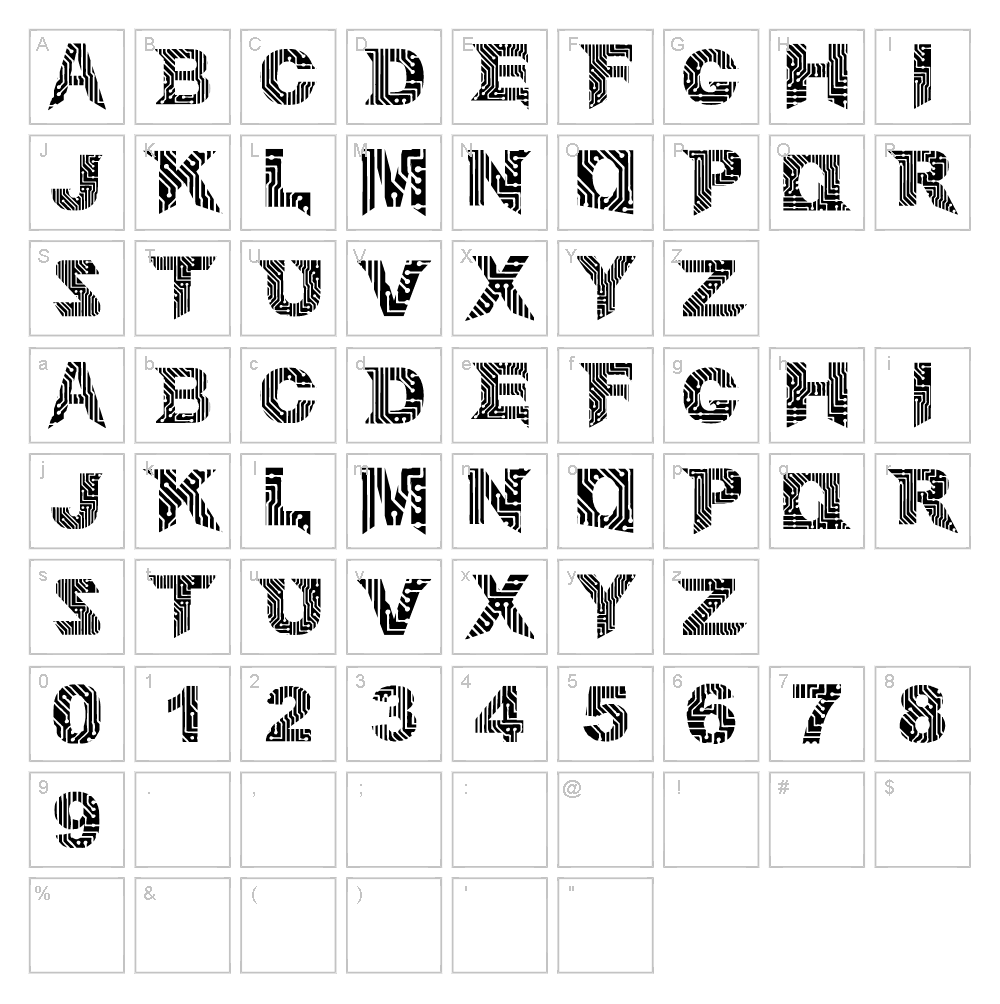
Circuit Mage is a striking techno font designed by Adadglgwut that combines sharp geometric lines with a futuristic aesthetic. The typeface features bold, angular strokes reminiscent of circuit boards and digital architecture, making it instantly recognizable and visually compelling. Its clean, mechanical letterforms convey innovation and cutting-edge technology while maintaining excellent readability across various sizes. Whether used for sci-fi branding or modern digital projects, Circuit Mage delivers a distinctive personality that captures attention.
Best Uses for Circuit Mage
Circuit Mage excels in tech-focused design applications including logo creation, app interfaces, gaming graphics, and futuristic branding campaigns. It's ideal for vinyl decals, t-shirt designs, and Cricut projects that demand a contemporary, edgy aesthetic. The font also works beautifully in poster design, product packaging, website headers, and any project requiring a bold statement with technological flair.
What Fonts Pair Well With Circuit Mage?
Circuit Mage pairs excellently with Roboto, a clean geometric sans-serif available on Google Fonts that complements its modern sensibility without competing for attention. For contrast, consider pairing it with Playfair Display, a sophisticated serif font that creates striking visual hierarchy. Space Mono, also on Google Fonts, is another strong match for monospace-style technical projects.
License & Commercial Use
Circuit Mage is 100% free for commercial use under its open-source license. You may use this font freely for logos, branding, print materials, digital projects, web design, mobile apps, merchandise, signage, and any other commercial application without restrictions. Credit to designer Adadglgwut is appreciated but not required. Please note that reselling, redistributing, or relicensing the font files themselves is not permitted.
Frequently Asked Questions
Is Circuit Mage free for commercial use?
Yes, absolutely. Circuit Mage is released under a free license that permits commercial use in logos, branding, print, digital media, apps, merchandise, and more. No purchase or attribution is required, though crediting Adadglgwut is always appreciated.
What file formats does Circuit Mage come in?
Circuit Mage is typically available in standard font formats including OTF (OpenType) and TTF (TrueType), making it compatible with Windows, macOS, and design applications like Adobe Creative Suite, Canva, and Cricut Design Space.
What fonts pair well with Circuit Mage?
Circuit Mage pairs beautifully with Roboto for modern tech projects, Playfair Display for elegant contrast, and Space Mono for technical designs. Each pairing creates different visual hierarchy depending on your design goals.
Can I use Circuit Mage in Cricut projects?
Yes, Circuit Mage works perfectly with Cricut Design Space. For added creative options, use the VectorDad Word Art Generator to create custom SVG files that leverage Circuit Mage's bold geometry in vinyl cutting projects.
How to Install Circuit Mage
- Download the Circuit Mage font file from VectorDad.com
- Unzip the downloaded folder to access the font file
- Double-click the font file (.TTF or .OTF) to open the font preview
- Click the "Install" button to add the font to your system
- Restart your design application, and Circuit Mage will be available in your font menu
Use Circuit Mage With VectorDad Tools
Maximize Circuit Mage's potential by using the VectorDad Word Art Generator to create custom vector designs ready for Cricut cutting. Combine this with the Curved Text Generator to bend and shape Circuit Mage text along custom paths for dynamic, professional-quality vinyl decals and craft projects.


