
WaterFire Font – Free Download (OTF, TTF, SVG)

Character Map
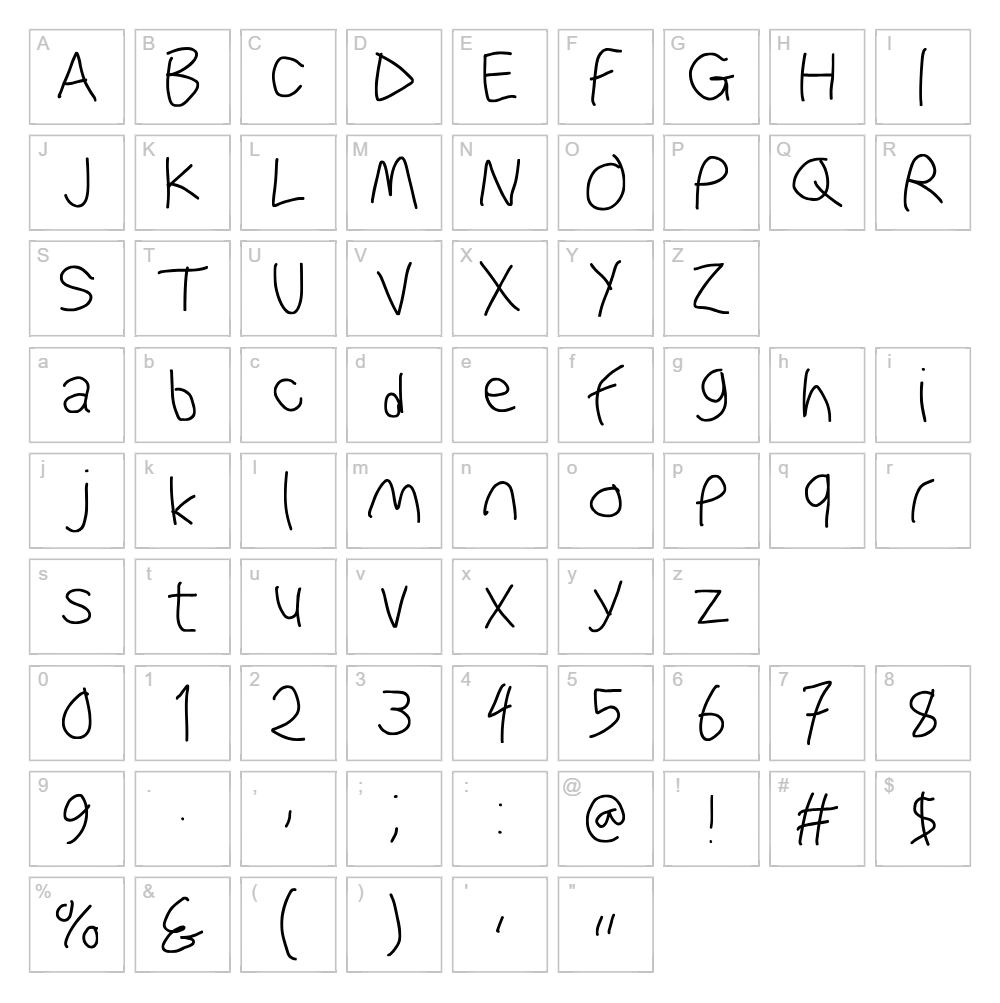
Font Files
- WaterFire.otf
- WaterFireObl.otf
Font Details
- License:Free for commercial use
- Author:
About WaterFire
WaterFire is a fluid, energetic handwritten script font designed by KineticPlasma Fonts that captures the spontaneous elegance of brush-drawn letterforms. Each character flows with organic curves and dynamic stroke variations, creating a sense of movement and natural creativity. The font balances legibility with artistic flair, making it equally suited for bold headlines and intimate personal messaging. Its contemporary script style brings a modern, youthful energy to any creative project.
Best Uses for WaterFire
WaterFire excels in branding, logo design, and social media graphics where personality and visual impact matter most. It's ideal for Cricut vinyl decals, t-shirt designs, greeting cards, and handcrafted product packaging. The font also works beautifully for event invitations, wedding stationery, book covers, and editorial layouts that call for a modern, expressive touch.
What Fonts Pair Well With WaterFire?
WaterFire pairs beautifully with clean, minimalist sans-serif fonts that provide visual balance. Consider pairing it with Roboto or Poppins (both available free on Google Fonts) for a contemporary feel, or Playfair Display for more elegant, editorial projects. These combinations create dynamic contrast while maintaining overall design harmony.
License & Commercial Use
WaterFire is 100% free for commercial use. You may use this font to create logos, print materials, digital designs, websites, mobile apps, merchandise, and any other commercial projects without restriction. When possible, credit to KineticPlasma Fonts is appreciated but not required. However, you may not resell, redistribute, or sublicense the font files themselves.
Frequently Asked Questions
Is WaterFire free for commercial use?
Yes. WaterFire is completely free for commercial use, including logo design, branding, print products, digital media, websites, apps, and merchandise. No license purchase or attribution is required, though crediting the designer is always appreciated.
What file formats does WaterFire come in?
WaterFire is available in standard font formats compatible with Windows, Mac, and design software. Check the download package for included file types, which typically include TTF and OTF formats for maximum compatibility.
What fonts pair well with WaterFire?
WaterFire pairs best with clean, modern sans-serif fonts like Roboto, Poppins, or Open Sans for contemporary designs. For more elegant applications, try pairing it with serif fonts like Playfair Display or Lora to create sophisticated contrast.
Can I use WaterFire for Cricut projects?
Absolutely. WaterFire works perfectly for Cricut vinyl decals, iron-on transfers, and engraved projects. For best results with Cricut Design Space, ensure your font file is properly installed on your computer before uploading your design.
How to Install WaterFire
- Download the WaterFire font file from VectorDad.com to your computer.
- Unzip or extract the downloaded font folder to access the font files.
- Double-click the WaterFire font file (.ttf or .otf) to open the font preview window.
- Click the Install button to add the font to your system.
- Restart your design software, and WaterFire will be available in your font menu.
Use WaterFire With VectorDad Tools
Take your WaterFire designs to the next level with the VectorDad Word Art Generator, which instantly converts text into stunning visual designs perfect for print and digital projects. For curved and circular text effects on your Cricut projects, try the Curved Text Generator to unlock creative layout possibilities.


