
Learning to Trust Font – Free Download (OTF, TTF, SVG)

About Learning to Trust
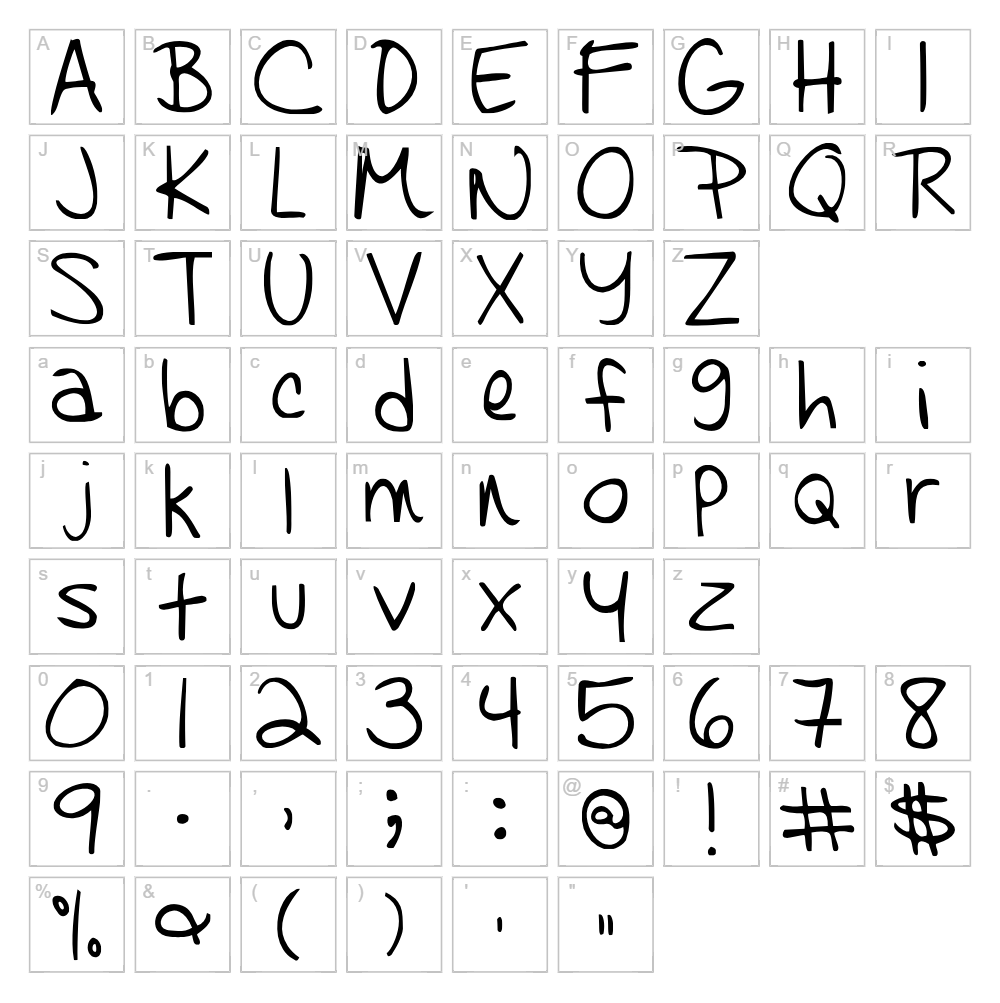
Learning to Trust is a charming handwritten font designed by Kimberly Geswein that captures the warmth and authenticity of natural pen strokes. The font features a friendly, flowing script style with consistent letterforms that feel both personal and professional. Each character carries a gentle rhythm, making it perfect for designs that need a touch of human warmth without sacrificing legibility. Geswein's signature design approach shines through, creating a typeface that balances casual accessibility with polished craft.
Best Uses for Learning to Trust
Learning to Trust excels in wedding invitations, greeting cards, and personalized branding projects where an authentic handwritten aesthetic adds emotional depth. It's ideal for Cricut crafters creating vinyl decals, t-shirt designs, and custom signage that demand a personal touch. The font also works beautifully for blog headers, social media graphics, and editorial layouts where you want to establish an approachable, creative brand voice.
What Fonts Pair Well With Learning to Trust?
Learning to Trust pairs beautifully with Open Sans, a clean and modern sans-serif that balances the script's organic feel with contemporary simplicity. For a more refined combination, try Playfair Display, an elegant serif that complements the handwritten style without competing for attention. Lato is another excellent pairing, offering a geometric sans-serif that provides visual contrast while maintaining overall design harmony.
License & Commercial Use
Learning to Trust is available for free commercial use, including logo design, packaging, merchandise, digital content, and print applications. You may use this font for business branding, website design, app development, and product creation without purchasing a commercial license. Attribution to Kimberly Geswein is appreciated but not required. However, you may not resell, redistribute, or rebrand the font file itself. Always review the original license terms for any specific restrictions.
Frequently Asked Questions
Is Learning to Trust free for commercial use?
Yes, Learning to Trust is completely free for commercial projects, including logo design, merchandise, packaging, and digital applications. You can use it for client work and business branding without additional licensing fees.
What file formats does Learning to Trust come in?
Learning to Trust is available in standard font formats including TTF (TrueType) and OTF (OpenType), compatible with Windows, Mac, and web applications. Check the download page for the specific file formats included in your download package.
What fonts pair well with Learning to Trust?
Learning to Trust pairs well with modern sans-serifs like Open Sans and Lato, which provide clean contrast to the handwritten style. For elegant combinations, Playfair Display offers a sophisticated serif option that complements the script beautifully.
Can I use Learning to Trust for Cricut projects?
Absolutely. Learning to Trust works perfectly for Cricut crafts including vinyl decals, t-shirt designs, and custom signage. Use the VectorDad Word Art Generator to convert your text into SVG files optimized for Cricut cutting machines.
How to Install Learning to Trust
- Download the Learning to Trust font file from VectorDad and save it to your computer.
- Unzip the downloaded folder to extract the font files.
- Double-click the TTF or OTF font file to open the font preview window.
- Click the Install button to add the font to your system.
- Restart your design applications and Learning to Trust will be available in your font menu.
Use Learning to Trust With VectorDad Tools
Transform your Learning to Trust text into custom SVG graphics using the VectorDad Word Art Generator, perfect for creating unique Cricut cutting files and design assets. For curved text effects, try the Curved Text Generator to add dynamic dimension to your handwritten script designs.


