
Talking to the Moon Font – Free Download (OTF, TTF, SVG)

Character Map
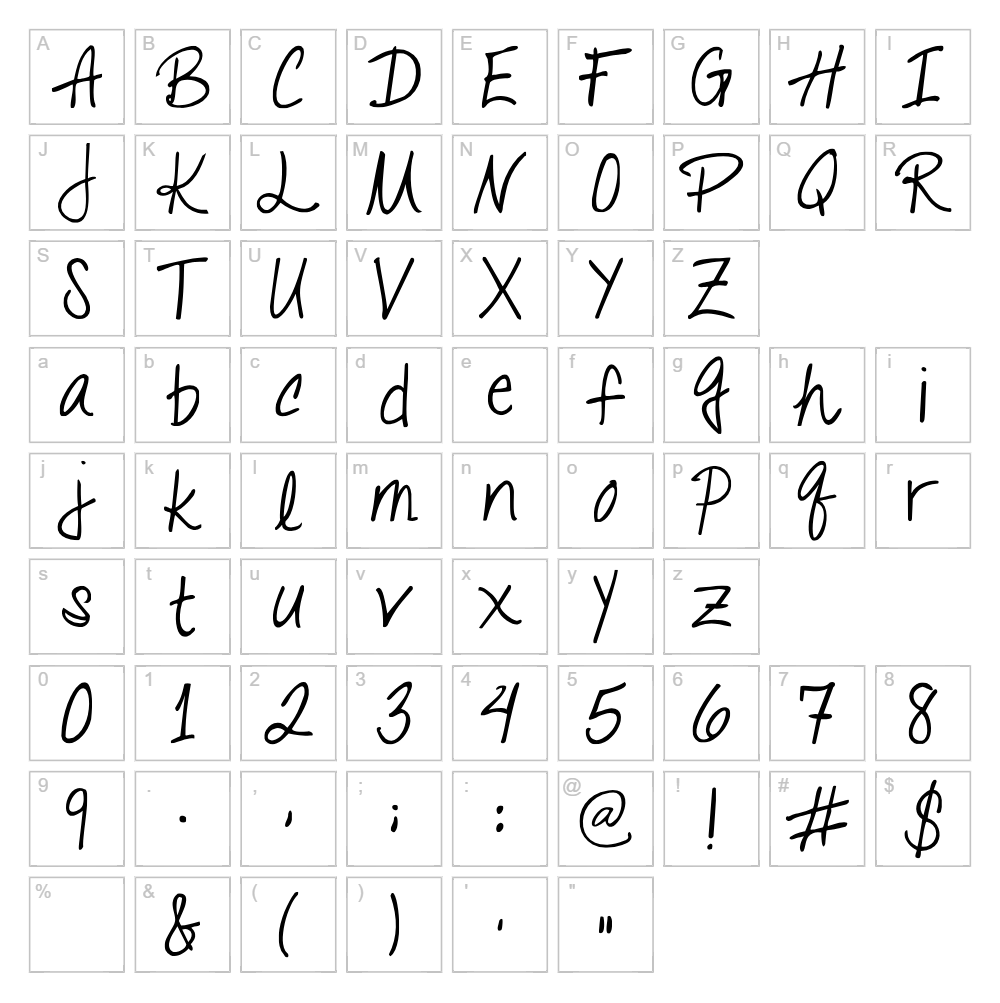
Download Talking to the Moon Font
Downloads as a ZIP file. Check the license notes on this page before commercial use.
Font Files
- TalkingToTheMoon.ttf
Font Details
- License:Free for personal use
- Author:
About Talking to the Moon
Talking to the Moon is a charming handwritten script font designed by Kimberly Geswein that captures the whimsical, dreamy quality of late-night correspondence. The font features soft, flowing letterforms with natural pen-stroke variations that create an intimate, personal feel perfect for projects requiring warmth and authenticity. Each character maintains a consistent baseline while allowing subtle irregularities that add genuine character and movement to any design. This typeface excels at conveying emotion and vulnerability through its carefully crafted letterforms.
Best Uses for Talking to the Moon
Talking to the Moon works beautifully for personal stationery, greeting cards, wedding invitations, and journal-style graphic designs. It's ideal for Cricut craft projects, vinyl decals, t-shirt designs, and any branding that needs to communicate sincerity and personal connection. The font also shines in editorial layouts, handmade aesthetic social media graphics, and romantic or nostalgic themed projects.
What Fonts Pair Well With Talking to the Moon?
Talking to the Moon pairs excellently with clean, minimalist typefaces that provide contrast and balance. Consider pairing it with Lato (a friendly Google Fonts sans-serif) for headers and body text, Playfair Display (an elegant serif) for upscale designs, or Montserrat (a modern geometric sans) for contemporary layouts. These pairings create visual harmony while allowing the handwritten script to remain the focal point.
License & Commercial Use
Talking to the Moon is available for free commercial use, meaning you can use it in logos, branding projects, print materials, digital designs, websites, applications, and merchandise production without purchasing a license. You are permitted to create designs for clients and sell products featuring this font, including t-shirts, mugs, vinyl decals, and other merchandise. The only restrictions are that you cannot resell, redistribute, or modify the font files themselves. Always include a credit to Kimberly Geswein as the designer when possible, and respect the original license terms.
Frequently Asked Questions
Is Talking to the Moon free for commercial use?
Yes, Talking to the Moon is free for commercial use. You can use it for client projects, product designs, merchandise, branding, print, and digital applications without restriction or payment. Always provide credit to designer Kimberly Geswein.
What file formats does Talking to the Moon come in?
Talking to the Moon is available in standard font formats compatible with all design software, including TrueType (.ttf) and OpenType (.otf) formats. These files work seamlessly on Windows and Mac, and are compatible with design applications like Adobe Creative Suite, Cricut Design Space, and most word processors.
What fonts pair well with Talking to the Moon?
Talking to the Moon pairs beautifully with sans-serif fonts like Lato, Montserrat, and Open Sans for body text and headers. For more elegant designs, try pairing it with serif fonts like Playfair Display or Cormorant Garamond. The contrast between the flowing script and structured sans-serif creates professional, balanced layouts.
Can I use Talking to the Moon for Cricut projects?
Absolutely. Talking to the Moon works perfectly for Cricut cutting machines and can be used to create vinyl decals, iron-on transfers, and intricate paper designs. Install the font on your computer, then access it through Cricut Design Space. For even more creative options, use the VectorDad tools to generate SVG files with this font.
How to Install Talking to the Moon
- Download the Talking to the Moon font file from VectorDad.com
- Unzip the downloaded file to access the font files (.ttf or .otf)
- Double-click the font file to open the font preview window
- Click the "Install" button to add the font to your system
- The font is now available in all design applications—restart apps if needed to see it in the font menu
Use Talking to the Moon With VectorDad Tools
Take your Talking to the Moon designs further with the VectorDad Word Art Generator, which lets you create stunning SVG files perfect for Cricut projects and vinyl cutting. Use the Curved Text Generator to bend and shape Talking to the Moon text along custom paths, creating unique designs that stand out on merchandise and craft projects.
Make Your Own Font
Like the look of Talking to the Moon but want letters in your own style? Draw or trace each character as an SVG, then turn the set into an installable .ttf font with our SVG to TTF converter. It runs in your browser, with no signup.


