
Melanie Font – Free Download (OTF, TTF, SVG)

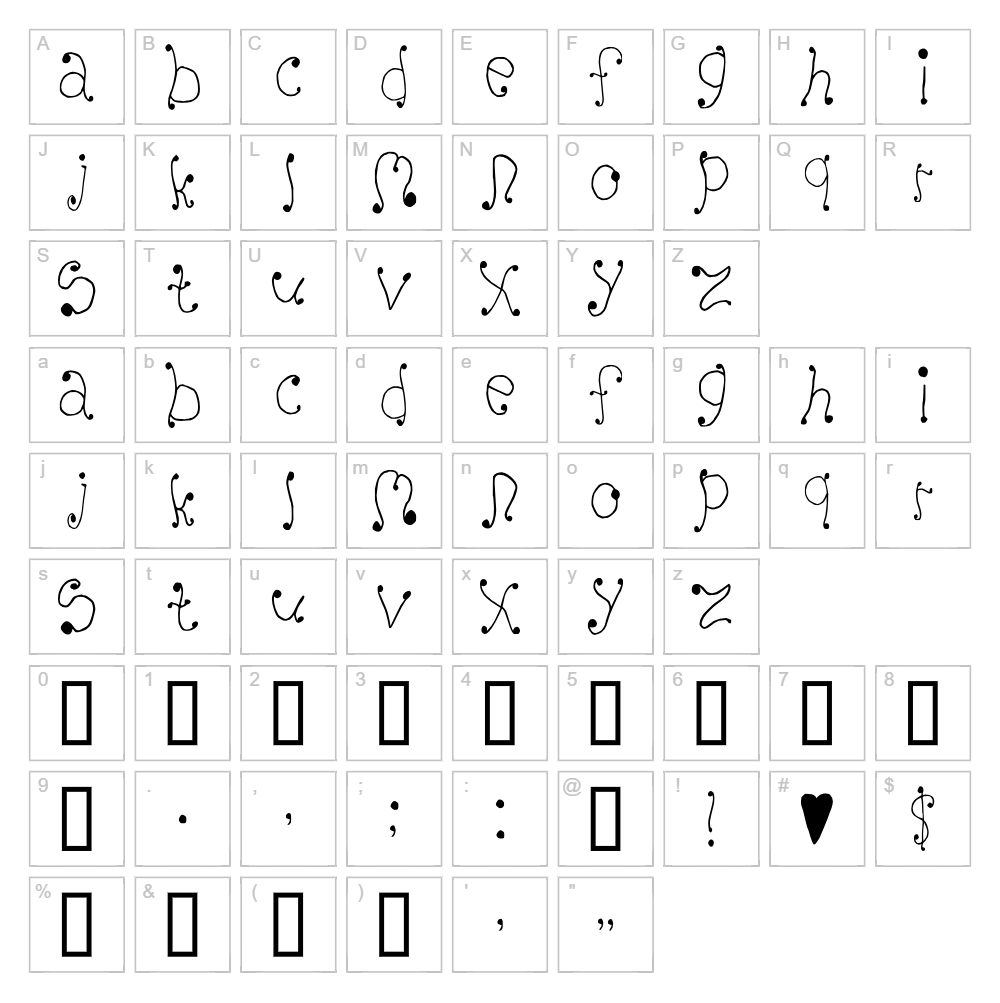
About Melanie
Melanie is a decorative curly font that brings elegance and personality to any design project. Created by Divide by Zero, this fancy typeface features flowing, ornamental strokes that dance across the page with a playful yet sophisticated charm. The intricate loops and curves give Melanie a handcrafted quality that works beautifully for designs seeking a touch of whimsy and refinement. Perfect for designers who want their typography to make a bold, decorative statement.
Best Uses for Melanie
Melanie shines in branding projects, luxury packaging design, and elegant wedding invitations where curly, decorative type elevates the overall aesthetic. This font is ideal for creating eye-catching logo designs, vinyl decal projects, and Cricut crafts that need personality and flair. It also works exceptionally well for editorial headers, social media graphics, and signage where you want typography to be a decorative focal point rather than purely functional.
What Fonts Pair Well With Melanie?
Since Melanie is a statement decorative font, it pairs beautifully with clean, minimal sans-serif options that provide contrast and readability. Consider pairing it with Poppins or Lato for body text and secondary headlines. For a more elegant combination, Cormorant Garamond (a refined serif) complements Melanie's decorative nature while maintaining sophistication and balance in your design layout.
License & Commercial Use
Melanie is 100% free for commercial use. You are permitted to use this font for logos, print materials, digital designs, web projects, mobile apps, merchandise, and any other commercial ventures without purchasing a license. Original design credit to Divide by Zero is appreciated but not required. However, you may not resell or redistribute the font files themselves—only use them for your creative projects.
Frequently Asked Questions
Is Melanie free for commercial use?
Yes, absolutely. Melanie is licensed for 100% free commercial use. You can use it in logos, print products, digital designs, websites, apps, merchandise, and any profit-generating project without restrictions.
What file formats does Melanie come in?
Melanie is available in standard font formats including TTF (TrueType) and OTF (OpenType), ensuring compatibility with Windows, Mac, and creative software like Adobe Creative Suite, Cricut Design Space, and Silhouette Studio.
What fonts pair well with Melanie?
Melanie pairs well with clean sans-serif fonts like Poppins or Lato for contrast, or with elegant serifs like Cormorant Garamond for a more refined look. See the Font Pairing section above for detailed recommendations.
Can I use Melanie for Cricut and vinyl decal projects?
Yes, Melanie works great for Cricut crafts and vinyl decal designs. Its curly, decorative letterforms create beautiful cut files, and you can use the VectorDad Word Art Generator to instantly convert text into SVG files optimized for your Cricut machine.
How to Install Melanie
- Download the Melanie font file from this page.
- Unzip the downloaded folder to access the font files.
- Double-click the TTF or OTF font file to open the font preview window.
- Click the Install button to add Melanie to your system.
- Restart your design applications, and Melanie will appear in all your font menus, ready to use.
Use Melanie With VectorDad Tools
Create stunning Cricut SVG projects instantly by using the VectorDad Word Art Generator to convert Melanie text into editable vector files. For circular or curved text designs, try the Curved Text Generator to add dimension and visual interest to your vinyl decals and craft projects.
Make Your Own Font
Like the look of Melanie but want letters in your own style? Draw or trace each character as an SVG, then turn the set into an installable .ttf font with our SVG to TTF font maker. It runs in your browser, with no signup.


