
Carlos Font – Free Download (OTF, TTF, SVG)

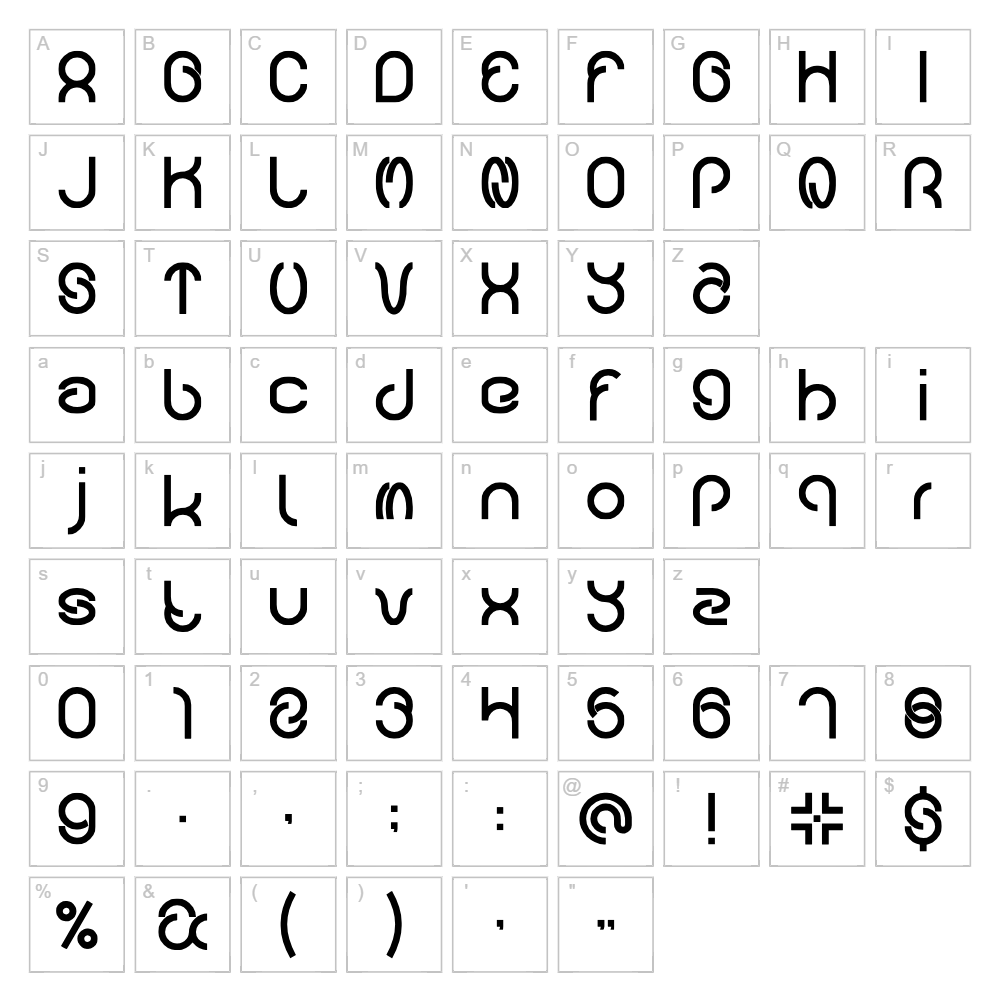
About Carlos
Carlos is a striking donationware font designed by weknow that blends decorative flair with contemporary styling. Its distinctive letterforms feature varied stroke weights and dynamic proportions that create visual interest without sacrificing readability. The font's fancy aesthetic gives it a sophisticated yet approachable character, making it versatile for both modern and artistic applications. Carlos stands out as a thoughtfully crafted typeface that brings personality to any design project.
Best Uses for Carlos
Carlos excels in headline design, branding projects, and creative packaging where distinctive typography makes an impact. Its decorative nature makes it ideal for poster design, album artwork, and social media graphics that demand attention. For Cricut crafters, Carlos works beautifully in vinyl decal designs, custom apparel, and personalized home décor projects where the font's unique character becomes a design feature.
What Fonts Pair Well With Carlos?
Since Carlos is a fancy display font, pair it with clean, minimal sans-serif fonts for balance. Montserrat and Open Sans from Google Fonts work excellently as supporting typefaces, allowing Carlos to shine as the focal point while maintaining legibility in body text. For a more editorial approach, Lora offers a serif alternative that complements decorative display fonts with sophisticated restraint.
License & Commercial Use
Carlos is available as donationware and is free for commercial use. This means you may use Carlos to create logos, printed materials, digital designs, web projects, mobile applications, and merchandise without restriction. You are welcome and encouraged to donate to support weknow's continued font design work. However, you may not resell or redistribute the font files themselves.
Frequently Asked Questions
Is Carlos free for commercial use?
Yes. Carlos is donationware, meaning it's free for both personal and commercial projects, including logos, print, digital, web, apps, and merchandise. A donation to weknow is encouraged but optional.
What file formats does Carlos come in?
Carlos is typically available in standard font formats including TTF (TrueType) and OTF (OpenType). These formats are compatible with Windows, macOS, and web applications.
What fonts pair well with Carlos?
Montserrat, Open Sans, and Lora are excellent pairings. See the "What Fonts Pair Well With Carlos?" section above for detailed recommendations on how to balance this decorative font with complementary typefaces.
Can I use Carlos for Cricut cutting machine projects?
Absolutely. Carlos works wonderfully for Cricut designs, vinyl decals, and custom apparel. Many crafters use the VectorDad Word Art Generator to quickly create SVG files from fonts like Carlos, which can be directly imported into Cricut Design Space.
How to Install Carlos
- Download the Carlos font file from the download link above and save it to your computer.
- Unzip the downloaded file to extract the font file(s) if they're in a compressed folder.
- Double-click the font file to open the font preview window.
- Click Install to add Carlos to your system's font library.
- Restart your applications and Carlos will now be available in all design software, word processors, and creative tools.
Use Carlos With VectorDad Tools
Transform Carlos into custom SVG designs using the VectorDad Word Art Generator, which lets you create decorative text effects instantly. For curved and circular text applications, the Curved Text Generator pairs seamlessly with Carlos to produce professional Cricut-ready designs.


