
Airstream Font – Free Download (OTF, TTF, SVG)

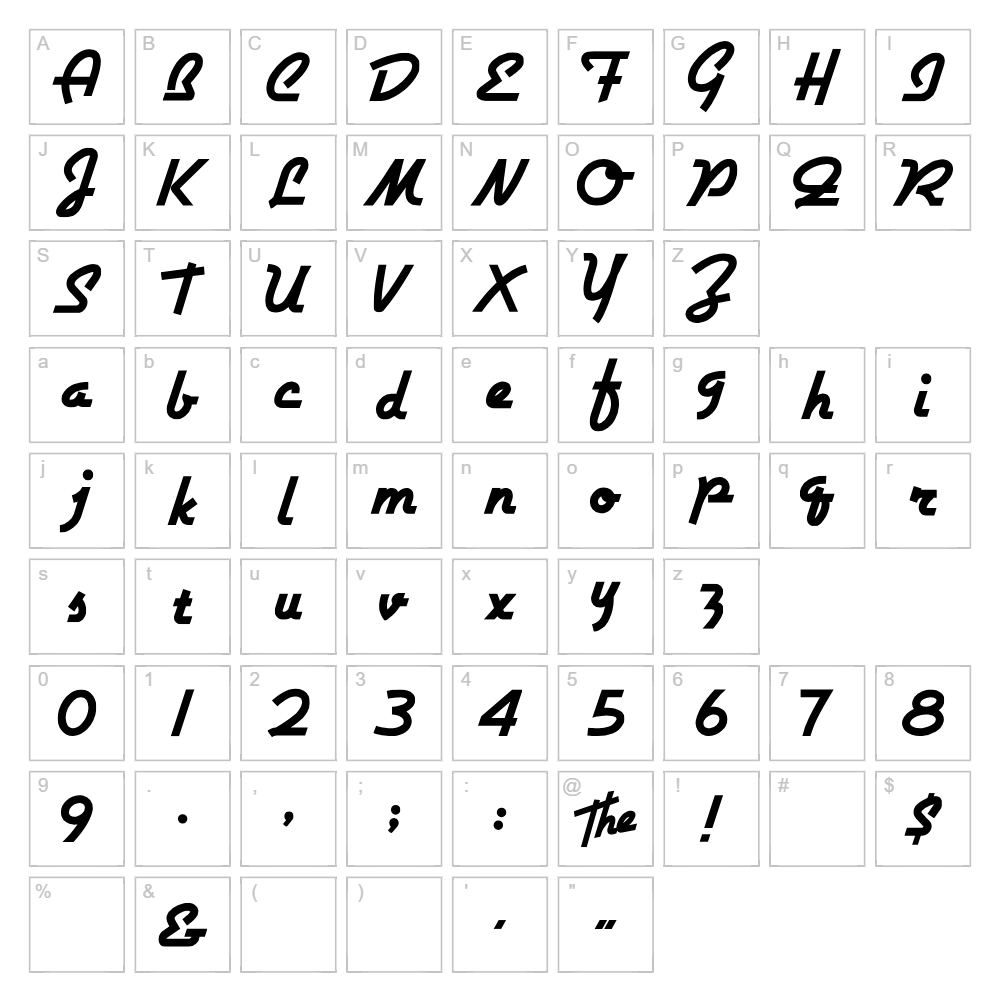
Character Map
Download Airstream Font
Downloads as a ZIP file. Check the license notes on this page before commercial use.
Font Files
- AIRSTREA.TTF
Font Details
- License:Free for personal use
- Author:
About Airstream
Airstream is a striking retro display font that captures the gleaming chrome aesthetic of vintage travel trailers and mid-century modern design. Created by Nick's Fonts, this typeface features bold, rounded letterforms with smooth curves and substantial weight that command attention on any design. The font exudes a nostalgic yet sophisticated charm, making it instantly recognizable and visually distinctive. Its polished character perfectly embodies the spirit of 1950s Americana and contemporary retro design trends.
Best Uses for Airstream
Airstream excels in logo design, branding projects, and vintage-inspired posters where a bold retro aesthetic is desired. The font works beautifully for t-shirt designs, vinyl decal projects, Cricut crafts, and signage that needs to stand out with nostalgic flair. It's also ideal for editorial headers, album artwork, and any creative project seeking that distinctive mid-century modern appeal.
What Fonts Pair Well With Airstream?
Airstream pairs exceptionally well with Montserrat, a clean geometric sans-serif that balances the font's boldness with modern simplicity. Playfair Display is another excellent choice, offering elegant serif contrast for luxury branding. For a lighter alternative, Open Sans provides a contemporary, minimal counterpoint that lets Airstream remain the design focal point.
License & Commercial Use
Airstream is 100% free for commercial use, meaning you can use it for logos, business branding, product packaging, print materials, digital designs, websites, mobile apps, merchandise, and advertising without restrictions. You are free to use Airstream in client projects, business ventures, and revenue-generating work. The only restriction is that you cannot resell or redistribute the font files themselves. Always credit Nick's Fonts as the designer in your project documentation when possible.
Frequently Asked Questions
Is Airstream free for commercial use?
Yes! Airstream is licensed for 100% commercial use. You can use it in logos, product packaging, merchandise, advertising, websites, and any business or profit-generating project without paying any fees or requesting permission.
What file formats does Airstream come in?
Airstream is typically available in standard font formats including .ttf (TrueType) and .otf (OpenType), ensuring compatibility across Windows, Mac, and web design platforms. Check the download package for the specific formats included.
What fonts pair well with Airstream?
Airstream pairs beautifully with modern sans-serifs like Montserrat and Open Sans for clean contrast, or with elegant serifs like Playfair Display for sophisticated pairings. The key is balancing Airstream's bold retro personality with a simpler, more neutral companion font.
Can I use Airstream for vintage-style Cricut projects?
Absolutely! Airstream's retro aesthetic makes it perfect for Cricut vinyl decals, heat transfer designs, and engraved projects with a nostalgic vibe. Its bold strokes cut cleanly and maintain excellent readability even at smaller sizes.
How to Install Airstream
- Download the Airstream font file from VectorDad or your chosen font source.
- Unzip the downloaded folder to access the font files (.ttf or .otf).
- Double-click the font file to open the font preview window on your computer.
- Click the "Install" button to install Airstream on your system.
- Restart your design applications, and Airstream will be available in all font menus across your creative software.
Use Airstream With VectorDad Tools
Bring Airstream to life with the VectorDad Word Art Generator, which instantly converts your text into stunning SVG designs perfect for Cricut projects, vinyl cutting, and digital printing. For curved and circular text effects, use the Curved Text Generator to create professional arched designs that showcase Airstream's bold retro character in unique ways.
Make Your Own Font
Like the look of Airstream but want letters in your own style? Draw or trace each character as an SVG, then turn the set into an installable .ttf font with our free font creator. It runs in your browser, with no signup.


