
Bestermind Font – Free Download (OTF, TTF, SVG)

Character Map
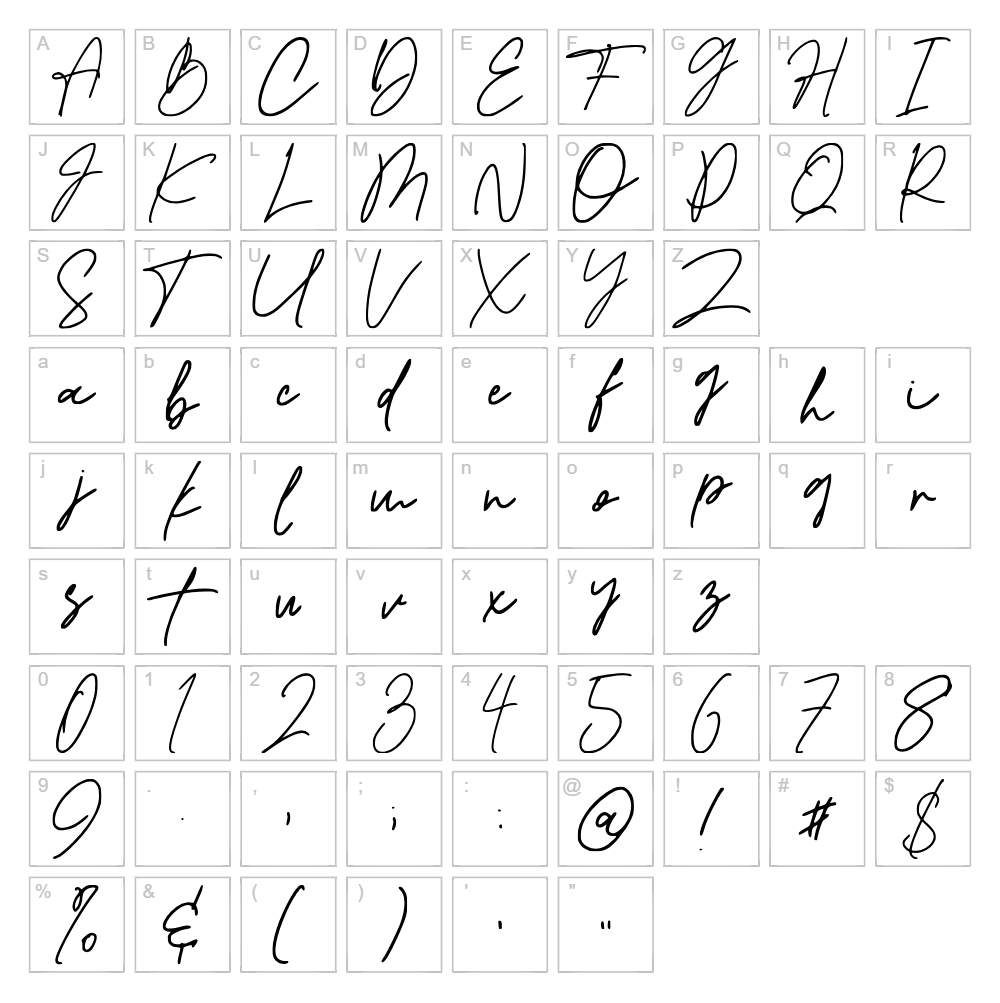
Download Bestermind Font
Downloads as a ZIP file. Check the license notes on this page before commercial use.
Font Files
- BestermindRegular.ttf
Font Details
- License:Free for personal use
- Author:
About Bestermind
Bestermind is a fluid, expressive handwritten script font designed by Thirtypath that captures the organic charm of pen-on-paper lettering with confident, flowing strokes. Each character carries a natural rhythm and personality, making it feel approachable yet sophisticated. The font excels at balancing legibility with artistic flair, featuring smooth connections and varied letterforms that give designs an authentic, handcrafted quality. Perfect for creators seeking a versatile script that works equally well in formal or casual applications.
Best Uses for Bestermind
Bestermind shines in branding projects, logo design, and packaging where a personal, human touch elevates the visual identity. It's ideal for Cricut crafters working on vinyl decals, greeting cards, and custom merchandise, as well as for web design headers, social media graphics, and editorial layouts that demand character and warmth.
What Fonts Pair Well With Bestermind?
Bestermind pairs beautifully with clean, modern sans-serif fonts like Montserrat or Poppins to create contrast between decorative and functional elements. For a more refined aesthetic, consider pairing it with Crimson Text, a classic serif font that complements Bestermind's elegance while maintaining clear readability in body copy.
License & Commercial Use
Bestermind is 100% free for commercial use, meaning you can use it in logos, branding, print materials, digital designs, websites, apps, and merchandise without seeking permission or paying licensing fees. You're welcome to use Bestermind in client projects, products for sale, and any commercial venture. Attribution to Thirtypath is appreciated but not required. However, you cannot resell or redistribute the font files themselves.
Frequently Asked Questions
Is Bestermind free for commercial use?
Yes, Bestermind is 100% free for commercial use. You can use it in logos, branding, print, digital designs, websites, apps, and merchandise without any licensing restrictions or fees.
What file formats does Bestermind come in?
Bestermind is available in standard font formats including OTF and TTF, ensuring compatibility with Windows, Mac, and creative software like Adobe Creative Suite, Cricut Design Space, and more.
What fonts pair well with Bestermind?
Bestermind pairs exceptionally well with modern sans-serif fonts like Montserrat and Poppins for contrast, or with serif options like Crimson Text for a more traditional, refined look. These pairings balance Bestermind's decorative script style with clean readability.
Can I use Bestermind in Cricut projects?
Absolutely. Bestermind works perfectly in Cricut Design Space and other cutting software for vinyl decals, custom apparel, signage, and personalized crafts. Its flowing letterforms and legibility make it a favorite for decorative cutting projects.
How to Install Bestermind
- Download the Bestermind font file from VectorDad
- Unzip the folder to access the font files (OTF or TTF)
- Double-click the font file to open the preview window
- Click the Install button to add the font to your system
- Restart your design application, and Bestermind will be available in your font list
Use Bestermind With VectorDad Tools
Maximize Bestermind's potential with the VectorDad Word Art Generator, which lets you create custom SVG word art in seconds—perfect for Cricut projects and vinyl decals. Combine it with the Curved Text Generator to bend Bestermind along paths and create stunning curved designs for logos, labels, and decorative crafts.
Make Your Own Font
Like the look of Bestermind but want letters in your own style? Draw or trace each character as an SVG, then turn the set into an installable .ttf font with our SVG to TTF font maker. It runs in your browser, with no signup.


