
Blackford Font – Free Download (OTF, TTF, SVG)

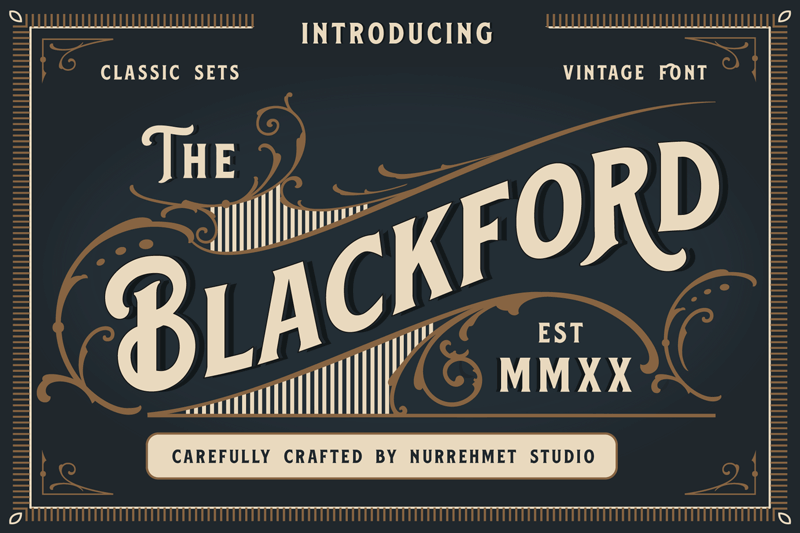
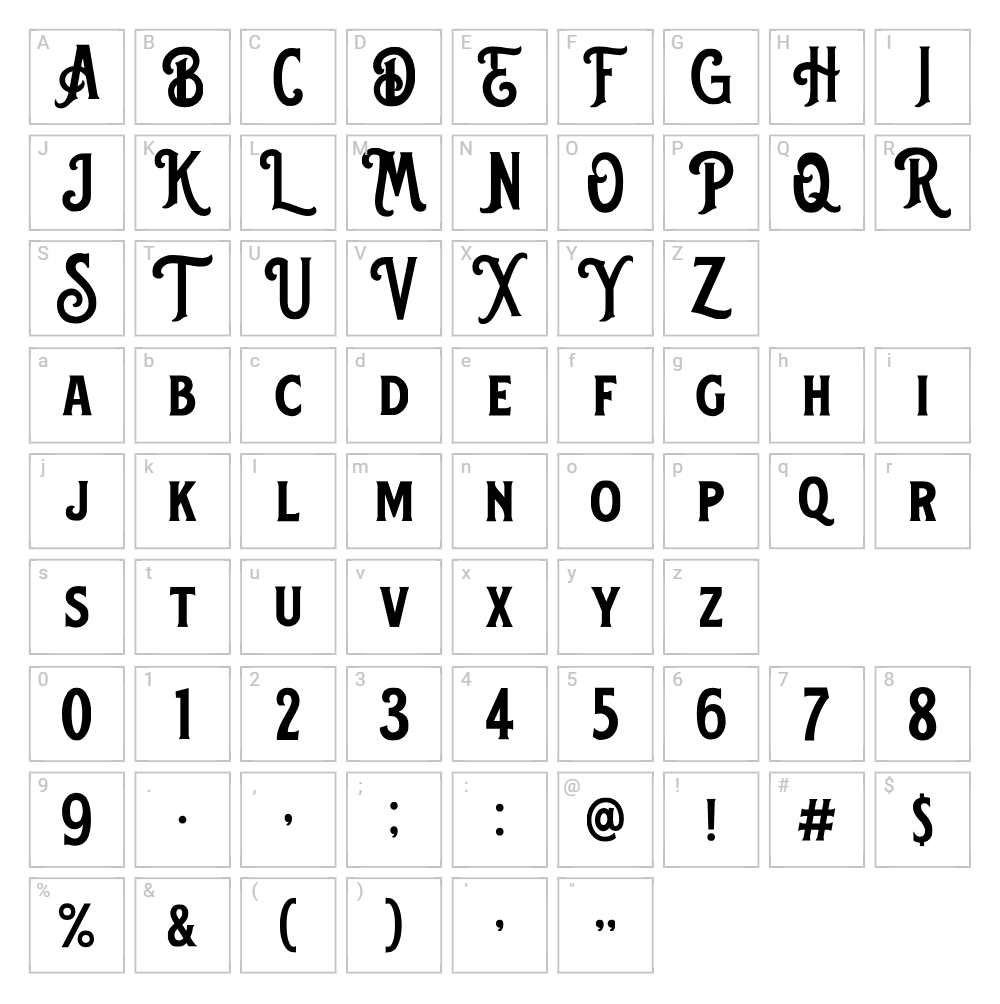
Character Map
Download Blackford Font
Downloads as a ZIP file. Check the license notes on this page before commercial use.
Font Files
- Blackford.ttf
Font Details
- License:Free for personal use
- Author:
About Blackford
Blackford is a striking display typeface from Nurrehmet Studio that blends retro elegance with modern flair. The font features bold, decorative letterforms with distinctive stylistic flourishes that evoke vintage poster design and classic typography. Its high-contrast strokes and ornamental details create a sophisticated yet playful mood, making it perfect for designers seeking a statement-making typeface. Blackford's unique character set and confident personality set it apart as a versatile choice for creative projects that demand visual impact.
Best Uses for Blackford
Blackford excels in headline design, logo creation, and branding projects where a bold, vintage-inspired aesthetic is desired. The font works beautifully for poster design, music graphics, apparel printing, Cricut craft projects, and merchandise packaging. Its decorative nature also makes it ideal for social media graphics, greeting cards, and editorial layouts where you want text to become a focal design element.
What Fonts Pair Well With Blackford?
Blackford pairs exceptionally well with clean, modern sans-serif typefaces that balance its ornamental style. Consider pairing it with Montserrat or Open Sans for body text and secondary headings, as their simplicity complements Blackford's elaborate character. For a more sophisticated look, Lora, a serif option available on Google Fonts, provides elegant contrast while maintaining visual harmony.
License & Commercial Use
Blackford is free for personal use, but commercial licensing may apply depending on your intended use. Always verify the current license terms with Nurrehmet Studio before using this font in client work, business branding, product packaging, or any commercial project. If you use Blackford commercially under an approved license, credit the designer as requested. Reselling or redistributing the font files themselves is strictly prohibited.
Frequently Asked Questions
Is Blackford free for commercial use?
Blackford is marked as free for personal use. For commercial applications such as logos, print materials, digital products, or merchandise, you should check the license terms with Nurrehmet Studio or obtain appropriate commercial licensing before proceeding with your project.
What file formats does Blackford come in?
Most fonts from independent foundries like Nurrehmet Studio are typically available in common formats such as TTF (TrueType) and OTF (OpenType). Check the download page to confirm which specific formats are included with Blackford.
What fonts pair well with Blackford?
Blackford pairs beautifully with minimalist sans-serif fonts like Montserrat and Open Sans, which provide clean contrast to its ornate style. For a more elegant pairing, consider using Lora, a serif font that balances Blackford's decorative flair with sophisticated restraint.
Can I use Blackford for Cricut projects and vinyl cutting?
Yes, Blackford works well for Cricut cutting projects, vinyl decals, and other craft applications. The font's bold letterforms and clear strokes translate nicely to physical media, making it an excellent choice for t-shirt designs, wall decals, and personalized craft projects.
How to Install Blackford
- Download the Blackford font file from VectorDad or the source foundry website.
- Unzip or extract the downloaded file to access the font files.
- Double-click the TTF or OTF font file to open the font preview window.
- Click the "Install" button to add Blackford to your system fonts.
- Restart your creative applications, and Blackford will appear in all font menus ready to use.
Use Blackford With VectorDad Tools
Take Blackford further by using the VectorDad Word Art Generator to create stunning vector graphics and SVG designs instantly. For curved text effects and circular designs, try the Curved Text Generator, perfect for Cricut projects, vinyl cutting, and professional design work.
Make Your Own Font
Like the look of Blackford but want letters in your own style? Draw or trace each character as an SVG, then turn the set into an installable .ttf font with our SVG to TTF font maker. It runs in your browser, with no signup.


