
Blunder Sticky Font – Free Download (OTF, TTF, SVG)

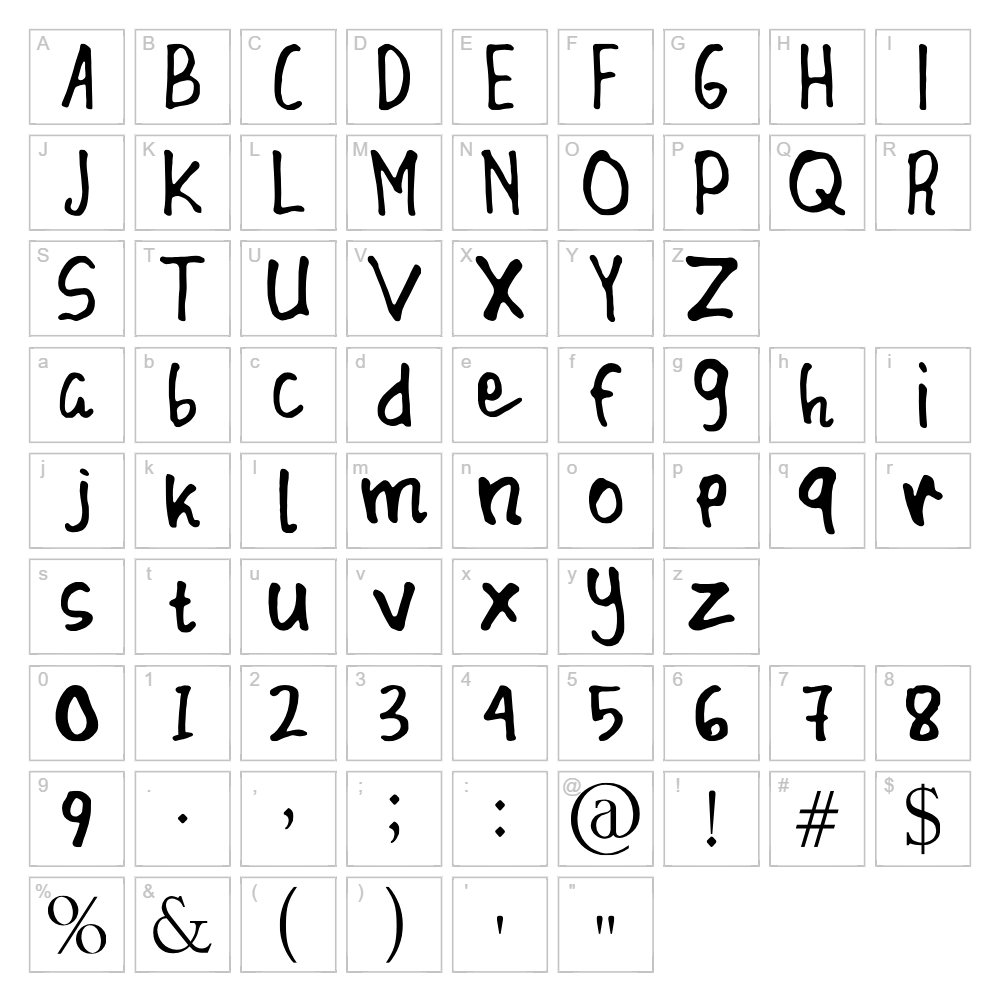
Character Map
Download Blunder Sticky Font
Downloads as a ZIP file. Check the license notes on this page before commercial use.
Font Files
- Blunder Sticky.otf
Font Details
- License:Free for personal use
- Author:
About Blunder Sticky
Blunder Sticky is a playful handwritten script font created by designer Noschey! that captures the charm of casual, organic lettering with a modern twist. The font features loose, flowing strokes with an intentionally imperfect quality that gives designs a friendly, approachable personality. Each character appears hand-drawn with natural variations in line weight and spacing, making it feel authentic and expressive. This distinctive style makes Blunder Sticky perfect for projects that need warmth, personality, and a touch of artistic flair.
Best Uses for Blunder Sticky
Blunder Sticky excels in branding, logo design, and creative packaging where a friendly, handcrafted aesthetic adds value. It's ideal for Cricut projects, vinyl decals, t-shirt designs, and merchandise that benefit from an informal, playful vibe. The font also works beautifully for social media graphics, greeting cards, event posters, and editorial headlines where personality and visual interest are key.
What Fonts Pair Well With Blunder Sticky?
Blunder Sticky pairs beautifully with clean, minimal sans-serif fonts like Roboto or Open Sans, which provide excellent contrast and readability. For a more sophisticated pairing, try Playfair Display, a serif font that balances the script's playfulness with elegant structure. These combinations work well for mixed typography in logos, headers, and body copy layouts.
License & Commercial Use
Blunder Sticky is 100% free for commercial use, meaning you can use it in logos, branding, print materials, digital designs, websites, mobile apps, and merchandise without restriction. You're free to create and sell products featuring this font in both physical and digital formats. Please credit designer Noschey! when possible. The one restriction: you cannot resell or redistribute the font files themselves.
Frequently Asked Questions
Is Blunder Sticky free for commercial use?
Yes! Blunder Sticky is completely free for commercial use. You can use it in logos, packaging, merchandise, websites, apps, and any other commercial projects without paying a license fee.
What file formats does Blunder Sticky come in?
Blunder Sticky is available in standard font formats including TTF (TrueType) and OTF (OpenType), which are compatible with Windows, Mac, Cricut Design Space, and most design software.
What fonts pair well with Blunder Sticky?
Blunder Sticky pairs well with modern sans-serifs like Roboto and Open Sans for contrast, or with elegant serifs like Playfair Display for a more refined look. The key is choosing a font with cleaner lines to balance Blunder Sticky's organic style.
Can I use Blunder Sticky for Cricut projects?
Absolutely! Blunder Sticky works great in Cricut Design Space and pairs perfectly with our VectorDad Word Art Generator and Curved Text Generator for creating custom SVG designs.
How to Install Blunder Sticky
- Download Blunder Sticky from VectorDad.com
- Unzip the downloaded file to access the font files
- Double-click the TTF or OTF font file to open the font preview
- Click the "Install" button to add the font to your system
- Restart your design software and Blunder Sticky will appear in your font list
Use Blunder Sticky With VectorDad Tools
Take Blunder Sticky to the next level with the VectorDad Word Art Generator, which lets you create custom SVG designs instantly without design software experience. Our Curved Text Generator makes it easy to bend and shape Blunder Sticky text for Cricut cutting projects and creative designs.
Make Your Own Font
Like the look of Blunder Sticky but want letters in your own style? Draw or trace each character as an SVG, then turn the set into an installable .ttf font with our free font creator. It runs in your browser, with no signup.


