
Blush Font — Free Download (TTF, OTF, SVG)

Character Map
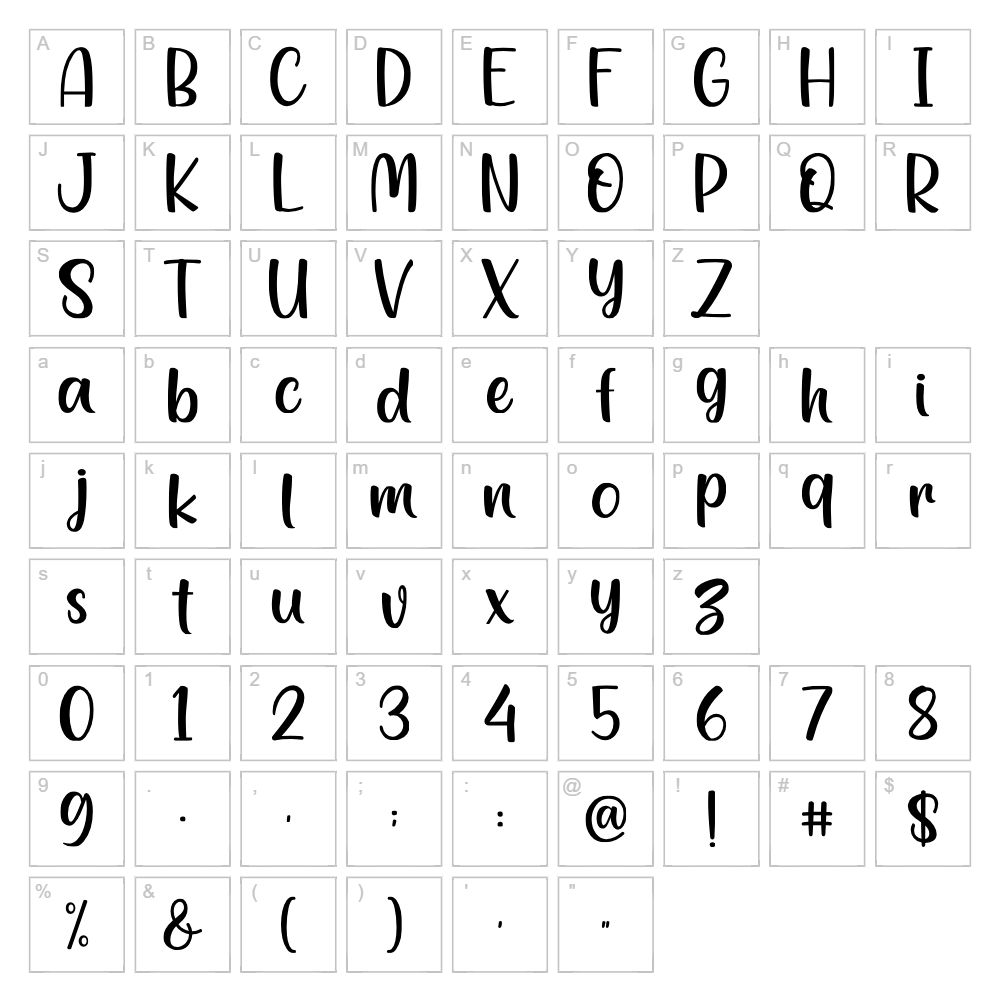
Download Blush Font
Downloads as a ZIP file. Check the license notes on this page before commercial use.
Font Files
- Jellyblush.ttf
Font Details
- License:Free for personal use
- Author:
About Blush Font — Free Download (TTF, OTF, SVG)
Blush Font is a graceful script typeface crafted by Eghtin Studio that combines delicate letterforms with modern sensibility. The font features flowing, interconnected strokes that create an elegant yet approachable aesthetic, perfect for designers seeking a balance between sophistication and warmth. Its natural pen-like quality gives each character personality while maintaining excellent readability across various sizes. Blush stands out for its versatile personality—equally at home in upscale branding or friendly creative projects.
Best Uses for Blush Font — Free Download (TTF, OTF, SVG)
Blush Font excels in logo design, wedding invitations, greeting cards, and brand identity projects where elegance and personality matter. The script style is ideal for Cricut cutting projects, vinyl decals, and t-shirt designs that need a sophisticated yet approachable touch. Use Blush for social media graphics, packaging labels, and digital editorial designs where you want typography to make a meaningful visual statement.
What Fonts Pair Well With Blush Font — Free Download (TTF, OTF, SVG)?
Pair Blush Script with clean sans-serif fonts like Open Sans or Montserrat to create balance between elegance and modern minimalism. For a softer pairing, combine it with Lora, a serif font that shares Blush's refined personality while providing excellent body text contrast. These combinations work beautifully in branding, editorial layouts, and marketing materials where hierarchy and visual interest are priorities.
License & Commercial Use
Blush Font is available for both personal and commercial use, provided proper attribution is given to Eghtin Studio. You are permitted to use this font in logos, print materials, digital designs, web projects, mobile applications, and merchandise without purchasing an additional commercial license. However, you may not resell, redistribute, or repackage the font files themselves. Always credit Eghtin Studio in your project metadata or design documentation where feasible. For specific licensing questions, consult the original foundry's terms.
Frequently Asked Questions
Is Blush Font — Free Download (TTF, OTF, SVG) free for commercial use?
Yes, Blush Font is free for commercial use, including logos, packaging, merchandise, and digital products. You must credit Eghtin Studio and cannot resell the font files themselves.
What file formats does Blush Font — Free Download (TTF, OTF, SVG) come in?
Blush Font is available in multiple formats: TTF (TrueType), OTF (OpenType), and SVG (Scalable Vector Graphics). The SVG format is especially useful for Cricut projects and web use where vector precision is essential.
What fonts pair well with Blush Font — Free Download (TTF, OTF, SVG)?
Blush pairs beautifully with modern sans-serifs like Open Sans and Montserrat, as well as elegant serifs like Lora. See Section 3 for detailed pairing recommendations and design applications.
Can I use Blush Font for Cricut cutting projects and vinyl decals?
Absolutely. The SVG version of Blush Font is optimized for Cricut machines and vinyl cutting applications. Its clean letterforms and flowing strokes produce crisp, professional results when cut or applied to apparel, home décor, and promotional items.
How to Install Blush Font — Free Download (TTF, OTF, SVG)
- Download the Blush Font files from VectorDad in your preferred format (TTF, OTF, or SVG).
- Unzip the downloaded file to access the individual font files on your computer.
- Double-click the font file you wish to install (e.g., Blush.ttf or Blush.otf).
- Click Install when the font preview window appears, confirming installation to your system.
- Restart your design software and Blush Font will be available in all applications' font menus.
Use Blush Font — Free Download (TTF, OTF, SVG) With VectorDad Tools
Maximize your Blush Font designs using the VectorDad Word Art Generator, which instantly converts your text into stunning visual artwork perfect for Cricut projects and print designs. Combine Blush with the Curved Text Generator to create circular, wavy, or custom-path text layouts that bring professional depth to logos, labels, and decorative graphics.
Make Your Own Font
Like the look of Blush Font but want letters in your own style? Draw or trace each character as an SVG, then turn the set into an installable .ttf font with our SVG to TTF converter. It runs in your browser, with no signup.


