
Bonk Font – Free Download (OTF, TTF, SVG)

Character Map
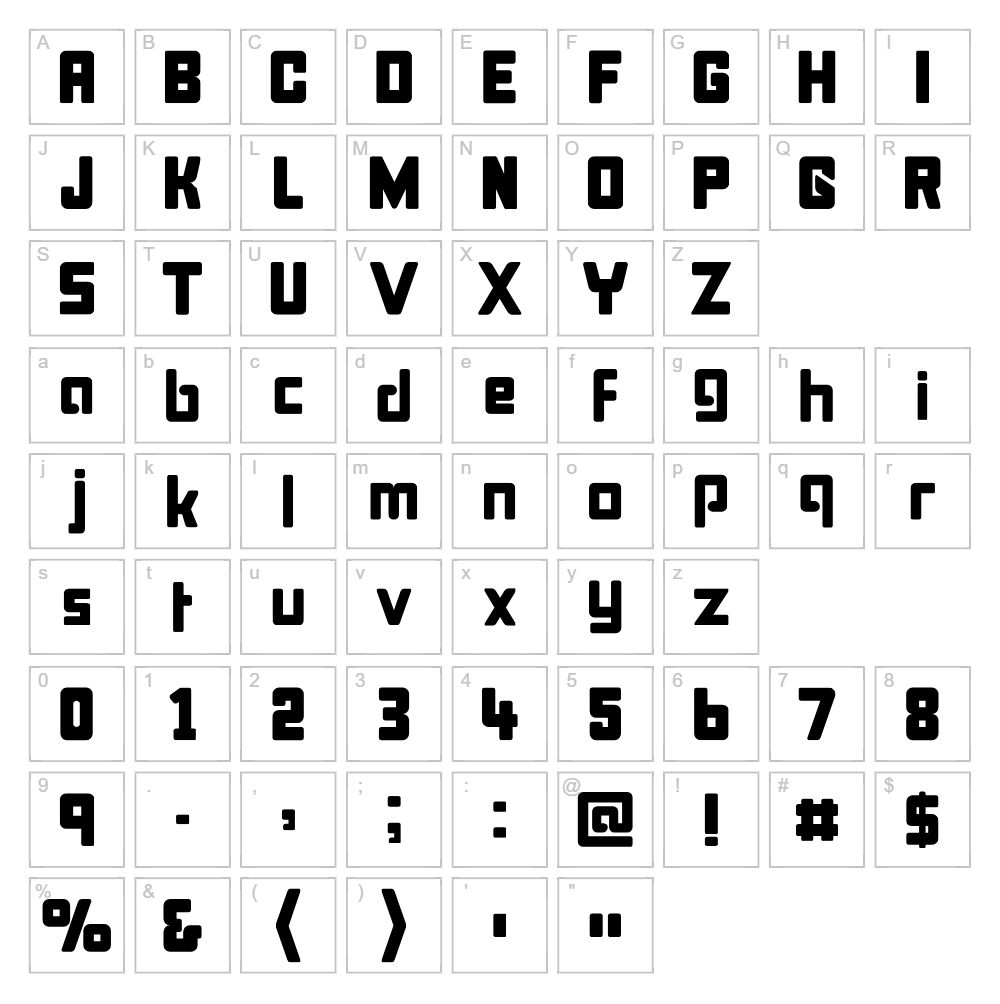
Download Bonk Font
Downloads as a ZIP file. Check the license notes on this page before commercial use.
Font Files
- Bonkund.ttf
- Bonkout.ttf
- Bonkoff.TTF
- Bonkit.ttf
- Bonkfat.ttf
- Bonkcoll.ttf
- Bonk.ttf
Font Details
- License:Free for personal use
- Author:
About Bonk
Bonk is a bold, geometric display font designed by GemFonts and released through Typotheticals. The typeface features clean, angular strokes with a distinctly modern aesthetic that commands attention on any design surface. Its thick letterforms and tight spacing create a confident, energetic presence perfect for designs that need to make an impact. Bonk excels at bridging the gap between techno-inspired geometry and approachable, contemporary style.
Best Uses for Bonk
Bonk shines in high-impact design applications including logo design, branding systems, and product packaging where bold typography is essential. The font is ideal for t-shirt graphics, vinyl decals, and Cricut craft projects that demand visibility and personality. It also performs exceptionally well in editorial headlines, event signage, and digital advertising where you need type that stops scrollers and catches eyes.
What Fonts Pair Well With Bonk?
Bonk pairs beautifully with clean, minimalist sans-serif fonts. Consider pairing it with Inter or Roboto (both available free on Google Fonts) for a modern, balanced combination. For a more elegant contrast, Lora, a high-quality serif option, provides sophisticated counterpoint to Bonk's bold geometry while maintaining excellent readability.
License & Commercial Use
Bonk is 100% free for commercial use, meaning you can confidently incorporate it into logos, print materials, digital designs, web projects, mobile apps, and merchandise without licensing concerns. Commercial applications including client work, product sales, and brand identity projects are all permitted. Please provide appropriate credit to GemFonts and Typotheticals when possible. However, reselling or redistributing the font files themselves is strictly prohibited under the license terms.
Frequently Asked Questions
Is Bonk free for commercial use?
Yes, absolutely. Bonk is licensed for full commercial use, including logos, packaging, merchandise, digital products, and client work without any additional licensing fees or restrictions.
What file formats does Bonk come in?
Bonk is available in standard font formats including TTF (TrueType) and OTF (OpenType), ensuring compatibility across Windows, Mac, and design applications including Adobe Creative Suite and Cricut Design Space.
What fonts pair well with Bonk?
Bonk pairs well with minimalist sans-serifs like Inter and Roboto for modern combinations, or with the serif font Lora for elegant contrast. The key is choosing fonts with different visual weights and personalities to create hierarchy.
Can I use Bonk in my Cricut projects?
Yes, Bonk works excellently in Cricut Design Space for creating vinyl decals, t-shirt designs, and cut files. For even more creative possibilities, use our VectorDad Word Art Generator to create custom SVG designs with Bonk before importing to your Cricut machine.
How to Install Bonk
- Download the Bonk font file from VectorDad.com to your computer.
- Unzip the downloaded file to access the TTF or OTF font files.
- Double-click the font file to open the font installation preview window.
- Click the "Install" button to add Bonk to your system fonts library.
- Restart your design applications (Adobe Creative Suite, Cricut Design Space, etc.) and Bonk will be available in your font menus.
Use Bonk With VectorDad Tools
Maximize your creativity by using Bonk with the VectorDad Word Art Generator, which lets you create custom word art designs with Bonk that are perfectly suited for Cricut projects and vinyl cutting. Take it further with the Curved Text Generator to bend and arc your Bonk text into stunning circular and curved compositions ideal for mugs, hats, and specialty Cricut designs.
Make Your Own Font
Like the look of Bonk but want letters in your own style? Draw or trace each character as an SVG, then turn the set into an installable .ttf font with our SVG to TTF font maker. It runs in your browser, with no signup.


