
Chisel Font – Free Download (OTF, TTF, SVG)

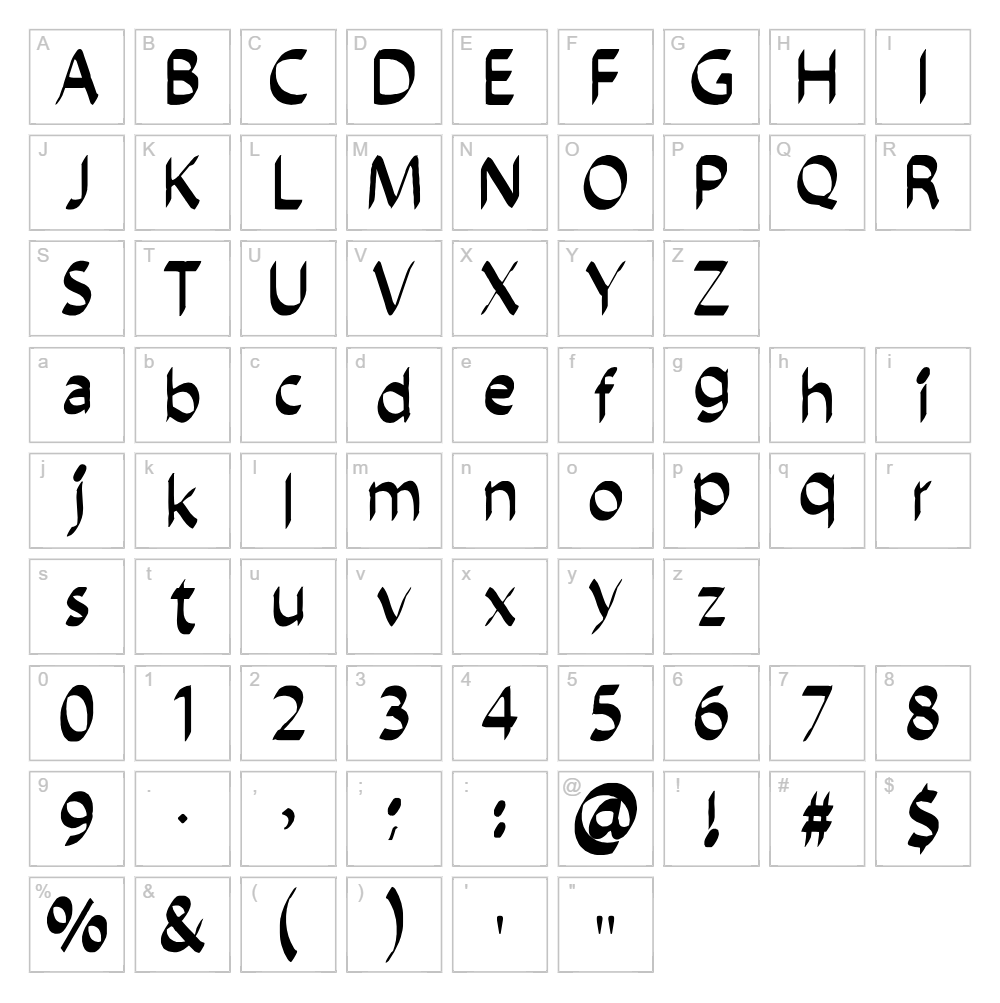
Character Map
Download Chisel Font
Downloads as a ZIP file. Check the license notes on this page before commercial use.
Font Files
- chiselscript.ttf
Font Details
- License:Free for personal use
- Author:
About Chisel
Chisel is a bold, geometric script font designed by Ajith Rajan that combines sharp, angular letterforms with a modern sensibility. The font features distinctive chiseled strokes and clean lines that give it a contemporary, architectural quality while maintaining excellent readability. Chisel works beautifully for projects that demand impact and precision without sacrificing personality. Its unique letterform design makes it instantly recognizable across both digital and print applications.
Best Uses for Chisel
Chisel excels in branding, logo design, and packaging where a strong, memorable typeface is essential. The font is particularly effective for Cricut vinyl decals, t-shirt designs, signage, and poster artwork that require high contrast and visual punch. It also works wonderfully for editorial design, album covers, and any project where a contemporary, structured aesthetic will elevate the composition.
What Fonts Pair Well With Chisel?
Chisel pairs exceptionally well with clean sans-serif typefaces like Roboto or Inter for body text and supporting content. For a more elegant contrast, consider pairing it with a classic serif font such as Playfair Display, which balances Chisel's modern edge with traditional sophistication. These combinations create dynamic typographic hierarchies while maintaining visual harmony across your design.
License & Commercial Use
Chisel is 100% free for commercial use. You are permitted to use this font for logos, branding, print projects, digital media, websites, applications, and merchandise production without any licensing fees or restrictions. You may create commercial products featuring Chisel, including t-shirts, mugs, signage, packaging, and digital products. Please provide credit to designer Ajith Rajan where possible. The only restriction is that you may not resell or redistribute the font files themselves.
Frequently Asked Questions
Is Chisel free for commercial use?
Yes, Chisel is completely free for commercial use. You can use it in logos, branded materials, merchandise, digital products, and any commercial project without licensing fees or restrictions.
What file formats does Chisel come in?
Chisel is available in standard font formats including TTF (TrueType) and OTF (OpenType), ensuring compatibility with Windows, Mac, and most design software including Adobe Creative Suite, Cricut Design Space, and Silhouette Studio.
What fonts pair well with Chisel?
Chisel pairs beautifully with geometric sans-serifs like Roboto and Inter for a modern look, or with serif fonts like Playfair Display for a more refined aesthetic. See Section 3 for detailed pairing recommendations and why these combinations work together.
Can I use Chisel in my Cricut projects and cut files?
Absolutely! Chisel is perfect for Cricut projects and can be used to create custom cut files, vinyl designs, and SVG projects. You can use it directly in Cricut Design Space or convert it to outlines for maximum design flexibility.
How to Install Chisel
- Download the Chisel font file from VectorDad to your computer.
- Unzip the downloaded folder to access the font files.
- Double-click the font file (TTF or OTF) to open the font preview window.
- Click the "Install" button to add Chisel to your system font library.
- Restart your design application, and Chisel will now be available in your font dropdown menu.
Use Chisel With VectorDad Tools
Maximize Chisel's potential by using the VectorDad Word Art Generator to create stunning text designs and graphics with instant visual previews. Take your Cricut projects further with the Curved Text Generator, which allows you to wrap Chisel text along custom paths and create professional-quality SVG files for cutting and crafting.
Make Your Own Font
Like the look of Chisel but want letters in your own style? Draw or trace each character as an SVG, then turn the set into an installable .ttf font with our SVG to TTF font maker. It runs in your browser, with no signup.


