
Co2 Font – Free Download (OTF, TTF, SVG)

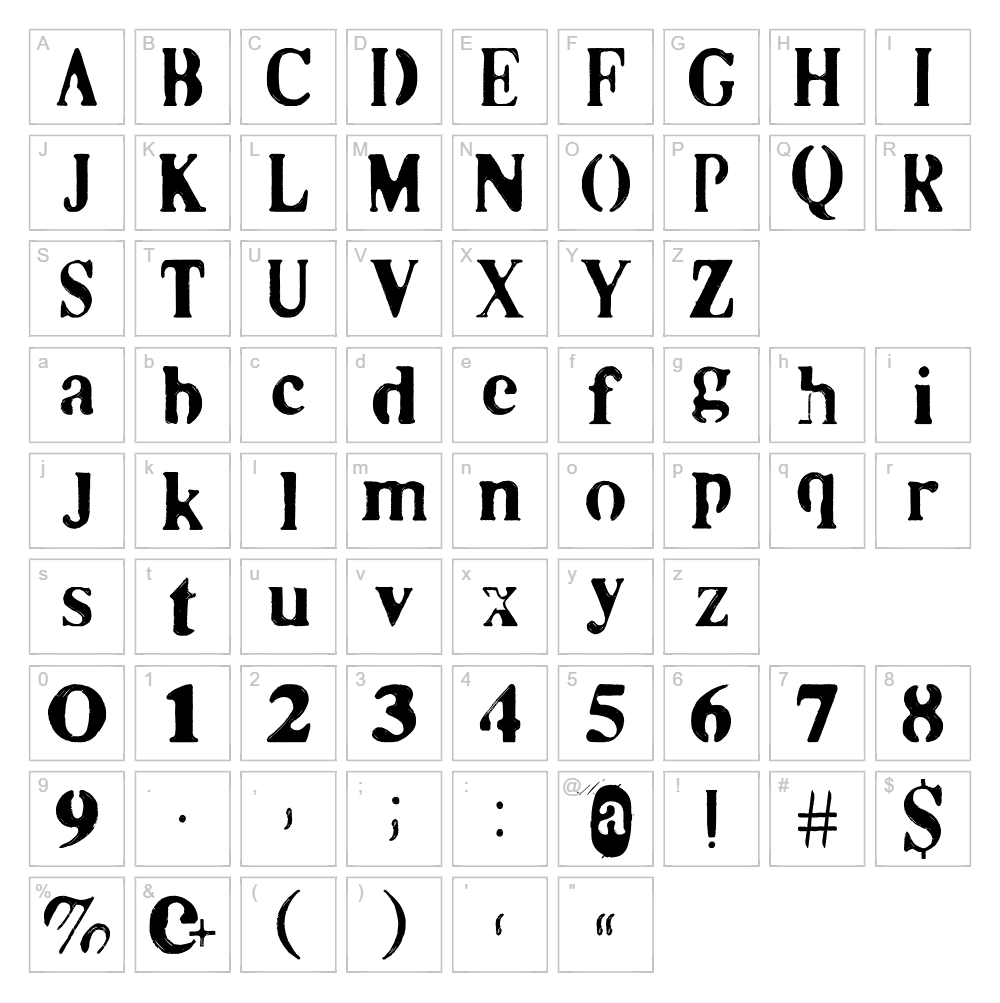
Character Map
Download Co2 Font
Downloads as a ZIP file. Check the license notes on this page before commercial use.
Font Files
- Co2.ttf
Font Details
- License:Free for personal use
- Author:
About Co2
Co2 is a striking eroded display font created by designer Lea_K. that combines bold, chunky letterforms with a weathered, distressed texture. The font's irregular edges and fractured appearance give it a contemporary, edgy aesthetic that feels both modern and tactile. With its unique character and artistic flair, Co2 stands out as a perfect choice for designers looking to add personality and visual impact to their creative projects.
Best Uses for Co2
Co2 excels in headline design, branding, and poster creation where bold visual statements are needed. The font's eroded style makes it ideal for album artwork, vintage-inspired graphics, apparel design, Cricut vinyl decals, and eye-catching signage. It's also well-suited for editorial layouts, social media graphics, and packaging design where you want to capture attention with unconventional typography.
What Fonts Pair Well With Co2?
Co2 pairs beautifully with clean, minimal sans-serif fonts that provide balance and readability alongside its bold personality. Consider pairing it with Roboto or Open Sans for body text and supporting typography. For a more sophisticated approach, Playfair Display creates an interesting contrast that works well in editorial and branding contexts.
License & Commercial Use
Co2 is 100% free for commercial use, meaning you can use it for logos, branding, printed materials, digital projects, web design, mobile applications, and merchandise without purchasing a license. You may incorporate the font into product designs, packaging, signage, and any client work without restriction. Please credit designer Lea_K. in your project when possible, and note that reselling or redistributing the font files themselves is not permitted.
Frequently Asked Questions
Is Co2 free for commercial use?
Yes, Co2 is completely free for commercial use. You can use it for business projects, client work, branding, merchandise, digital products, and print materials without any licensing fees or restrictions.
What file formats does Co2 come in?
Co2 is available in standard font file formats including OTF and TTF, making it compatible with both Mac and Windows systems, as well as design software like Adobe Creative Suite, Cricut Design Space, and other font applications.
What fonts pair well with Co2?
Co2 pairs well with minimalist sans-serif fonts like Roboto and Open Sans for balance, or with elegant serif fonts like Playfair Display for more sophisticated designs. These pairings create visual harmony while letting Co2's bold personality shine.
Can I use Co2 in Cricut Design Space?
Yes, once installed on your computer, Co2 will be available in Cricut Design Space. The font's eroded, artistic style is particularly effective for creating unique vinyl decals, heat transfer designs, and custom apparel projects.
How to Install Co2
- Download the Co2 font file from VectorDad.com to your computer
- Unzip the downloaded folder to extract the font file
- Double-click the font file (OTF or TTF) to open the font preview window
- Click "Install" to add Co2 to your system fonts
- Restart your design applications and Co2 will be available in all font menus
Use Co2 With VectorDad Tools
Maximize Co2's design potential with the VectorDad Word Art Generator, which instantly converts your text into customizable SVG files ready for Cricut projects. Take your designs further with the Curved Text Generator to wrap Co2's bold letters along custom paths and arcs, perfect for vinyl decals and apparel applications.
Make Your Own Font
Like the look of Co2 but want letters in your own style? Draw or trace each character as an SVG, then turn the set into an installable .ttf font with our free font creator. It runs in your browser, with no signup.
Similar Fonts
If you like Co2, you may also like these free fonts:


