
Cochem Font – Free Download (OTF, TTF, SVG)

Character Map
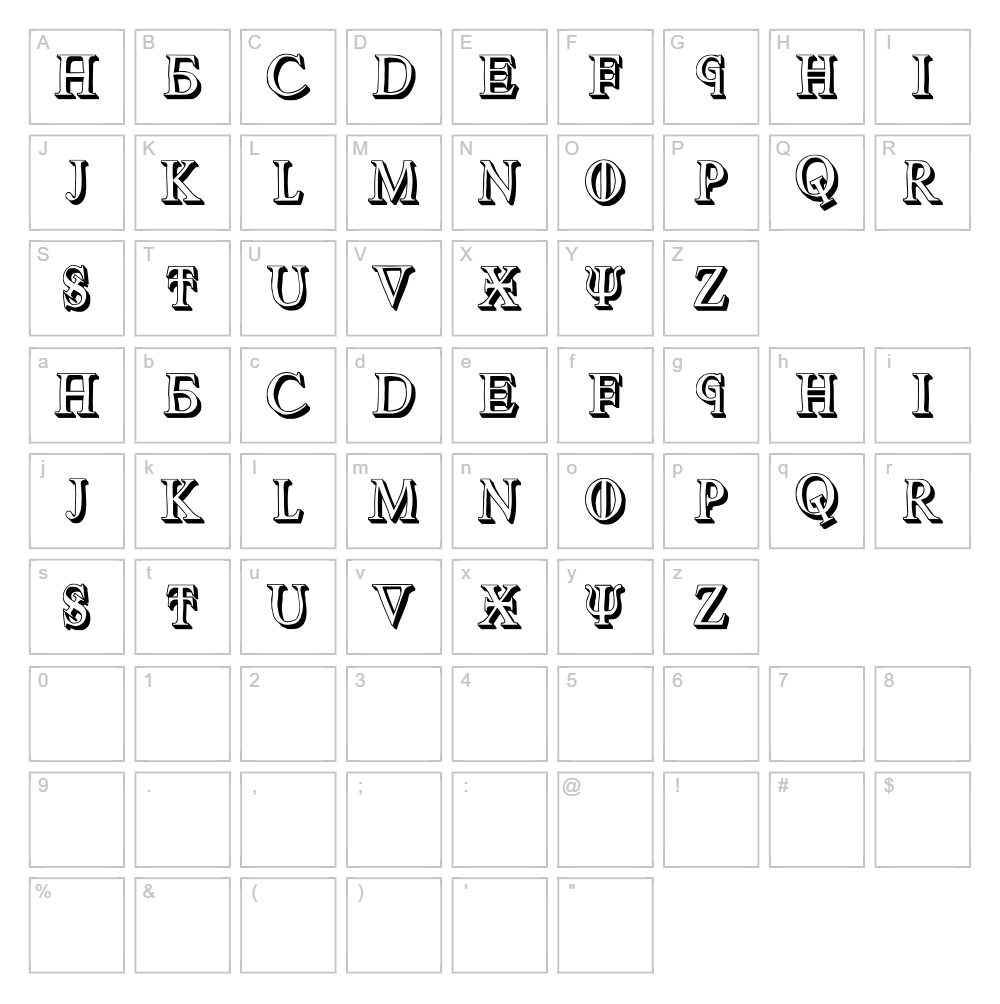
Download Cochem Font
Downloads as a ZIP file. Check the license notes on this page before commercial use.
Font Files
- Cochem.ttf
Font Details
- License:Free for personal use
- Author:
About Cochem
Cochem is a distinctive fancy font designed by Vladimir Nikolic that brings bold character and visual flair to any creative project. With its stylized letterforms and dynamic stroke variations, this typeface exudes confidence and sophistication while maintaining an approachable, contemporary feel. The font's unique blend of decorative elements and legibility makes it stand out for designers seeking something memorable without sacrificing functionality. Whether used at large display sizes or in branding applications, Cochem delivers impact and personality.
Best Uses for Cochem
Cochem excels in logo design, branding projects, and headline work where visual distinction is paramount. This font is ideal for t-shirt designs, vinyl decals, Cricut crafts, poster design, and social media graphics that demand attention. Its fancy styling also makes it perfect for editorial design, greeting cards, and decorative signage where creative expression takes center stage.
What Fonts Pair Well With Cochem?
Cochem pairs beautifully with clean, minimalist sans-serif fonts that provide balance to its elaborate style. Consider pairing it with Roboto or Open Sans from Google Fonts for a modern contrast, or complement it with Lora, a sophisticated serif option that grounds decorative headlines with timeless elegance.
License & Commercial Use
Cochem is 100% free for commercial use, including logos, branding, print materials, digital designs, websites, mobile applications, and merchandise production. You may use this font to create products for personal profit or client work without requesting additional permission. Attribution to designer Vladimir Nikolic is appreciated but not required. However, you may not resell, redistribute, or repackage the font files themselves.
Frequently Asked Questions
Is Cochem free for commercial use?
Yes, Cochem is completely free for commercial use. You can use it for logos, print projects, digital designs, websites, apps, merchandise, and any other commercial application without licensing fees or restrictions.
What file formats does Cochem come in?
Cochem is available in standard font formats including TTF (TrueType) and OTF (OpenType), compatible with Windows, Mac, and most design applications including Adobe Creative Suite, Canva, Cricut Design Space, and more.
What fonts pair well with Cochem?
Cochem pairs well with minimalist sans-serif fonts like Roboto and Open Sans for modern projects, or with serif fonts like Lora for editorial work. The key is choosing complementary fonts with simpler, cleaner designs to balance Cochem's decorative character.
Can I use Cochem in my Cricut projects?
Absolutely! Cochem works seamlessly in Cricut Design Space. After installing the font on your computer, it will appear in your Cricut app's font library, ready for cutting custom vinyl decals, t-shirt designs, and other craft projects.
How to Install Cochem
- Download the Cochem font file from VectorDad.com and save it to your computer.
- Unzip the downloaded file to access the individual font files.
- Double-click the TTF or OTF file to open the font preview window.
- Click the "Install" button to add Cochem to your system font library.
- Restart your design applications, and Cochem will appear in your font menu, ready to use.
Use Cochem With VectorDad Tools
Take your Cochem designs to the next level with the VectorDad Word Art Generator, which lets you create stunning text designs perfect for Cricut projects and digital art. For even more creative possibilities, try the Curved Text Generator to bend and shape Cochem lettering along custom paths for unique, eye-catching compositions.
Make Your Own Font
Like the look of Cochem but want letters in your own style? Draw or trace each character as an SVG, then turn the set into an installable .ttf font with our SVG to TTF converter. It runs in your browser, with no signup.


