Disney Font – Free Download (OTF, TTF, SVG)

About Disney
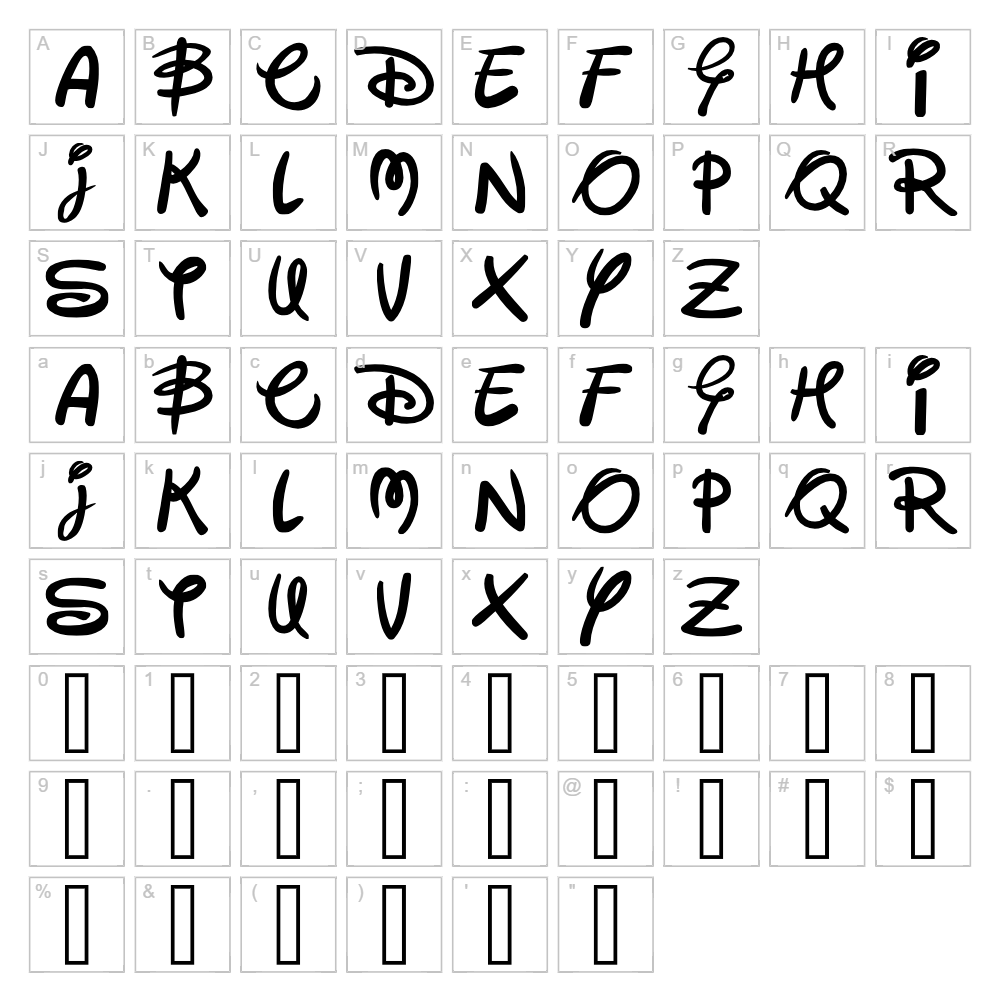
Disney is a whimsical script font created by Fontomen that captures the playful, enchanting spirit of animated storytelling. With its flowing letterforms and distinctive character, this font brings a touch of magic and nostalgia to any design project. The elegant yet approachable style combines smooth curves with expressive strokes, making it instantly recognizable and memorable. Whether you're designing invitations, posters, or creative graphics, Disney delivers a cheerful personality that resonates with audiences of all ages.
Best Uses for Disney
Disney excels in projects where personality and charm are essential. Use it for greeting cards, birthday invitations, children's book covers, vinyl decal designs for Cricut, and festive signage. The font's playful nature also makes it perfect for social media graphics, custom merchandise design, and scrapbooking layouts where you want to evoke wonder and joy.
What Fonts Pair Well With Disney?
Disney pairs beautifully with clean, modern sans-serif fonts that balance its decorative style. Consider pairing it with:
- Montserrat — A geometric sans-serif that provides excellent contrast and readability
- Open Sans — A friendly, neutral companion that keeps designs grounded
- Playfair Display — An elegant serif option for a more sophisticated, layered composition
License & Commercial Use
Disney is free for personal use. For commercial applications, please verify the current license terms with Fontomen, as restrictions may apply. When using Disney in commercial projects such as logos, printed materials, digital designs, web projects, mobile apps, and merchandise, always ensure you have the appropriate license. Credit to Fontomen is appreciated. Reselling or redistributing the font file itself is not permitted under any license.
Frequently Asked Questions
Is Disney free for commercial use?
Disney is designated as free for personal use. Commercial use may require a separate license from Fontomen. Always review the license terms before using this font in business projects, merchandise, or client work.
What file formats does Disney come in?
Disney is typically available in standard font formats including TTF (TrueType) and OTF (OpenType), ensuring compatibility across Windows, Mac, and design applications. Check the download package for included formats.
What fonts pair well with Disney?
Disney works best with clean sans-serif fonts like Montserrat or Open Sans for balance, or with elegant serifs like Playfair Display for a more refined look. See the Font Pairing section above for detailed suggestions.
Can I use Disney for Cricut and vinyl cutting projects?
Yes, Disney is excellent for Cricut projects and vinyl decal cutting. Its smooth, flowing letterforms translate beautifully to physical cuts. Use the VectorDad Word Art Generator to create SVG files optimized for your Cricut machine.
How to Install Disney
- Download the font file — Obtain the Disney font package from the link on this page.
- Unzip the folder — Extract all files from the downloaded ZIP archive to a location on your computer.
- Double-click the font file — Open the TTF or OTF file to launch the font installation dialog.
- Click Install — Confirm installation when prompted by your operating system.
- Restart your design application — Close and reopen Photoshop, Illustrator, Cricut Design Space, or any other software to access Disney in your font menu.
Use Disney With VectorDad Tools
Create stunning word art and custom text graphics for your Cricut projects using the VectorDad Word Art Generator. Experiment with curved text layouts and decorative effects using the Curved Text Generator to bring your Disney font designs to life in SVG format.