EA Font – Free Download (OTF, TTF, SVG)

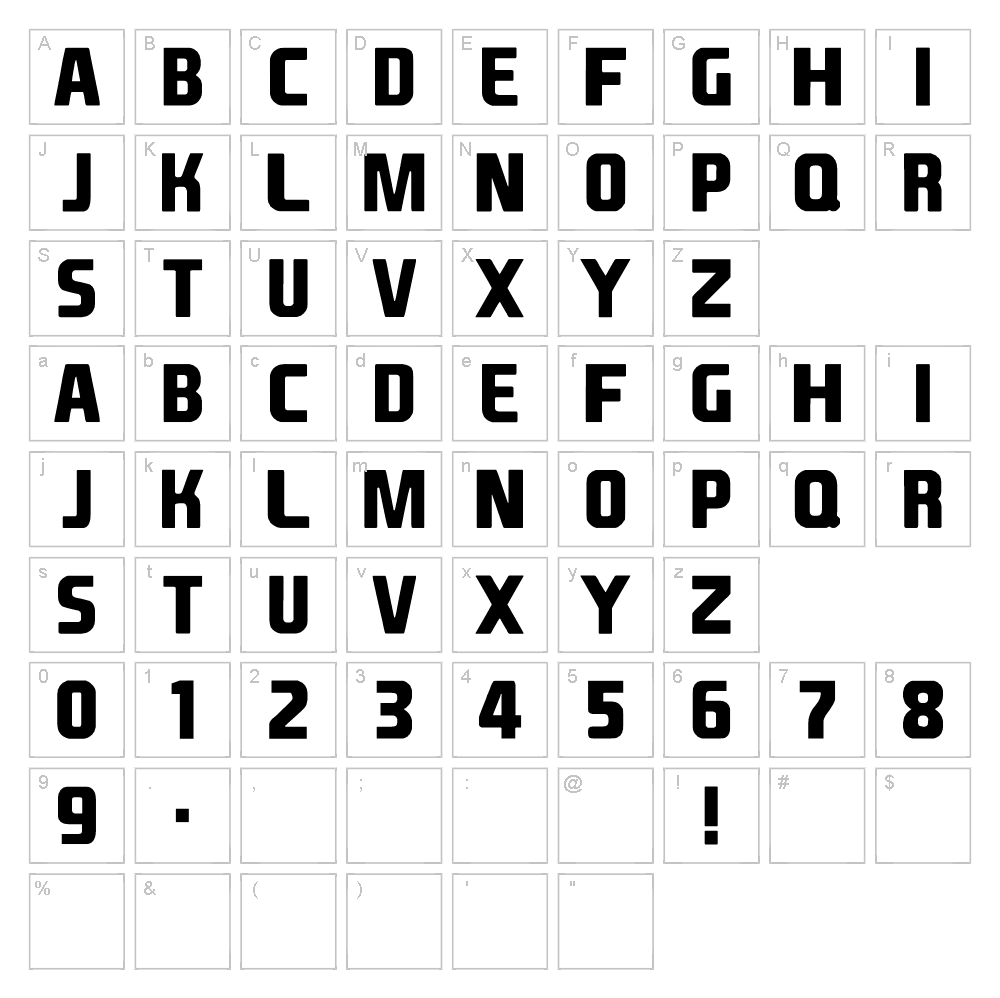
Character Map
Download EA Font
Downloads as a ZIP file. Check the license notes on this page before commercial use.
Font Files
- EASPORTS15.ttf
Font Details
- License:Free for personal use
- Author:
About EA Font
EA Font is a striking techno-inspired typeface designed by Billy Smith that brings a modern, geometric edge to any creative project. Its clean lines and futuristic character set make it perfect for contemporary design work that demands visual impact and sophistication. The font balances technical precision with approachable letterforms, creating a versatile option for designers seeking something bold yet functional. Whether you're crafting cutting-edge branding or experimental layouts, EA Font delivers personality without sacrificing readability.
Best Uses for EA Font
EA Font shines in tech-forward design applications like logo design, digital branding, and modern packaging. It's an excellent choice for Cricut cutting projects, vinyl decals, poster design, and any project where contemporary aesthetic matters. From music event graphics to app interfaces and futuristic signage, this font brings a polished, professional edge to commercial and creative work.
What Fonts Pair Well With EA Font?
EA Font pairs beautifully with Roboto, a clean sans-serif from Google Fonts that complements its modern sensibility while offering excellent legibility for body text. For contrast, try Playfair Display, a high-contrast serif that creates sophisticated hierarchy when paired with EA Font's geometric precision. Another strong pairing is Inter, a geometric sans-serif optimized for screens that matches EA Font's contemporary, tech-focused aesthetic.
License & Commercial Use
EA Font is 100% free for commercial use, meaning you can use it in logos, branding systems, printed materials, digital designs, websites, mobile applications, merchandise, and packaging without restriction or licensing fees. You may use the font for client work, business ventures, and any profit-driven creative project. The only requirement is to credit Billy Smith as the designer when feasible, and you cannot resell or redistribute the font files themselves. For complete peace of mind, your commercial projects are fully protected under this generous free license.
Frequently Asked Questions
Is EA Font free for commercial use?
Yes, absolutely. EA Font is 100% free for commercial use, including logos, branding, print, digital projects, websites, apps, merchandise, and any business or client work. Simply credit the designer Billy Smith where possible.
What file formats does EA Font come in?
EA Font is available in standard web and desktop formats including TTF (TrueType) and OTF (OpenType), ensuring compatibility with Windows, Mac, design software, and web browsers.
What fonts pair well with EA Font?
EA Font pairs excellently with Roboto for a modern tech look, Playfair Display for elegant contrast, and Inter for contemporary digital design. Each option provides different visual hierarchy while respecting EA Font's geometric, techno-forward personality.
Can I use EA Font for Cricut projects and vinyl cutting?
Yes, EA Font works great for Cricut cutting projects, vinyl decals, and heat transfer designs. Its bold, clean letterforms cut cleanly and maintain legibility at various sizes, making it ideal for personalized crafts, t-shirt designs, and home decor projects.
How to Install EA Font
- Download EA Font from VectorDad.com and save the file to your computer.
- Unzip the folder to extract the font file (TTF or OTF format).
- Double-click the font file to open the font preview window on your system.
- Click the "Install" button to add the font to your system library.
- Restart your applications and EA Font will now be available in all design software, word processors, and creative tools.
Use EA Font With VectorDad Tools
Maximize your EA Font creativity with the VectorDad Word Art Generator, which instantly converts your text into stunning SVG-ready designs perfect for Cricut projects and digital cutting. For even more possibilities, try the Curved Text Generator to bend and shape EA Font along custom paths, creating dynamic vinyl decals, logos, and artistic layouts.
Make Your Own Font
Like the look of EA Font but want letters in your own style? Draw or trace each character as an SVG, then turn the set into an installable .ttf font with our SVG to TTF converter. It runs in your browser, with no signup.