
Evil Mail Font – Free Download (OTF, TTF, SVG)

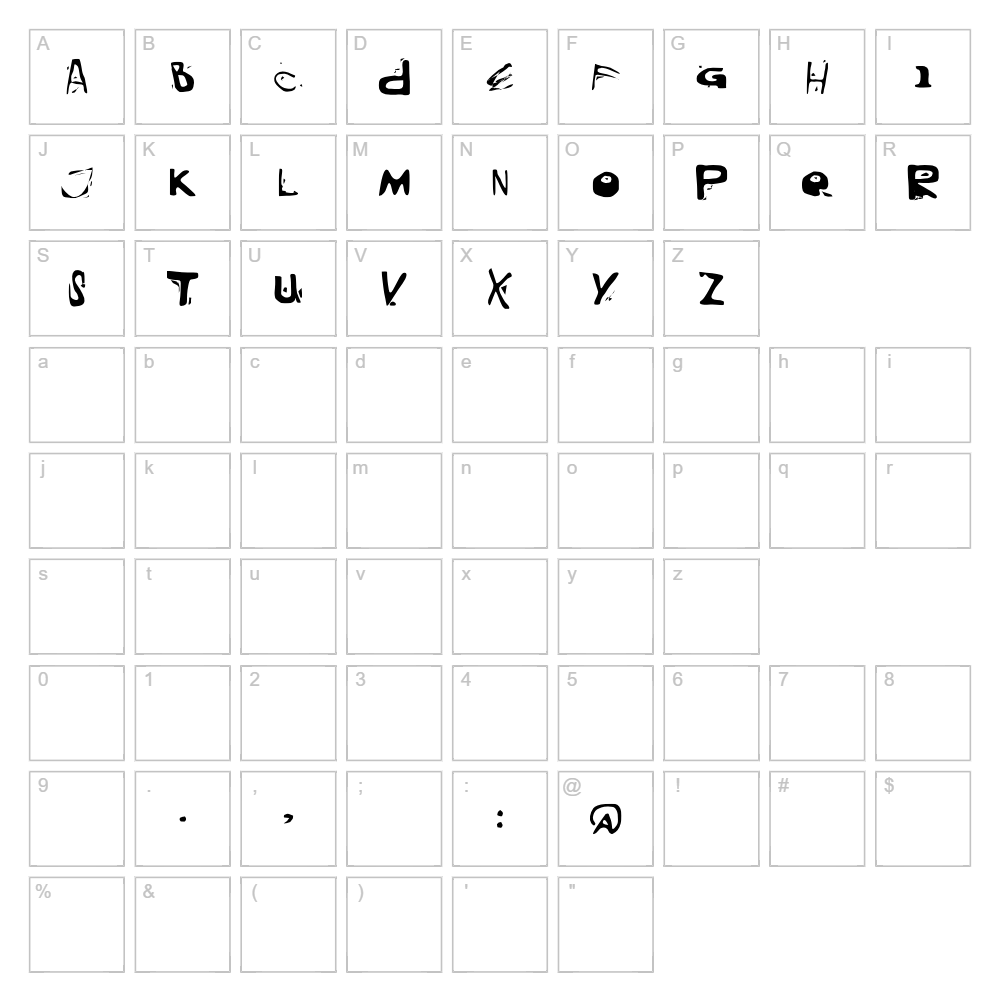
Character Map
Download Evil Mail Font
Downloads as a ZIP file. Check the license notes on this page before commercial use.
Font Files
- Blackm.ttf
Font Details
- License:Free for personal use
- Author:
About Evil Mail
Evil Mail is a distorted fancy typeface designed by Mr.Fisk Fonts that delivers a delightfully chaotic aesthetic perfect for projects demanding visual impact and personality. The font features warped, irregular letterforms with exaggerated distortion throughout, creating a deliberately imperfect and energetic appearance that immediately captures attention. Each character carries an intentionally broken quality that makes it ideal for edgy, playful, or alternative design contexts. This unique distortion style sets Evil Mail apart from conventional fonts, offering designers a rare blend of sophistication and controlled chaos.
Best Uses for Evil Mail
Evil Mail excels in eye-catching applications like poster design, alternative branding, music and entertainment graphics, and edgy social media content. The font's distinctive distorted style makes it particularly effective for Cricut vinyl decal projects, t-shirt designs, and custom apparel where bold personality takes priority over traditional legibility. It's also ideal for Halloween graphics, horror-themed projects, punk and alternative event promotions, and any design needing an unconventional, memorable statement.
What Fonts Pair Well With Evil Mail?
Evil Mail pairs beautifully with Montserrat, a clean geometric sans-serif from Google Fonts that provides excellent contrast to the distorted letterforms. Playfair Display, an elegant serif option, creates an intriguing juxtaposition between Evil Mail's chaos and refined typography. For a cohesive alternative approach, Space Grotesk complements the font's modern, edgy energy while maintaining superior readability for body copy and supporting text.
License & Commercial Use
Evil Mail is available for free commercial use, meaning you can use the font for logos, branding projects, print materials, digital designs, web properties, mobile applications, and merchandise without restriction or payment. Commercial uses include creating branded products for sale, professional design services, corporate communications, and monetized digital content. However, you must credit Mr.Fisk Fonts in your project documentation, and you may not resell, redistribute, or repackage the font files themselves. Always review the complete license agreement included with the download to ensure full compliance with any specific restrictions.
Frequently Asked Questions
Is Evil Mail free for commercial use?
Yes, Evil Mail is completely free for commercial use. You can use it for business logos, print advertising, merchandise, web design, app development, and any other commercial projects without paying licensing fees. You simply need to provide credit to Mr.Fisk Fonts and avoid reselling the font files.
What file formats does Evil Mail come in?
Evil Mail is typically available in standard font formats including TTF (TrueType) and OTF (OpenType), which are compatible with both Windows and Mac systems. These formats work across design software like Adobe Creative Suite, CorelDRAW, Canva, and Cricut Design Space for both digital and print projects.
What fonts pair well with Evil Mail?
Evil Mail pairs exceptionally well with clean, minimal sans-serif fonts like Montserrat, Roboto, or Space Grotesk, which provide balance to its distorted aesthetic. Serif options like Playfair Display create elegant contrast, while other geometric fonts enhance the edgy, modern quality Evil Mail brings to a design.
Can I use Evil Mail for Cricut projects?
Absolutely! Evil Mail works perfectly for Cricut cutting projects including vinyl decals, heat transfer designs, and custom signage. The distorted style actually enhances the visual appeal of cut materials, and you can further customize designs using the VectorDad Word Art Generator to create ready-to-cut SVG files featuring Evil Mail.
How to Install Evil Mail
- Download the font file — Click the download button on the Evil Mail font page to receive the compressed ZIP file to your computer.
- Unzip the folder — Extract the ZIP file to access the Evil Mail font file (typically a .TTF or .OTF file).
- Double-click the font file — Open the extracted font file by double-clicking it to launch the font preview window.
- Click Install — Select the Install button in the preview window to add Evil Mail to your system fonts.
- Restart your applications — Close and reopen your design software (Photoshop, Illustrator, Cricut Design Space, Canva, etc.) to access Evil Mail in the font menu.
Use Evil Mail With VectorDad Tools
Create stunning word art and custom SVG designs featuring Evil Mail using the VectorDad Word Art Generator, which allows you to instantly convert any text into beautifully styled graphics ready for Cricut projects. Take your designs further with the Curved Text Generator to bend and arc Evil Mail lettering along custom paths, perfect for vinyl decals, signage, and eye-catching apparel designs.
Make Your Own Font
Like the look of Evil Mail but want letters in your own style? Draw or trace each character as an SVG, then turn the set into an installable .ttf font with our SVG to TTF converter. It runs in your browser, with no signup.
Similar Fonts
If you like Evil Mail, you may also like these free fonts:


