
Fenway Scoreboard Font – Free Download (OTF, TTF, SVG)

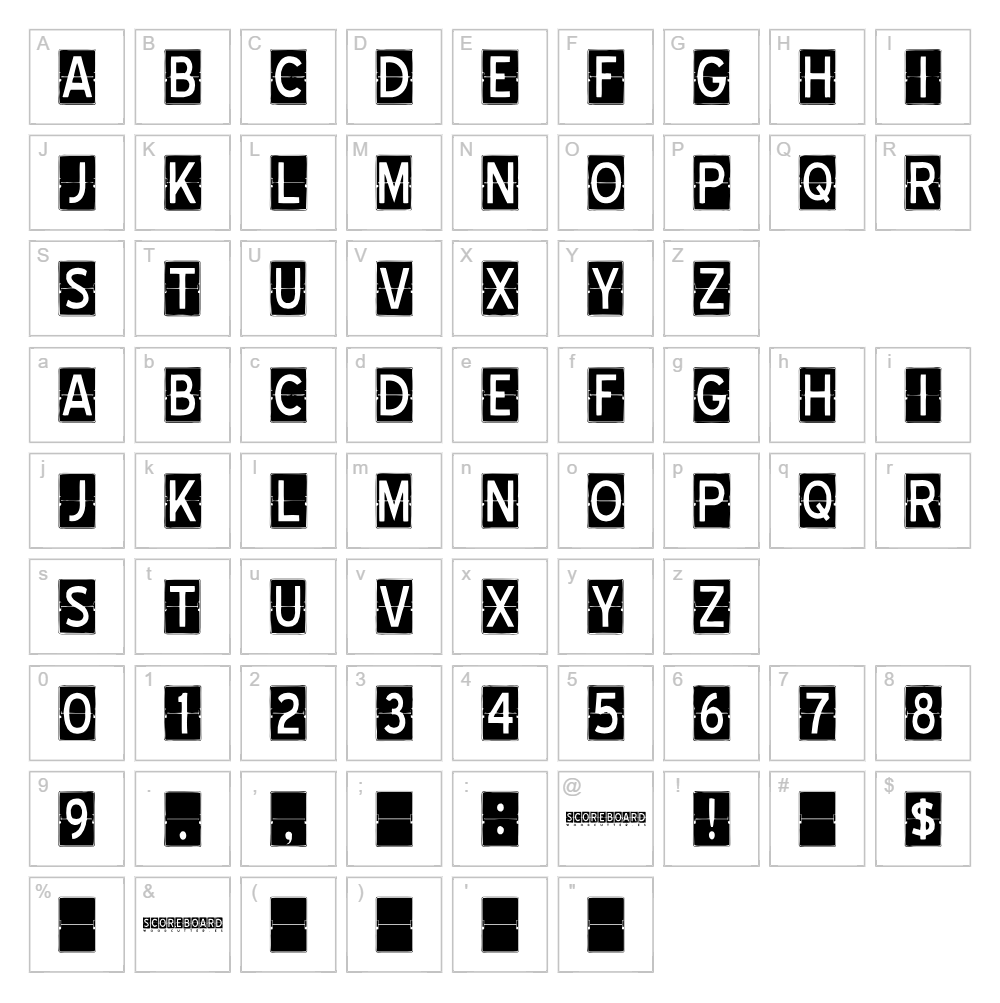
Character Map
Download Fenway Scoreboard Font
Downloads as a ZIP file. Check the license notes on this page before commercial use.
Font Files
- SCOREBOARD.ttf
Font Details
- License:Free for personal use
- Author:
About Fenway Scoreboard
Fenway Scoreboard is a bold, blocky decorative typeface inspired by classic baseball scoreboard lettering, designed by Woodcutter. With its geometric construction and strong, square-edged strokes, this font captures the vintage industrial aesthetic of mid-century sports venues. The letterforms are highly legible and evoke nostalgia while maintaining a contemporary edge, making it instantly recognizable and memorable. Its chunky proportions and structured lines create a commanding presence on any design canvas.
Best Uses for Fenway Scoreboard
Fenway Scoreboard excels in sports branding, vintage poster design, and retro merchandise like t-shirts and baseball caps. This typeface is perfect for Cricut vinyl decal projects, signage, and event promotion materials where a bold, nostalgic aesthetic is desired. It also works beautifully in logo design for sports teams, bars, or any brand wanting to evoke classic Americana and vintage stadium culture.
What Fonts Pair Well With Fenway Scoreboard?
Fenway Scoreboard pairs excellently with clean, minimalist sans-serif fonts that balance its heavy decorative weight. Consider pairing it with Roboto for body text and callouts, or Playfair Display for an elegant serif contrast. Montserrat is another reliable sans-serif option that maintains readability while complementing the font's vintage character.
License & Commercial Use
Fenway Scoreboard is 100% free for commercial use. You may use this font freely for logos, branding, print materials, digital designs, web projects, mobile apps, and merchandise production without purchasing a license. Proper credit to Woodcutter is appreciated but not required. However, reselling or redistributing the font files themselves is strictly prohibited—always direct users to download from authorized sources like VectorDad.com.
Frequently Asked Questions
Is Fenway Scoreboard free for commercial use?
Yes. Fenway Scoreboard is completely free for commercial use, including logos, print projects, digital media, web design, and merchandise. You do not need a commercial license to use this font in client work or your own business.
What file formats does Fenway Scoreboard come in?
Fenway Scoreboard is available in standard font formats including TTF (TrueType) and OTF (OpenType), ensuring compatibility with Windows, Mac, and design software like Adobe Creative Suite, Cricut Design Space, and Silhouette Studio.
What fonts pair well with Fenway Scoreboard?
Fenway Scoreboard pairs well with clean sans-serif typefaces like Roboto and Montserrat, or elegant serifs like Playfair Display. See Section 3 above for detailed pairing recommendations and rationale.
Can I use Fenway Scoreboard for Cricut and vinyl cutting projects?
Absolutely. Fenway Scoreboard's bold, clean letterforms are ideal for vinyl decals and Cricut cutting projects. The font's thick strokes ensure durability when cut and applied to surfaces like mugs, shirts, and car decals.
How to Install Fenway Scoreboard
- Download the Fenway Scoreboard font file from VectorDad.com.
- Unzip the downloaded folder to access the font files (TTF or OTF).
- Double-click the font file to open the font preview window.
- Click "Install" to add the font to your system library.
- Restart your design application and Fenway Scoreboard will be available in your font menu.
Use Fenway Scoreboard With VectorDad Tools
Maximize your creativity with the VectorDad Word Art Generator, which lets you instantly create custom word art designs using Fenway Scoreboard and export them as print-ready SVG files. For curved text effects and circular designs, try the Curved Text Generator to transform your scoreboard lettering into professional Cricut projects in seconds.
Make Your Own Font
Like the look of Fenway Scoreboard but want letters in your own style? Draw or trace each character as an SVG, then turn the set into an installable .ttf font with our free font creator. It runs in your browser, with no signup.
Similar Fonts
If you like Fenway Scoreboard, you may also like these free fonts:


