
Figaro Font – Free Download (OTF, TTF, SVG)

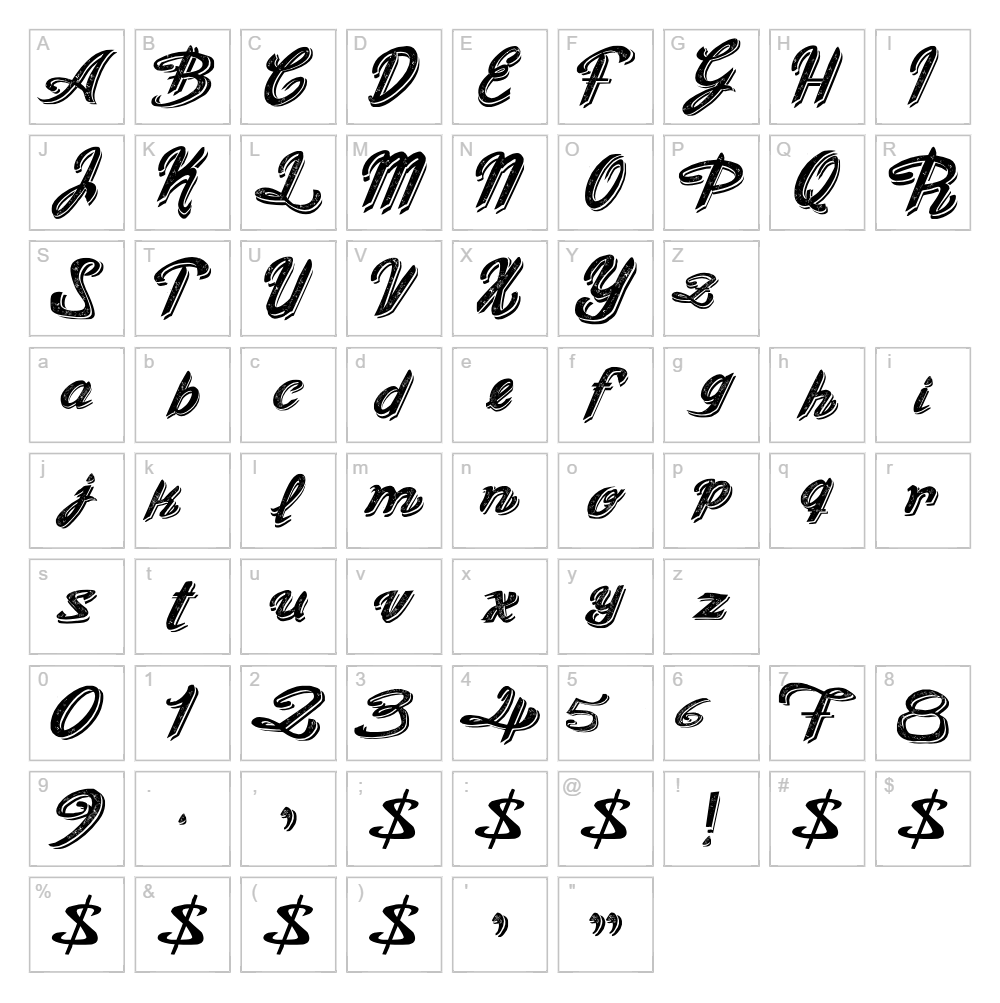
Character Map
Download Figaro Font
Downloads as a ZIP file. Check the license notes on this page before commercial use.
Font Files
- Old Figaro Cursive.ttf
Font Details
- License:Free for personal use
- Author:
About Figaro
Figaro is an elegant script font crafted by Galdino Otten Fonts that combines flowing letterforms with refined stroke work, creating a sophisticated and artistic aesthetic. The font features smooth, connected characters with subtle variations in line weight that give it a hand-lettered quality while maintaining legibility. Its graceful design conveys creativity and elegance, making it ideal for designers seeking a distinctive typographic voice. Figaro stands out for its balance between ornamental appeal and practical usability across various creative projects.
Best Uses for Figaro
Figaro excels in branding and logo design where an artistic, premium aesthetic is desired, particularly for fashion, beauty, and lifestyle brands. It's an excellent choice for Cricut crafting projects including personalized vinyl decals, custom signage, wedding invitations, and decorative home décor items. The font also works beautifully for editorial design, poster layouts, and social media graphics where you need to capture attention with elegant, flowing typography.
What Fonts Pair Well With Figaro?
Figaro pairs beautifully with clean, modern sans-serif fonts that provide contrast and balance. Consider pairing it with Roboto or Open Sans from Google Fonts for a contemporary look, or with Lora serif font for a more traditional, sophisticated combination. These pairings allow Figaro's script elegance to shine while supporting text remains clear and readable.
License & Commercial Use
Figaro is available for personal use under Galdino Otten Fonts' free license. For commercial projects, please verify the current license terms with Galdino Otten Fonts, as some free fonts from this foundry permit commercial use for logos, print materials, digital designs, web projects, mobile applications, and merchandise. Always credit Galdino Otten Fonts appropriately. Reselling or redistributing the font files themselves is strictly prohibited under the terms of use.
Frequently Asked Questions
Is Figaro free for commercial use?
Figaro is marked as free for personal use. If you plan to use it commercially for logos, packaging, or merchandise, please check the current license terms with Galdino Otten Fonts to ensure compliance.
What file formats does Figaro come in?
Figaro is available in standard font formats including TrueType (.ttf) and OpenType (.otf) formats, making it compatible with Windows, Mac, and most design software applications.
What fonts pair well with Figaro?
Figaro pairs excellently with sans-serif fonts like Roboto and Open Sans for modern designs, or with serif fonts like Lora for classical elegance. See our full pairing recommendations above.
Can I use Figaro for Cricut projects?
Yes, Figaro works great for Cricut crafting projects including custom decals, signage, and personalized gifts. You can generate Figaro text designs using the VectorDad Word Art and Curved Text generators to create ready-to-cut SVG files.
How to Install Figaro
- Download the Figaro font file from VectorDad or the Galdino Otten Fonts website.
- Unzip the downloaded folder to access the font file(s).
- Double-click the Figaro font file (.ttf or .otf) to open the font preview window.
- Click the "Install" button to add the font to your system library.
- Figaro is now available in all your design applications—restart your software if needed to see the font in your font list.
Use Figaro With VectorDad Tools
Create stunning text designs with Figaro using the VectorDad Word Art Generator, which instantly converts your text into ready-to-cut SVG files perfect for Cricut projects. For curved and circular text effects, try the Curved Text Generator to add dynamic dimensionality to your designs.
Make Your Own Font
Like the look of Figaro but want letters in your own style? Draw or trace each character as an SVG, then turn the set into an installable .ttf font with our SVG to TTF font maker. It runs in your browser, with no signup.


