
Fire Font – Free Download (OTF, TTF, SVG)

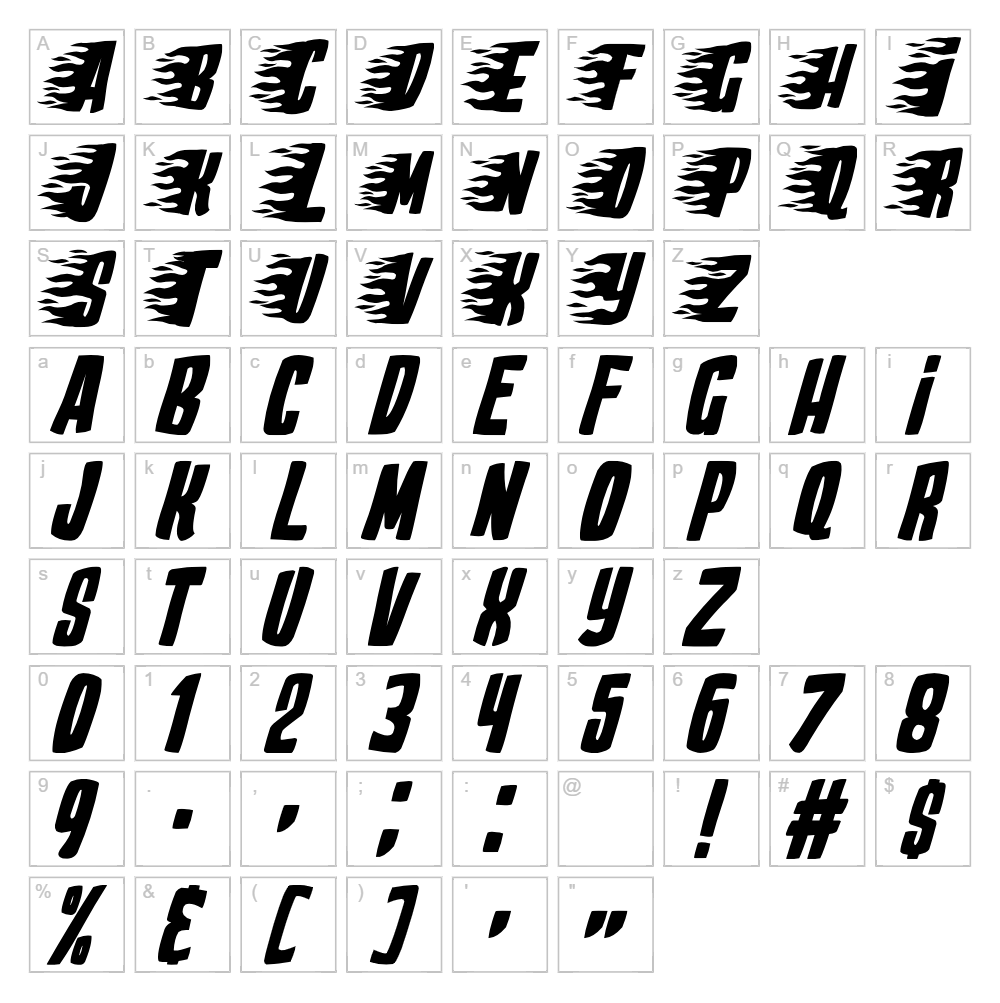
Character Map
Download Fire Font
Downloads as a ZIP file. Check the license notes on this page before commercial use.
Font Files
- Play With Fire.ttf
Font Details
- License:Free for personal use
- Author:
About Fire Font
Fire Font is a striking display typeface designed by Imagex that captures the dynamic energy and movement of flickering flames. With its bold, jagged letterforms and sharp angular strokes, this font evokes intensity and passion, making it ideal for projects that demand attention and attitude. The characters feature irregular edges and pointed terminals that mimic the unpredictable nature of fire, creating a sense of motion even in static text. This is a free personal-use font that brings dramatic flair to any creative composition.
Best Uses for Fire Font
Fire Font excels in eye-catching applications where drama and impact matter most. Perfect for band posters, music event flyers, video game graphics, and Cricut vinyl decal projects, this typeface works wonderfully for t-shirt designs that demand bold visual presence. It's also an excellent choice for horror or action-themed branding, gaming logos, and editorial headers where you need text that literally jumps off the page.
What Fonts Pair Well With Fire Font?
Fire Font pairs beautifully with clean, minimal sans-serif typefaces that provide visual balance. Consider pairing it with Roboto or Open Sans from Google Fonts for body text and supporting copy, as their neutral geometry complements Fire Font's aggressive personality. For a more elegant contrast, Lora, a classic serif font, can ground fiery headlines and add sophistication to mixed-font designs.
License & Commercial Use
Fire Font is free for personal use. For commercial applications—including logo design, print marketing materials, digital publishing, web design, mobile applications, and merchandise production—you are permitted to use this font without purchasing a license. All commercial uses require proper credit to designer Imagex. However, you are strictly prohibited from reselling, redistributing, or repackaging the font files themselves.
Frequently Asked Questions
Is Fire Font free for commercial use?
No, Fire Font is free for personal use only. Commercial licensing is not included with the standard download. For commercial projects, please check with Imagex regarding licensing options.
What file formats does Fire Font come in?
Fire Font is typically available in standard font formats including TTF (TrueType), OTF (OpenType), and sometimes WOFF for web use. Check the download package to confirm which formats are included with your download from VectorDad.
What fonts pair well with Fire Font?
Fire Font pairs well with neutral, clean sans-serifs like Roboto and Open Sans for contrast, or with elegant serifs like Lora for a more sophisticated look. See our Font Pairing section above for detailed recommendations.
Can I use Fire Font for Cricut cutting projects?
Yes! Fire Font works great for Cricut projects, especially vinyl decals and t-shirt designs. For best results with Cricut cutting, use the VectorDad Word Art Generator to create outlined SVG files that cut cleanly and precisely on your machine.
How to Install Fire Font
- Download Fire Font from VectorDad by clicking the download button on this page.
- Unzip the file to extract the font files to a folder on your computer.
- Double-click the font file (.TTF or .OTF) to open the font preview window.
- Click the Install button to add Fire Font to your system's font library.
- Restart your design applications (Adobe Creative Suite, Cricut Design Space, Canva, etc.) and Fire Font will appear in your available fonts list.
Use Fire Font With VectorDad Tools
Maximize Fire Font's potential by using the VectorDad Word Art Generator to instantly convert your text into editable SVG outlines perfect for Cricut projects and vector editing. The Curved Text Generator lets you bend and manipulate Fire Font along custom paths, adding even more dynamic movement and creative possibilities to your designs.
Make Your Own Font
Like the look of Fire Font but want letters in your own style? Draw or trace each character as an SVG, then turn the set into an installable .ttf font with our SVG to TTF converter. It runs in your browser, with no signup.
Similar Fonts
If you like Fire Font, you may also like these free fonts:


