
Formal Letter Font – Free Download (OTF, TTF, SVG)

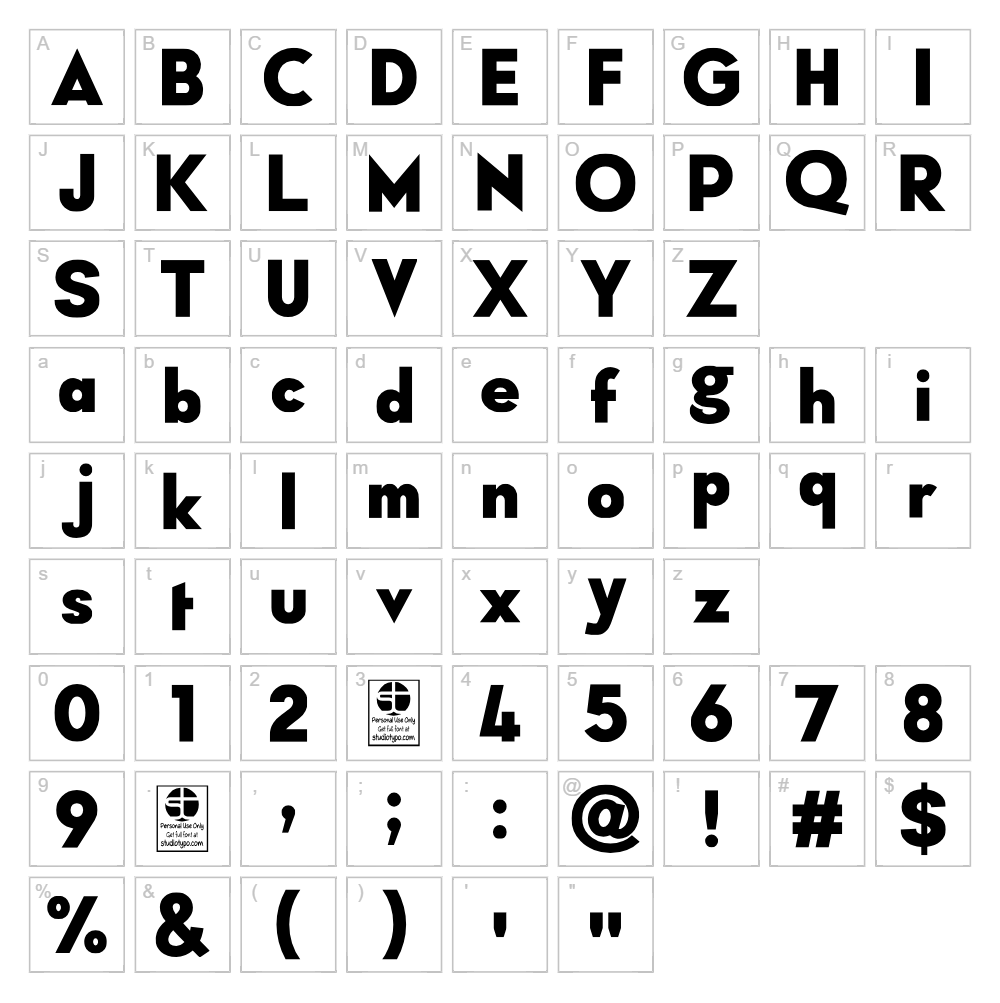
Character Map
Download Formal Letter Font
Downloads as a ZIP file. Check the license notes on this page before commercial use.
Font Files
- Typo Formal Bold Demo.otf
- Typo Formal Bold Italic Demo.otf
- Typo Formal Italic Demo.otf
- Typo Formal Light Demo.otf
- Typo Formal Light Italic Demo.otf
- Typo Formal Regular Demo.otf
- Typo Formal Shadowed Demo.otf
Font Details
- License:Free for personal use
- Author:
About Formal Letter
Formal Letter is a clean and professional sans serif typeface designed by Studio Typo, combining timeless elegance with modern simplicity. The font features balanced stroke weights and generous spacing, making it highly readable across both digital and print applications. Its refined letterforms carry a sophisticated yet approachable character, perfect for projects that demand both formality and warmth. Formal Letter strikes an ideal balance between contemporary minimalism and classical typography principles.
Best Uses for Formal Letter
Formal Letter excels in professional branding, corporate identity systems, and formal business communications such as letterheads and certificates. It's equally well-suited for editorial design, wedding stationery, signage, and packaging that requires a polished, trustworthy appearance. For Cricut enthusiasts, this font works beautifully in vinyl decal projects, framed wall art, and custom invitations where legibility and sophistication are paramount.
What Fonts Pair Well With Formal Letter?
Formal Letter pairs beautifully with complementary typefaces that enhance its professional quality:
- Lora — A serif font available on Google Fonts that adds traditional elegance to body text and contrasts nicely with Formal Letter's clean structure.
- Roboto — A versatile sans serif that works harmoniously for supporting text, data, or secondary messaging.
- Playfair Display — A high-contrast serif that creates sophisticated contrast when used for headlines alongside Formal Letter for body copy.
License & Commercial Use
Formal Letter is available for free personal use, allowing you to use it in personal projects without cost or restriction. For commercial projects, including logo design, branded print materials, digital products, web applications, mobile apps, and merchandise production, you must obtain a commercial license from Studio Typo. When using this font commercially under license, proper credit to Studio Typo is appreciated. Please note that reselling, redistribution, or repackaging of the font files themselves is strictly prohibited under the license agreement.
Frequently Asked Questions
Is Formal Letter free for commercial use?
Formal Letter is free for personal use only. Commercial applications require a commercial license from Studio Typo. This covers logos, print materials, digital design, web use, applications, and merchandise.
What file formats does Formal Letter come in?
Formal Letter typically includes standard font formats such as OTF (OpenType) and TTF (TrueType), ensuring compatibility across Windows, Mac, and web applications. Check the download package for all included formats.
What fonts pair well with Formal Letter?
Serif options like Lora and Playfair Display create beautiful contrast, while Roboto provides a cohesive sans serif pairing. See Section 3 above for detailed pairing recommendations.
Can I use Formal Letter for Cricut projects?
Yes, Formal Letter works excellently with Cricut machines for vinyl decals, iron-on designs, and cut projects. We recommend using our VectorDad Word Art Generator to create ready-to-cut designs quickly and easily with this font.
How to Install Formal Letter
- Download the Formal Letter font file from VectorDad.com to your computer.
- Unzip the downloaded file to extract all font files and resources.
- Double-click the font file (typically named Formal Letter.ttf or Formal Letter.otf) to open the font preview window.
- Click the "Install" button to install the font to your system library.
- Restart your applications and Formal Letter will be available in the font menu of all design software, including Cricut Design Space, Adobe Creative Suite, and Microsoft Office.
Use Formal Letter With VectorDad Tools
Transform Formal Letter into ready-to-cut SVG designs using the VectorDad Word Art Generator, perfect for creating Cricut projects with custom text in seconds. For advanced lettering effects, try the Curved Text Generator to bend Formal Letter along paths and create stunning circular, wavy, or custom-shaped text designs for your next craft project.
Make Your Own Font
Like the look of Formal Letter but want letters in your own style? Draw or trace each character as an SVG, then turn the set into an installable .ttf font with our free font creator. It runs in your browser, with no signup.
Similar Fonts
If you like Formal Letter, you may also like these free fonts:


