
Golden Arrow Font – Free Download (OTF, TTF, SVG)

Character Map

Download Golden Arrow Font
Downloads as a ZIP file. Check the license notes on this page before commercial use.
Font Files
- Golden_Arrow.ttf
Font Details
- License:Free for personal use
- Author:
About Golden Arrow
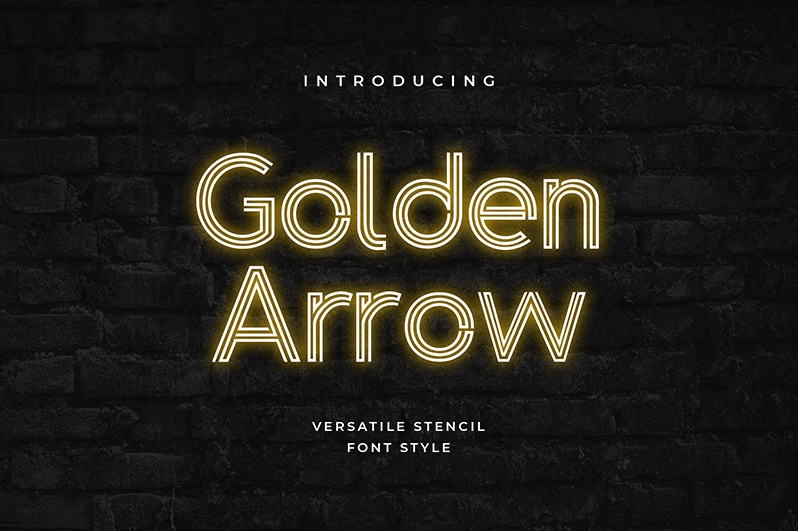
Golden Arrow is a striking retro-inspired font designed by UI Creative that captures the bold, geometric essence of vintage signage and mid-century aesthetics. With its clean lines and art deco influences, this typeface combines elegant letterforms with a timeless appeal that feels both nostalgic and contemporary. The font's distinctive character makes it instantly recognizable, whether rendered large or small, and its refined stroke weight ensures legibility across various applications. Golden Arrow is perfect for designers seeking a fancy typeface with personality and historic charm.
Best Uses for Golden Arrow
Golden Arrow excels in logo design, branding projects, and vintage-themed merchandise such as t-shirts and vinyl decals that leverage Cricut cutting technology. This font is ideal for poster design, signage, packaging labels, and editorial headlines where a touch of retro elegance elevates the visual impact. Whether you're crafting personal projects or building cohesive brand identities, Golden Arrow brings sophistication and nostalgic flair to any creative endeavor.
What Fonts Pair Well With Golden Arrow?
Golden Arrow pairs beautifully with Poppins, a modern geometric sans-serif available on Google Fonts, which balances the font's retro warmth with contemporary clean lines. For a classic combination, pair it with Playfair Display, an elegant serif font that complements Golden Arrow's sophisticated aesthetic. Another excellent match is Roboto, a versatile sans-serif that provides neutral support without competing for visual attention.
License & Commercial Use
Golden Arrow is free for personal and commercial use, allowing you to create logos, print materials, digital designs, web graphics, applications, and merchandise without licensing fees. Commercial applications include selling products featuring the font, using it in client work, and incorporating it into branded digital and physical media. You may use Golden Arrow for business purposes provided you credit UI Creative as the designer. However, you cannot resell or redistribute the font files themselves or claim ownership of the typeface.
Frequently Asked Questions
Is Golden Arrow free for commercial use?
Yes, Golden Arrow is completely free for commercial use. You can use this font in client projects, business branding, product design, and any commercial application without paying licensing fees. Simply provide credit to UI Creative, the font's designer.
What file formats does Golden Arrow come in?
Golden Arrow is available in standard font formats including TTF (TrueType) and OTF (OpenType), ensuring compatibility with design software on Windows, Mac, and Linux systems. Both formats work seamlessly with design applications, Cricut software, and web-based tools.
What fonts pair well with Golden Arrow?
Golden Arrow pairs excellently with modern sans-serifs like Poppins and Roboto for contemporary designs, or with elegant serifs like Playfair Display for sophisticated branding. The key is balancing Golden Arrow's retro personality with clean, readable supporting fonts that don't compete visually.
Can I use Golden Arrow for Cricut projects and vinyl decals?
Absolutely! Golden Arrow's clean lines and bold strokes make it perfect for Cricut cutting projects, vinyl decal design, and heat transfer applications. The font's geometric precision ensures crisp edges when cut, making it ideal for personalized merchandise and DIY crafting.
How to Install Golden Arrow
- Download the Golden Arrow font file from VectorDad.com and save it to your computer.
- Unzip or extract the downloaded file to access the font files inside the folder.
- Double-click the font file (TTF or OTF) to open the font preview window.
- Click the Install button to add Golden Arrow to your system fonts.
- Restart your design applications, and Golden Arrow will be available in all font menus across your programs.
Use Golden Arrow With VectorDad Tools
Unlock Golden Arrow's full creative potential with the VectorDad Word Art Generator, which transforms your text into stunning visual designs perfect for printing and cutting. Enhance your Cricut projects further by using the Curved Text Generator to wrap Golden Arrow text along paths, creating dynamic logos and circular designs.
Make Your Own Font
Like the look of Golden Arrow but want letters in your own style? Draw or trace each character as an SVG, then turn the set into an installable .ttf font with our SVG to TTF converter. It runs in your browser, with no signup.


