
Good Timing Font – Free Download (OTF, TTF, SVG)

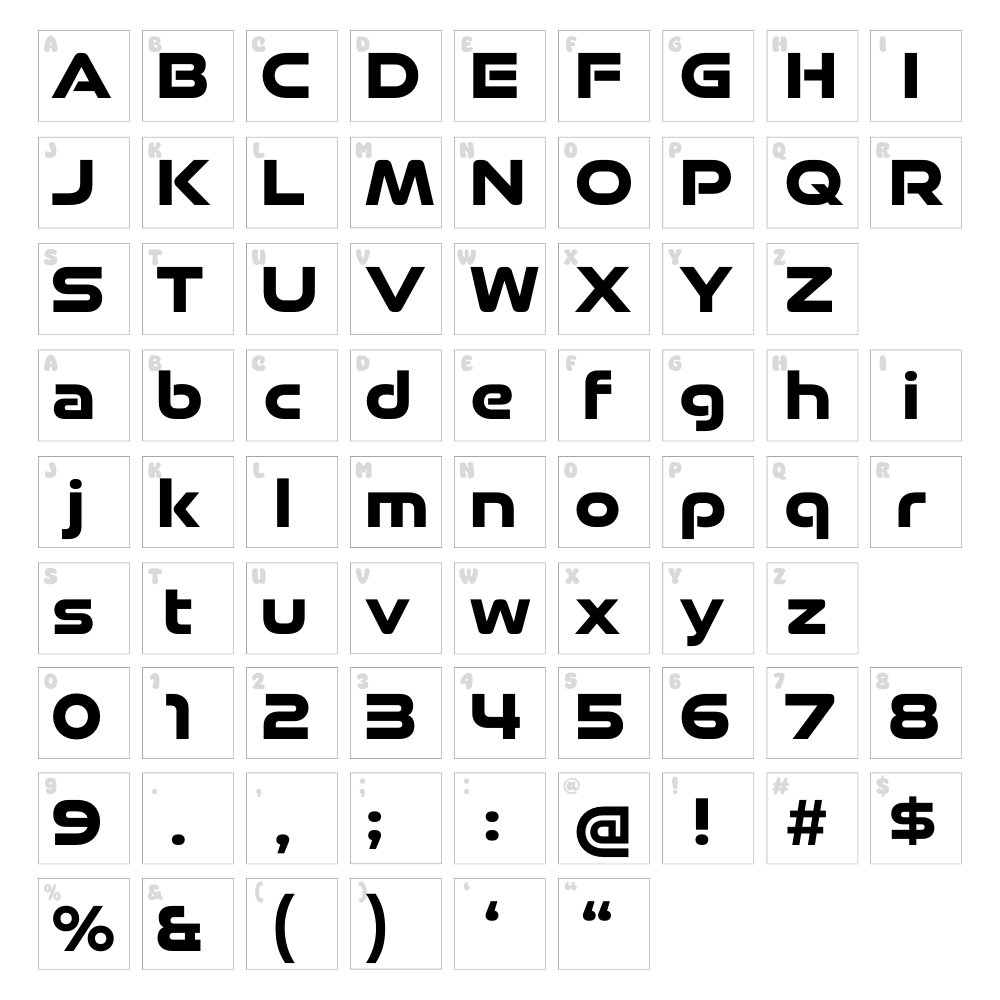
Character Map
Download Good Timing Font
Downloads as a ZIP file. Check the license notes on this page before commercial use.
Font Files
- good timing bd.otf
Font Details
- License:Free for personal use
- Author:
- Website:
About Good Timing
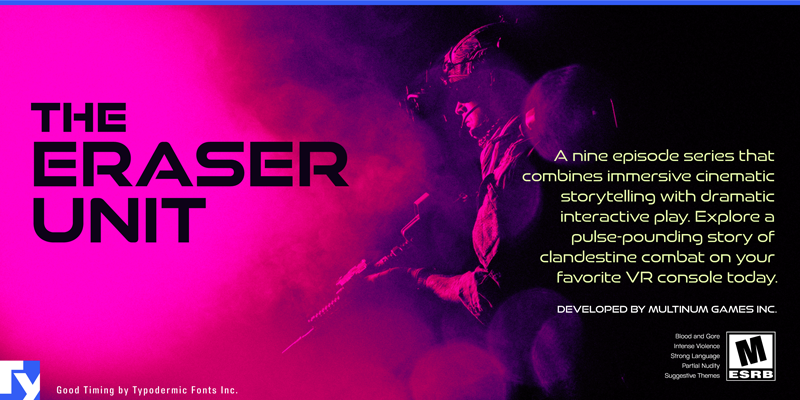
Good Timing is a striking geometric display font from Typodermic Fonts that captures a distinctly futuristic aesthetic with its clean, angular letterforms and precise stroke work. The font combines sci-fi sensibility with bold techno energy, featuring uniform line weights and sharp terminal details that evoke the visual language of retro-futurism and cyberpunk design. Each character is constructed with mathematical precision, making it ideal for projects that demand a cutting-edge, otherworldly appearance. The typeface's confident personality makes it perfect for designers seeking impact without sacrificing readability.
Best Uses for Good Timing
Good Timing excels in sci-fi poster design, video game titles, tech startup branding, and futuristic product packaging. It's equally effective for vinyl decals, Cricut crafting projects, and eye-catching signage that needs to stand out in crowded environments. Whether you're creating digital album artwork, dystopian-themed merchandise, or avant-garde editorial layouts, this font delivers bold presence and modern flair.
What Fonts Pair Well With Good Timing?
Good Timing pairs beautifully with Space Grotesk, a geometric sans-serif that complements its futuristic DNA while providing excellent body text clarity. IBM Plex Mono offers a technical counterpoint perfect for tech-forward layouts, and Courier Prime adds a retro-computing dimension that enhances the sci-fi narrative. All three options are free on Google Fonts.
License & Commercial Use
Good Timing is 100% free for commercial use, meaning you can use it in logos, branding systems, print materials, digital designs, websites, applications, and merchandise without purchasing a license. You may create products for sale—including apparel, decals, and physical goods—featuring this typeface. We ask that you credit Typodermic Fonts when possible, and remember that reselling or redistributing the font file itself is not permitted. Always review the full license terms for any edge cases specific to your project.
Frequently Asked Questions
Is Good Timing free for commercial use?
Yes, absolutely. Good Timing is released under a free license that permits commercial projects including logos, print design, digital assets, websites, apps, and merchandise. Attribution to Typodermic Fonts is appreciated but not always required—check the specific license file for details.
What file formats does Good Timing come in?
Good Timing is available in standard web and desktop formats including OTF (OpenType) and TTF (TrueType), ensuring compatibility with design software like Adobe Creative Suite, Figma, Cricut Design Space, and most operating systems.
What fonts pair well with Good Timing?
Space Grotesk, IBM Plex Mono, and Courier Prime all complement Good Timing's geometric, tech-forward personality. These pairings work well for layering headline and body text while maintaining visual cohesion in sci-fi and modern design contexts.
Can I use Good Timing for Cricut and vinyl decal projects?
Yes, Good Timing works perfectly for Cricut projects and vinyl decal creation. Its bold, clean letterforms cut and weed easily, and the sharp geometry looks fantastic on physical products. Use the VectorDad Word Art Generator to quickly convert text into ready-to-cut SVG files.
How to Install Good Timing
- Download Good Timing from VectorDad.com and save the .zip file to your computer.
- Unzip the folder by double-clicking it or using your system's archive extractor.
- Locate the font file (typically named GoodTiming.otf or GoodTiming.ttf) and double-click it to open the font preview.
- Click the Install button in the preview window to add the font to your system library.
- Restart your design application (Adobe Creative Suite, Figma, Cricut Design Space, etc.) and Good Timing will appear in your font menu.
Use Good Timing With VectorDad Tools
Transform Good Timing into scalable SVG artwork using the VectorDad Word Art Generator, which instantly converts your text into cut-ready files perfect for Cricut and laser cutting projects. For curved or circular text effects, try the Curved Text Generator to create professional-grade designs with minimal effort.
Make Your Own Font
Like the look of Good Timing but want letters in your own style? Draw or trace each character as an SVG, then turn the set into an installable .ttf font with our free font creator. It runs in your browser, with no signup.
Similar Fonts
If you like Good Timing, you may also like these free fonts:


