Granular Font – Free Download (OTF, TTF, SVG)

Character Map
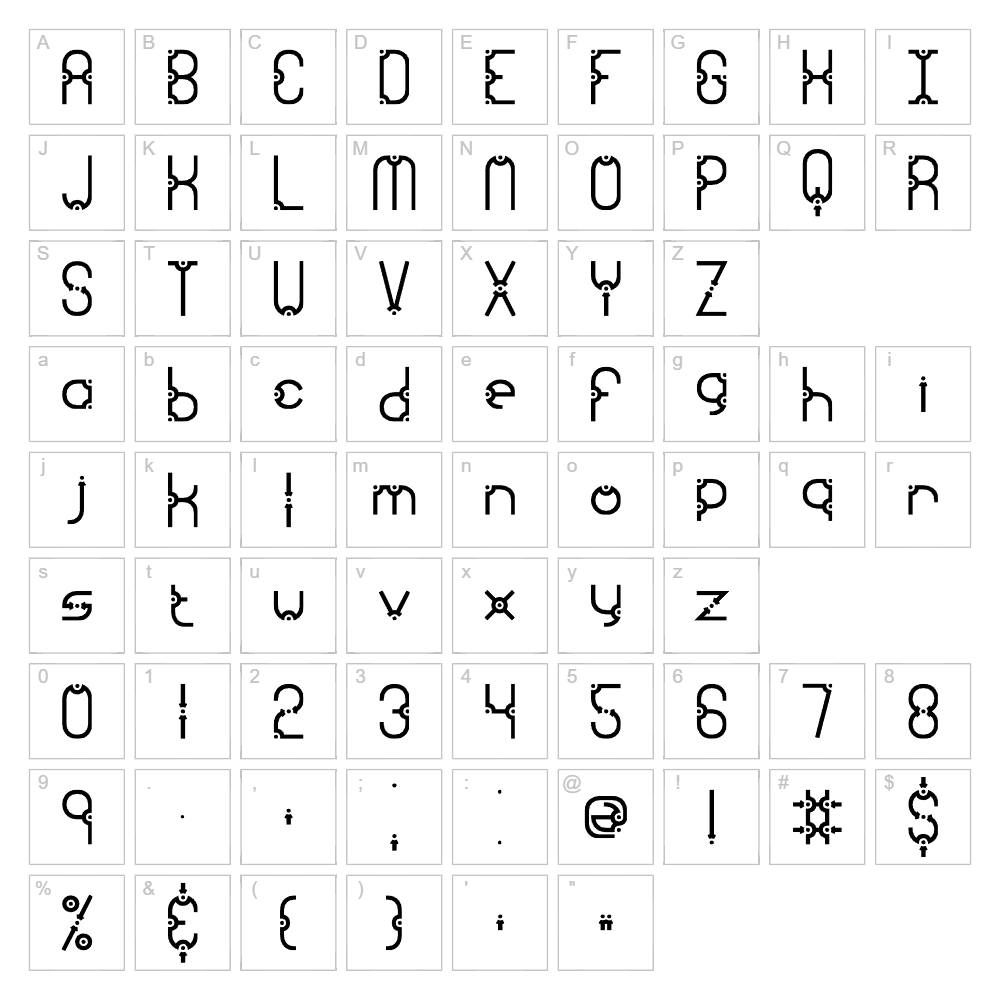
Download Granular Font
Downloads as a ZIP file. Check the license notes on this page before commercial use.
Font Files
- granular.ttf
Font Details
- License:Free for personal use
- Author:
About Granular
Granular is a bold, geometric typeface designed by Ænigma that brings a modern, tech-forward aesthetic to any design project. Its sharp, angular letterforms and distinctive stroke weight create a striking visual presence that commands attention on any medium. The font's industrial-inspired character makes it ideal for designers seeking a contemporary edge with strong personality. Granular strikes the perfect balance between avant-garde styling and readability, making it versatile across digital and print applications.
Best Uses for Granular
Granular excels in logo design, branding systems, and poster layouts where impact and modernity are priorities. It's perfect for tech companies, gaming studios, music events, and fashion brands looking to convey innovation and edge. The font also works beautifully for vinyl decals, Cricut projects, t-shirt designs, and digital signage where bold typography becomes the focal point.
What Fonts Pair Well With Granular?
Granular pairs exceptionally well with clean sans-serif typefaces that provide contrast and balance. Consider pairing it with Inter or Roboto (both available on Google Fonts) for a modern, professional look, or combine it with Playfair Display for an elegant serif counterpoint that creates visual interest and hierarchy in your designs.
License & Commercial Use
Granular is 100% free for commercial use, permitting you to use the font in logos, branding materials, print publications, digital media, websites, mobile applications, and merchandise. You may create products for sale featuring Granular's typography without restriction. However, you must credit designer Ænigma in your project credits or documentation. Reselling or redistributing the font files themselves is strictly prohibited under the font's license agreement.
Frequently Asked Questions
Is Granular free for commercial use?
Yes, Granular is 100% free for commercial use. You can use it in logos, branded materials, print projects, websites, apps, and merchandise without paying licensing fees. Simply ensure proper credit is given to Ænigma.
What file formats does Granular come in?
Granular is available in standard font formats including TTF (TrueType) and OTF (OpenType), ensuring compatibility with Windows, Mac, and most design software including Adobe Creative Suite, Cricut Design Space, and other professional tools.
What fonts pair well with Granular?
Granular pairs beautifully with minimalist sans-serifs like Inter and Roboto for a cohesive modern look, or with serif fonts like Playfair Display to create elegant contrast and visual hierarchy in multi-font designs.
Can I use Granular for Cricut projects and vinyl decals?
Absolutely. Granular's bold, clean letterforms make it ideal for Cricut projects, vinyl decals, and heat transfer designs. The font's geometric structure ensures crisp cuts and excellent adhesion on various materials from vinyl to fabric.
How to Install Granular
- Download the Granular font file from VectorDad.com to your computer.
- Unzip the downloaded folder to access the font files (TTF or OTF format).
- Double-click the font file to open the font preview window on your system.
- Click the "Install" button to add Granular to your system fonts folder.
- Restart your design applications, and Granular will be available in all font menus.
Use Granular With VectorDad Tools
Maximize your creative potential by pairing Granular with the VectorDad Word Art Generator, which transforms your text into stunning SVG designs ready for Cricut cutting. Take your projects further with the Curved Text Generator to create dynamic curved typography effects that elevate your vinyl decals, signage, and promotional materials.
Make Your Own Font
Like the look of Granular but want letters in your own style? Draw or trace each character as an SVG, then turn the set into an installable .ttf font with our SVG to TTF converter. It runs in your browser, with no signup.