
Grapevine Font — Free Download (TTF, OTF, SVG)


About Grapevine
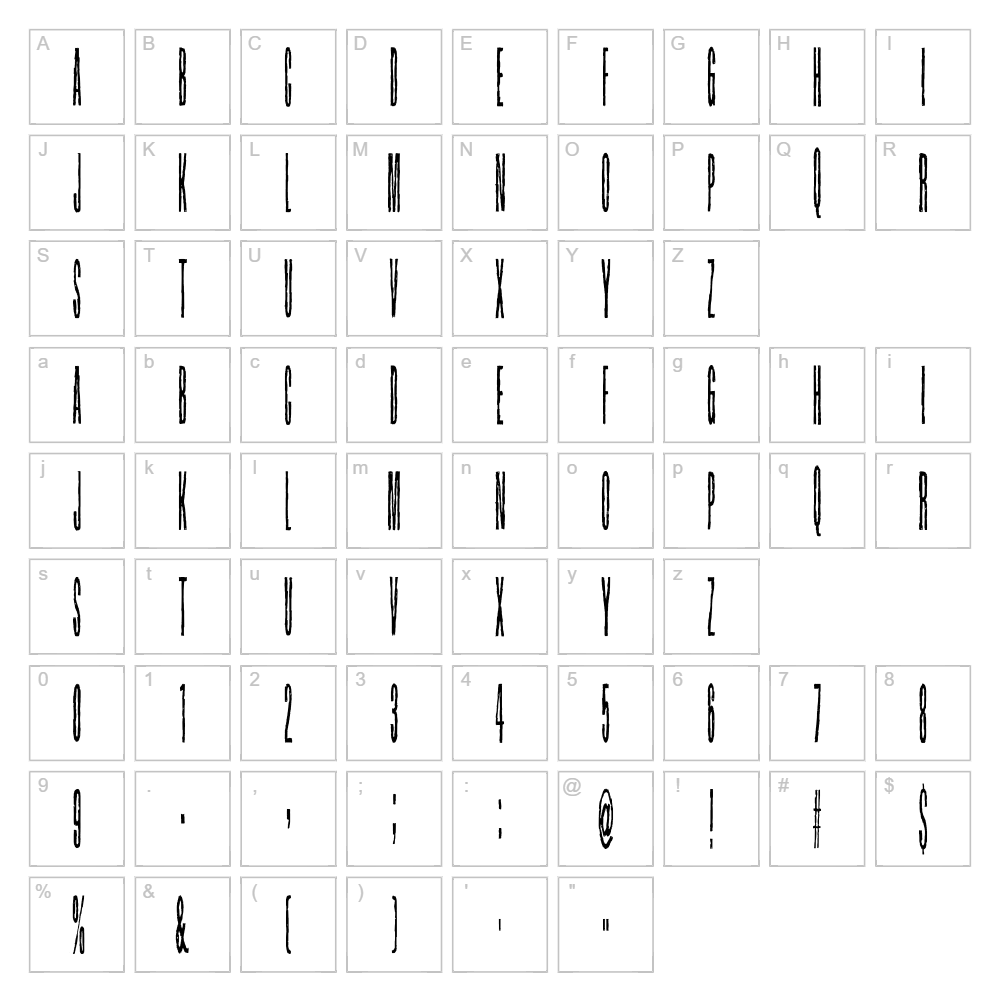
Grapevine is a distinctive eroded display font created by junkohanhero that brings a weathered, vintage aesthetic to any design project. The typeface features irregular, distressed edges that give it a naturally worn appearance, as if the letters have been exposed to time and the elements. Its organic texture and unique character make it ideal for designers seeking a fancy yet approachable typeface with personality. The donationware license ensures accessibility while supporting the independent designer behind this creative work.
Best Uses for Grapevine
Grapevine excels in vintage branding, retro poster design, and rustic signage where an aged, artistic quality enhances the message. The font is particularly effective for Cricut cutting projects, vinyl decals, and t-shirt designs that benefit from its textured, eye-catching appearance. It also works beautifully in editorial layouts, album artwork, and product packaging where you want to evoke nostalgia and creative flair.
What Fonts Pair Well With Grapevine?
Grapevine's ornate style pairs excellently with clean, minimalist sans-serif fonts to create visual contrast. Consider pairing it with Montserrat for a modern-vintage balance, Playfair Display for an elegant serif combination, or Open Sans for professional readability alongside the decorative display text.
License & Commercial Use
Grapevine is a donationware font that is free for commercial use. You are permitted to use this typeface in logos, print materials, digital designs, websites, mobile applications, merchandise, and any other commercial project without purchasing a license. You must provide credit to junkohanhero as the original designer. However, you may not resell or redistribute the font files themselves, whether modified or unmodified.
Frequently Asked Questions
Is Grapevine free for commercial use?
Yes, Grapevine is a donationware font that is completely free for commercial use, including logos, packaging, merchandise, and digital products. Credit to junkohanhero is appreciated.
What file formats does Grapevine come in?
Grapevine is typically available in standard font formats such as TTF (TrueType) and OTF (OpenType), ensuring compatibility with Windows, Mac, and design software including Adobe Creative Suite and Cricut Design Space.
What fonts pair well with Grapevine?
Grapevine pairs beautifully with clean sans-serifs like Montserrat and Open Sans, as well as elegant serifs like Playfair Display. See our Font Pairing section above for detailed recommendations.
Can I use Grapevine for Cricut projects?
Absolutely! Grapevine's distinctive eroded texture makes it perfect for Cricut cutting projects. The font's bold character translates well to vinyl decals, iron-on transfers, and engraved designs, giving your handmade projects a professional, artistic edge.
How to Install Grapevine
- Download the Grapevine font file from VectorDad by clicking the download button on this page.
- Unzip the downloaded file to access the font files inside.
- Double-click the TTF or OTF font file to open the font preview window.
- Click the Install button to add Grapevine to your system font library.
- Restart your design applications, and Grapevine will be available in your font menu across all programs.
Use Grapevine With VectorDad Tools
Transform Grapevine into eye-catching word art designs using the VectorDad Word Art Generator, perfect for creating custom Cricut SVG projects and digital designs. Take your creativity further with the Curved Text Generator to wrap Grapevine text along paths and circles, adding dynamic dimension to your vinyl decals, signage, and custom merchandise.


