
GuRu Font – Free Download (OTF, TTF, SVG)

Character Map
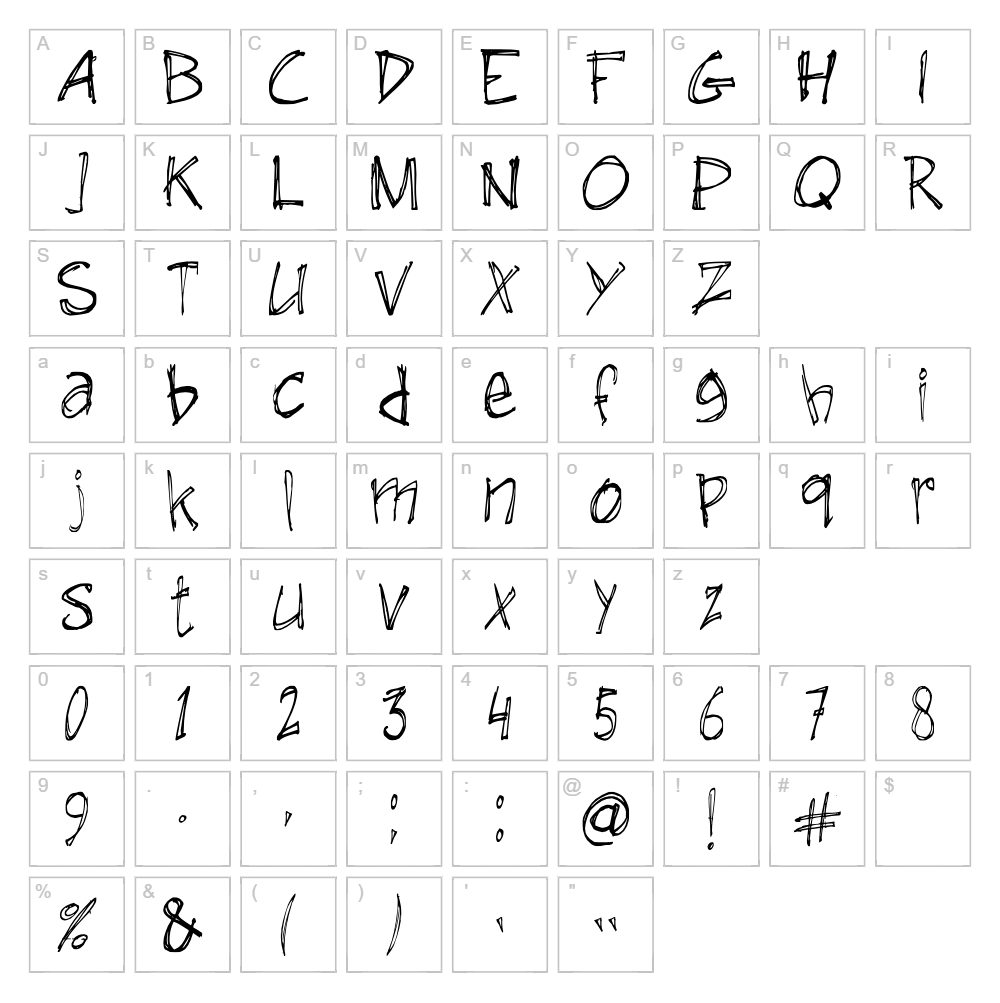
Download GuRu Font
Downloads as a ZIP file. Check the license notes on this page before commercial use.
Font Files
- GuRu-hand1-2008.ttf
Font Details
- License:Free for personal use
- Author:
About GuRu
GuRu is a distinctive script font designed by Guus Ruijten that blends contemporary elegance with hand-drawn character. Its flowing letterforms feature smooth, organic strokes that create a sense of movement and natural rhythm across the page. The font's balanced weight and generous spacing make it both visually striking and surprisingly legible, even at smaller sizes. GuRu stands out for its ability to convey personality while maintaining professional polish, making it a versatile choice for designers seeking something more expressive than standard typefaces.
Best Uses for GuRu
GuRu excels in branding projects, logo design, and packaging where a touch of sophistication and movement is desired. This font is perfect for vinyl decals, Cricut cutting projects, wedding invitations, and display signage that demands attention. It also works beautifully for editorial headers, social media graphics, and poster design where creative expression takes priority.
What Fonts Pair Well With GuRu?
GuRu pairs exceptionally well with clean, minimalist sans-serif fonts that provide contrast and readability. Consider pairing it with Roboto or Open Sans for body text and supporting copy. For a more elegant combination, Lora serif font creates a sophisticated contrast that balances GuRu's script energy with classical refinement.
License & Commercial Use
GuRu is 100% free for commercial use, meaning you can use it in logo designs, branding projects, print materials, digital publications, web design, mobile applications, and merchandise creation without paying any licensing fees. You may use GuRu for client work, business branding, product packaging, and any commercial venture. Credit to designer Guus Ruijten is appreciated but not required. However, you are not permitted to resell or redistribute the font files themselves as a product.
Frequently Asked Questions
Is GuRu free for commercial use?
Yes, GuRu is completely free for commercial use. You can use it in logos, print materials, digital designs, merchandise, web projects, and client work without any licensing restrictions or fees.
What file formats does GuRu come in?
GuRu is available in standard font formats including TTF (TrueType) and OTF (OpenType), ensuring compatibility across Windows, Mac, and Linux systems as well as design software like Adobe Creative Suite, Cricut Design Space, and Silhouette Studio.
What fonts pair well with GuRu?
GuRu pairs beautifully with sans-serif fonts like Roboto and Open Sans for contrast and readability. For an elegant look, combine it with Lora serif font to balance the script's energy with classic sophistication.
Can I use GuRu for Cricut and vinyl cutting projects?
Absolutely. GuRu works wonderfully for Cricut cutting projects, vinyl decals, and other craft applications. Its clean letterforms cut cleanly without losing detail, and the flowing script style adds visual appeal to personalized items and custom designs.
How to Install GuRu
- Download the GuRu font file from VectorDad in your preferred format (TTF or OTF)
- Unzip the downloaded folder to access the font file on your computer
- Double-click the font file to open the font preview window
- Click the "Install" button to add GuRu to your system fonts
- Restart your design applications and GuRu will be available in all font menus across your creative software
Use GuRu With VectorDad Tools
Transform GuRu into eye-catching designs using the VectorDad Word Art Generator, which instantly converts your text into ready-to-cut SVG files perfect for Cricut projects. For curved and circular text designs, try the Curved Text Generator to create professional-looking banners, logos, and decorative elements using GuRu's elegant letterforms.
Make Your Own Font
Like the look of GuRu but want letters in your own style? Draw or trace each character as an SVG, then turn the set into an installable .ttf font with our SVG to TTF font maker. It runs in your browser, with no signup.


