
History Walker GT Font – Free Download (OTF, TTF, SVG)


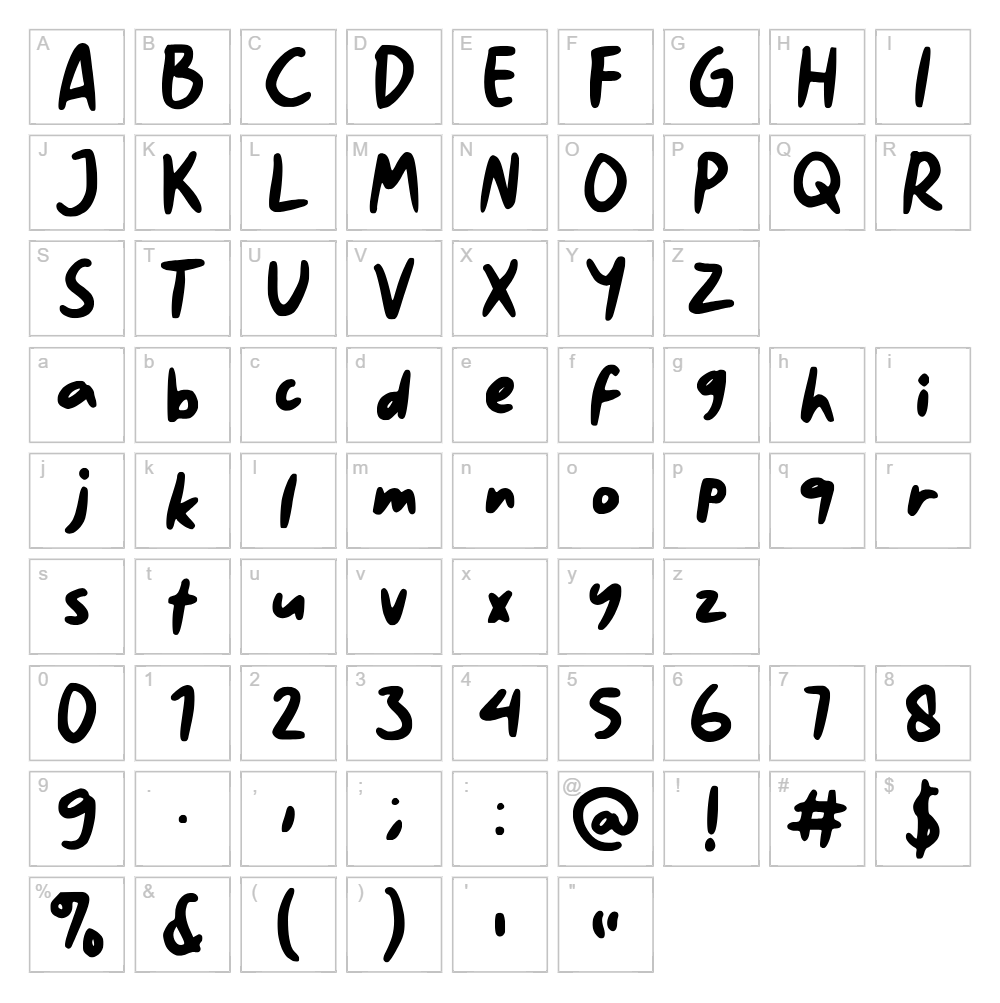
Character Map
Download History Walker GT Font
Downloads as a ZIP file. Check the license notes on this page before commercial use.
Font Files
- HistoryWalkerGTDemo.otf
- HistoryWalkerGTDemo.ttf
Font Details
- License:Free for personal use
- Author:
About History Walker GT
History Walker GT is a charming handwritten script font designed by Gartype Studio that captures the natural flow and organic beauty of pen-on-paper lettering. With its smooth, connected strokes and relaxed letterforms, this typeface conveys warmth and authenticity while maintaining excellent legibility across various sizes. The font's unpretentious character makes it feel personal and approachable, perfect for projects that demand genuine human connection. History Walker GT stands out for its balanced mix of casual confidence and refined elegance, making it versatile enough for both playful and sophisticated applications.
Best Uses for History Walker GT
History Walker GT excels in branding, greeting cards, wedding invitations, and personalized stationery where a human touch is valued. It's ideal for Cricut cutting projects, vinyl decals, t-shirt designs, and handmade-style social media graphics that appeal to audiences seeking authentic, organic aesthetics. The font also works beautifully in editorial design, book covers, poetry collections, and any creative project where storytelling and emotional resonance matter.
What Fonts Pair Well With History Walker GT?h2>
For a complementary sans-serif pairing, consider Poppins (Google Fonts), which offers clean, modern contrast to History Walker GT's handwritten charm. Lora (Google Fonts), a refined serif typeface, creates an elegant combination that bridges classic and contemporary styles. For a more playful duo, Quicksand (Google Fonts) provides rounded, geometric balance that softens the organic script without competing for visual attention.
License & Commercial Use
History Walker GT is available for personal and commercial use. This means you can freely use the font for logo design, print materials, digital products, websites, mobile applications, merchandise, and branded campaigns without paying licensing fees. You may use History Walker GT for client work, small business branding, Etsy shop designs, and print-on-demand products. Always provide attribution credit to Gartype Studio where possible. However, you may not resell, redistribute, or repackage the font files themselves, and you cannot claim ownership of the typeface design.
Frequently Asked Questions
Is History Walker GT free for commercial use?
Yes, History Walker GT is free for both personal and commercial projects. You can use it for logos, branding, merchandise, websites, and client work without purchasing a commercial license. Always credit Gartype Studio.
What file formats does History Walker GT come in?
History Walker GT is typically available in standard font formats including TTF (TrueType) and OTF (OpenType). These formats work across Windows, Mac, and Linux systems, and are compatible with design software like Adobe Creative Suite, Procreate, Affinity, and Cricut Design Space.
What fonts pair well with History Walker GT?
History Walker GT pairs beautifully with clean sans-serifs like Poppins and Quicksand for modern contrast, or with serif fonts like Lora for more sophisticated layouts. The key is choosing fonts with different visual weights and personalities to let both typefaces shine.
Can I use History Walker GT for Cricut projects and vinyl cutting?
Absolutely! History Walker GT works wonderfully for Cricut cutting projects, vinyl decals, and SVG designs. Its clear letterforms cut cleanly without fine details breaking apart, making it reliable for physical crafts and digital cutting machines.
How to Install History Walker GT
- Download History Walker GT from the font file link on this page and save it to your computer.
- Unzip the downloaded file to extract the font file(s) to a folder.
- Locate the font file (usually named "HistoryWalkerGT.ttf" or similar) and double-click it to open the font preview window.
- Click the "Install" button in the font preview dialog to install the font on your system.
- Restart your design applications (Adobe Creative Suite, Cricut Design Space, Canva, etc.) and History Walker GT will appear in your available fonts list.
Use History Walker GT With VectorDad Tools
Create stunning word art and custom text designs using History Walker GT with the VectorDad Word Art Generator, which lets you instantly convert your text into layered SVG files perfect for Cricut projects. For curved or circular text designs, the Curved Text Generator pairs beautifully with History Walker GT's flowing letterforms, giving your vinyl decals and cutting projects professional dimension.
Make Your Own Font
Like the look of History Walker GT but want letters in your own style? Draw or trace each character as an SVG, then turn the set into an installable .ttf font with our free font creator. It runs in your browser, with no signup.


