
Ideas and Apps Font – Free Download (OTF, TTF, SVG)

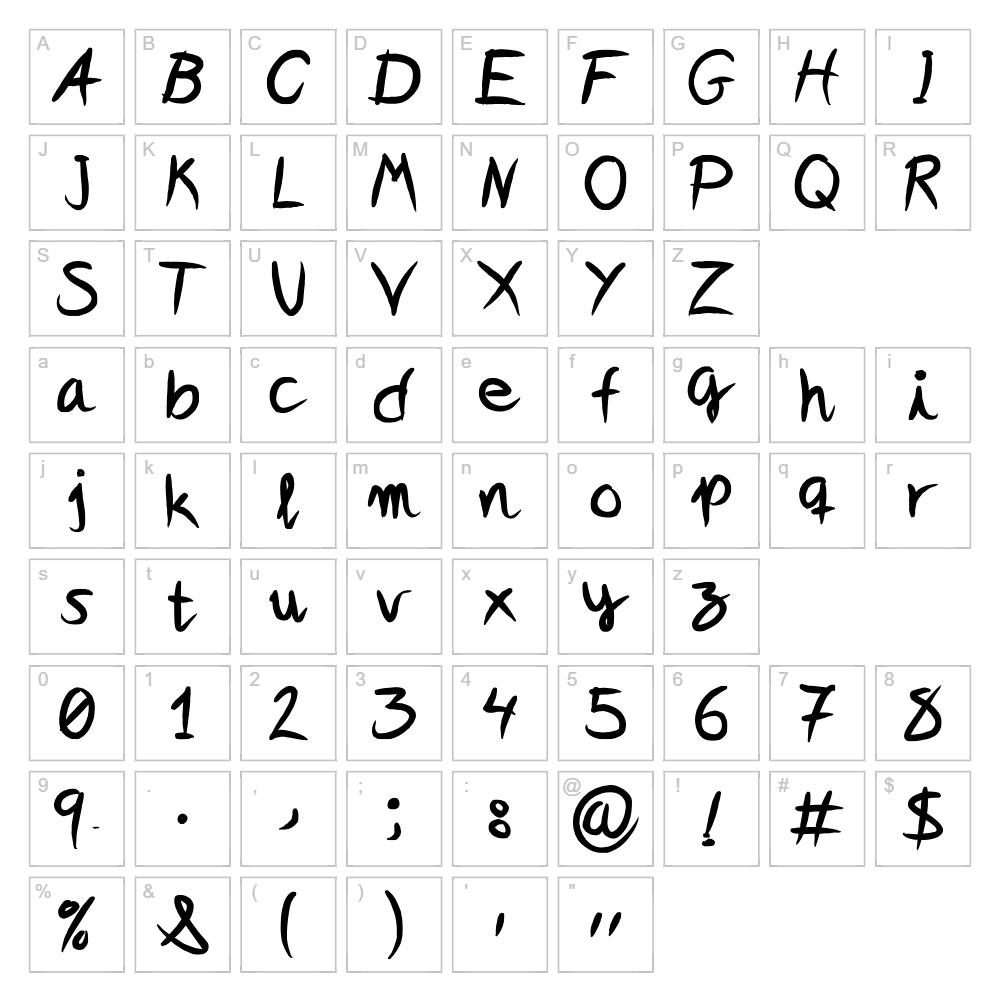
About Ideas and Apps
Ideas and Apps is a charming handwritten script font that captures the organic flow of pen-to-paper creativity. With its natural stroke variations and relaxed letterforms, this typeface brings an authentic, human touch to any design project. The font excels at conveying warmth and approachability, making it ideal for brands and projects that need personality without sacrificing legibility. Whether you're designing something playful or heartfelt, Ideas and Apps delivers character that feels genuinely handcrafted.
Best Uses for Ideas and Apps
Ideas and Apps shines in branding, packaging, and social media graphics where a personal, friendly tone is essential. Use it for greeting cards, wedding invitations, Cricut vinyl decal projects, and t-shirt designs that benefit from handwritten appeal. This font also works beautifully for blog headers, product labels, and signage where you want to stand out with authentic, human-centered design.
What Fonts Pair Well With Ideas and Apps?
Pair Ideas and Apps with clean sans-serif fonts like Open Sans or Montserrat for a balanced contrast between handwritten warmth and modern simplicity. For a more elegant combination, try pairing it with Playfair Display, a sophisticated serif that complements script fonts beautifully. All three options are freely available on Google Fonts.
License & Commercial Use
Ideas and Apps is 100% free for commercial use. You can use this font for logo design, branding, packaging, print materials, digital projects, websites, mobile applications, merchandise, and advertising without restriction. Attribution to Ideas and Apps is appreciated but not required. You may not resell or redistribute the font files themselves.
Frequently Asked Questions
Is Ideas and Apps free for commercial use?
Yes, Ideas and Apps is completely free for commercial use. You can use it in logos, branding, merchandise, print, digital projects, and any commercial application without paying licensing fees.
What file formats does Ideas and Apps come in?
Ideas and Apps is typically available in standard font formats including TTF (TrueType) and OTF (OpenType), ensuring compatibility with Windows, Mac, and design software like Cricut Design Space, Adobe Creative Suite, and Canva.
What fonts pair well with Ideas and Apps?
Open Sans, Montserrat, and Playfair Display are excellent pairing options. The clean sans-serifs provide contrast, while Playfair Display offers elegant sophistication. All are available free on Google Fonts.
Can I use Ideas and Apps for Cricut vinyl cutting projects?
Absolutely! Ideas and Apps works beautifully in Cricut Design Space for cutting vinyl decals, custom apparel, and signage. The handwritten style creates eye-catching designs that stand out on physical products.
How to Install Ideas and Apps
- Download the Ideas and Apps font file from VectorDad.com
- Unzip the downloaded file to access the font files
- Double-click the TTF or OTF font file to open the font preview
- Click the "Install" button to add the font to your system
- The font is now available in all your design applications including Cricut Design Space, Adobe apps, and web design tools
Use Ideas and Apps With VectorDad Tools
Maximize your designs by using Ideas and Apps with the VectorDad Word Art Generator, which transforms text into stunning SVG graphics perfect for Cricut projects. Create curved and arched text designs using the Curved Text Generator to add professional flair to your vinyl decals, t-shirt designs, and creative projects.


