
Japanese Font – Free Download (OTF, TTF, SVG)

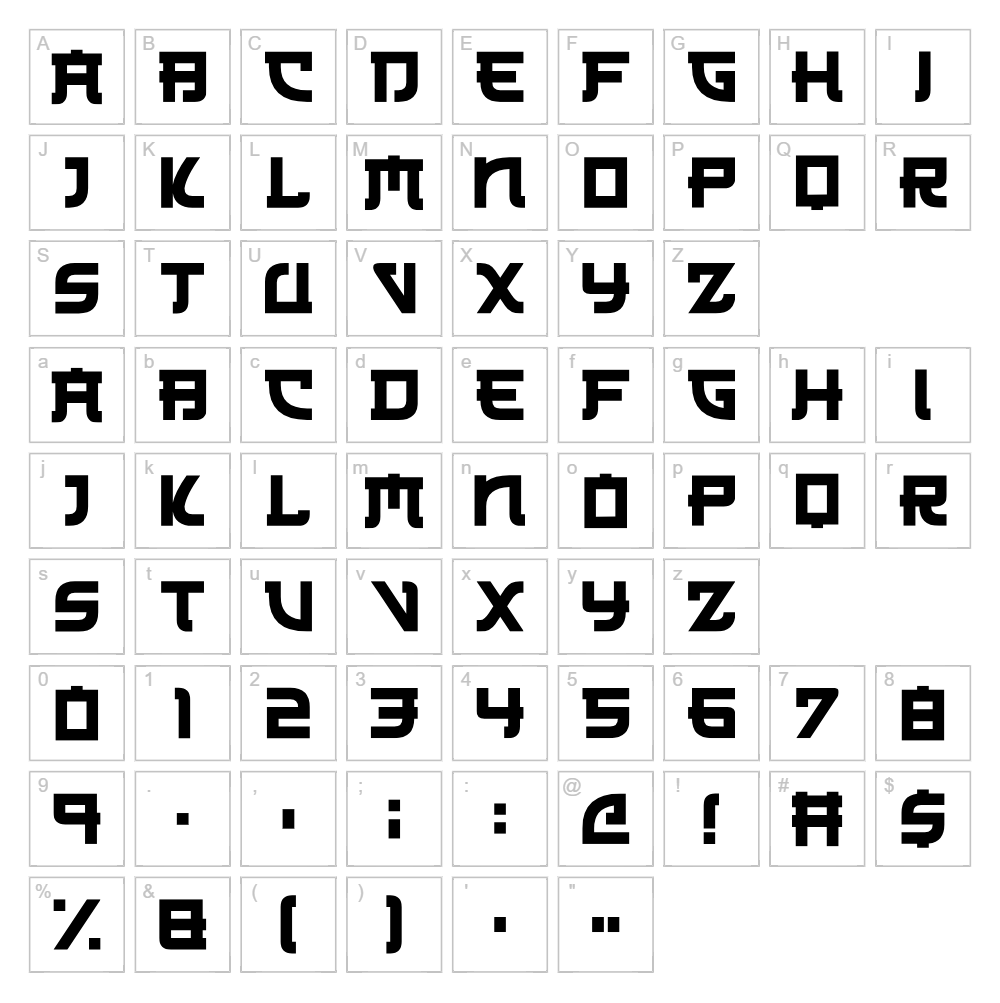
Character Map
Download Japanese Font
Downloads as a ZIP file. Check the license notes on this page before commercial use.
Font Files
- Japanese 3017.otf
- Japanese 3017.ttf
Font Details
- License:Free for personal use
- Author:
About Japanese
Japanese is a striking display font crafted by Hawtpixel that captures the essence of East Asian typography with its bold, angular character forms and distinctive geometric construction. The font features clean, confident strokes that evoke a contemporary interpretation of traditional Japanese calligraphy, blending modern design sensibilities with cultural authenticity. Each letterform is meticulously designed to deliver visual impact while maintaining legibility, making it ideal for designers seeking a font with genuine foreign character appeal. This typeface stands out for its ability to convey sophistication and cultural richness without sacrificing clarity or usability.
Best Uses for Japanese
Japanese excels in design applications where a distinctive foreign aesthetic is desired, including logo design, branding for Asian fusion products, and cultural event graphics. The font is particularly effective for t-shirt designs, vinyl decal projects, Cricut crafts, and merchandise where bold visual impact matters. It also works beautifully in editorial layouts, restaurant signage, and poster designs that benefit from its strong, recognizable character style.
What Fonts Pair Well With Japanese?
To complement Japanese's bold, distinctive character, pair it with clean sans-serif fonts like Roboto or Open Sans for supporting text and body copy. For a more sophisticated combination, consider Lora, a serif font available on Google Fonts, which provides elegant contrast while maintaining visual harmony. These pairings balance Japanese's ornamental presence with readable, functional typography.
License & Commercial Use
Japanese is licensed for personal use, allowing individual creators and hobbyists to use the font freely in non-commercial projects. For commercial applications including logo design, print materials, digital marketing, web design, mobile applications, and merchandise production, you must obtain explicit permission from Hawtpixel or verify the current commercial licensing terms on their official foundry website. Always credit Hawtpixel when using the font publicly. Redistribution, reselling, or sharing the font files themselves is strictly prohibited under all circumstances.
Frequently Asked Questions
Is Japanese free for commercial use?
Japanese is marked as free for personal use only. Commercial use including logos, merchandise, and professional projects requires permission from Hawtpixel. Check their foundry website for current commercial licensing options and terms.
What file formats does Japanese come in?
Most free fonts from independent designers like Hawtpixel are available in standard formats including TTF (TrueType) and OTF (OpenType). When downloading, check the package contents to confirm which formats are included and choose the version compatible with your design software.
What fonts pair well with Japanese?
Japanese pairs beautifully with clean sans-serif fonts like Roboto and Open Sans for balanced contrast, or with the elegant serif font Lora for more sophisticated layouts. See Section 3 above for detailed pairing recommendations.
Can I use Japanese for Cricut cutting projects?
Yes, Japanese works well for Cricut projects including vinyl decals, heat transfer designs, and cut-out graphics. Install the font on your computer, then use it in Cricut Design Space to create custom layered designs and decorative pieces.
How to Install Japanese
- Download the font file — Visit the font's official page and click the download button to get the font package to your computer.
- Unzip the folder — Extract the downloaded .zip file to access the individual font files inside.
- Double-click the font file — Locate the .ttf or .otf file and double-click it to open the font preview window.
- Click Install — In the preview window, click the "Install" button to add Japanese to your system fonts.
- Access in all applications — Once installed, Japanese will appear in the font dropdown menu of design software including Adobe Creative Suite, Cricut Design Space, Canva, and all other programs on your computer.
Use Japanese With VectorDad Tools
Maximize Japanese's potential by using it with the VectorDad Word Art Generator, which allows you to create custom text designs and convert them into SVG files ready for Cricut cutting and digital projects. For curved text effects and circular lettering designs, try the Curved Text Generator to unlock creative possibilities with Japanese's bold character forms.
Make Your Own Font
Like the look of Japanese but want letters in your own style? Draw or trace each character as an SVG, then turn the set into an installable .ttf font with our SVG to TTF converter. It runs in your browser, with no signup.
Similar Fonts
If you like Japanese, you may also like these free fonts:


