
Jefferson Font – Free Download (OTF, TTF, SVG)

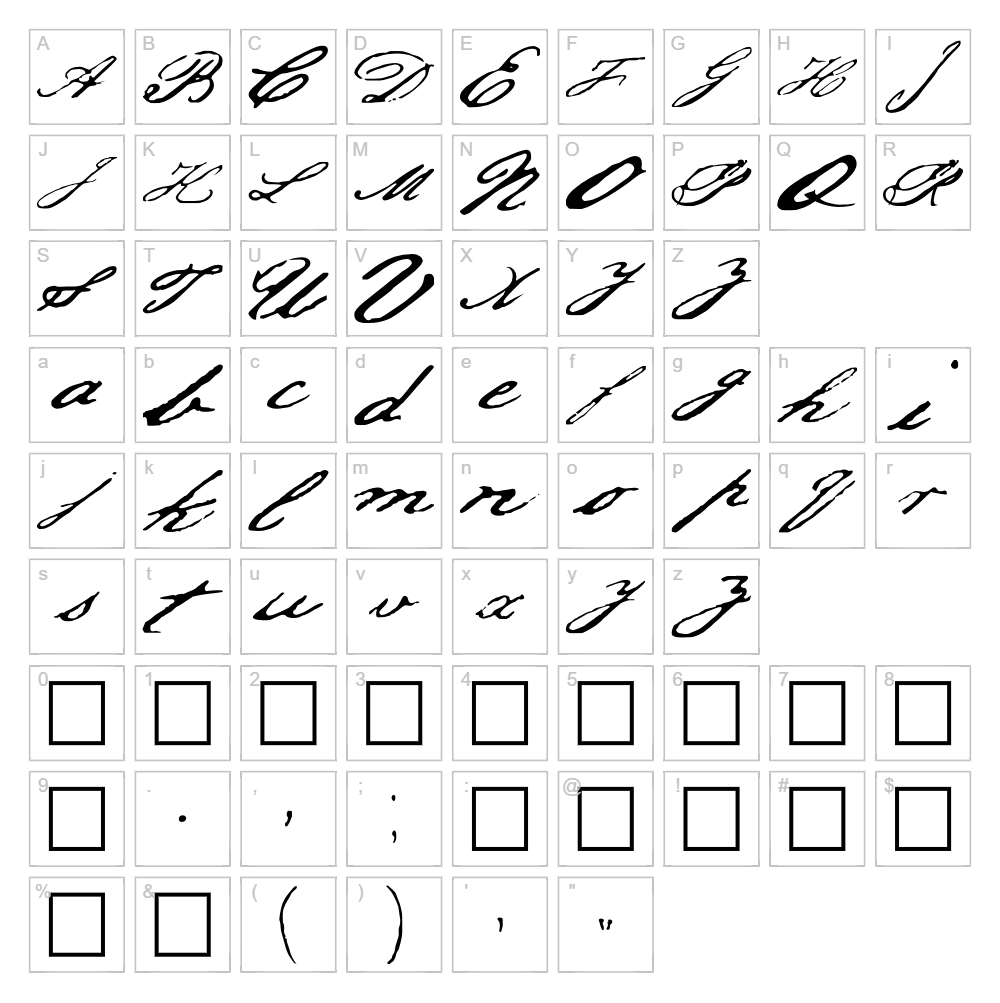
Character Map
Download Jefferson Font
Downloads as a ZIP file. Check the license notes on this page before commercial use.
Font Files
- Jeffrson.ttf
Font Details
- License:Free for personal use
- Author:
About Jefferson
Jefferson is an elegant calligraphy font designed by SnatchSoft that captures the flowing grace of classical penmanship with a modern sensibility. The font features smooth, connected letterforms with graceful swashes and varying stroke weights that evoke hand-drawn artistry. Each character maintains a refined balance between ornamental detail and legibility, making it suitable for both decorative and functional applications. The distinctive style brings sophistication to any project that demands a touch of classical elegance.
Best Uses for Jefferson
Jefferson shines in logo design, branding projects, and high-end packaging where elegance is paramount. The font is perfect for wedding invitations, greeting cards, certificate designs, and Cricut vinyl decal projects that benefit from its decorative script style. It also works beautifully for signage, editorial headers, and social media graphics where a refined calligraphic touch elevates the visual impact.
What Fonts Pair Well With Jefferson?
Jefferson pairs beautifully with clean, minimalist sans-serif fonts like Lato or Open Sans from Google Fonts, which provide modern balance to its ornate style. For a more sophisticated pairing, consider Cormorant Garamond, a classical serif that complements Jefferson's elegant aesthetic while maintaining excellent readability in body text.
License & Commercial Use
Jefferson is 100% free for commercial use, which means you can use it in logo design, branding projects, print materials, digital designs, web applications, and merchandise without restriction. You may apply Jefferson to product packaging, apparel, signage, social media graphics, and any other commercial project. The only requirement is to provide credit to SnatchSoft as the original designer. However, reselling or redistributing the font files themselves is strictly prohibited.
Frequently Asked Questions
Is Jefferson free for commercial use?
Yes, Jefferson is completely free for commercial use. You can use it for logos, branding, print projects, merchandise, websites, apps, and any other commercial application without paying a fee or seeking permission, provided you credit SnatchSoft.
What file formats does Jefferson come in?
Jefferson typically comes in standard font formats including TTF (TrueType) and OTF (OpenType), making it compatible with Windows, macOS, and Linux systems across design software, office applications, and web browsers.
What fonts pair well with Jefferson?
Jefferson pairs well with minimalist sans-serifs like Lato and Open Sans for modern contrast, or with elegant serifs like Cormorant Garamond for a cohesive classical aesthetic. These complementary fonts balance Jefferson's ornate script with clean readability.
Can I use Jefferson for Cricut projects?
Yes, Jefferson works wonderfully for Cricut projects including vinyl decals, paper cuts, and heat transfer designs. Its smooth letterforms and decorative swashes cut cleanly and look stunning on apparel, home décor, and personalized gifts created with Cricut machines.
How to Install Jefferson
- Download the font from VectorDad.com and save it to your computer.
- Unzip the file using your operating system's built-in extraction tool.
- Double-click the font file (the .ttf or .otf file) to open the font preview window.
- Click the Install button to add Jefferson to your system font library.
- Restart your design applications and Jefferson will appear in your font list, ready to use across all programs.
Use Jefferson With VectorDad Tools
Elevate your Cricut projects by using the VectorDad Word Art Generator to create stunning text designs with Jefferson that can be cut and applied to any surface. Combine Jefferson with the Curved Text Generator to wrap your calligraphy text along custom paths, perfect for creating professional logos, circular designs, and eye-catching vinyl decal projects.
Make Your Own Font
Like the look of Jefferson but want letters in your own style? Draw or trace each character as an SVG, then turn the set into an installable .ttf font with our SVG to TTF converter. It runs in your browser, with no signup.
Similar Fonts
If you like Jefferson, you may also like these free fonts:


