
Lazer 84 Font – Free Download (OTF, TTF, SVG)

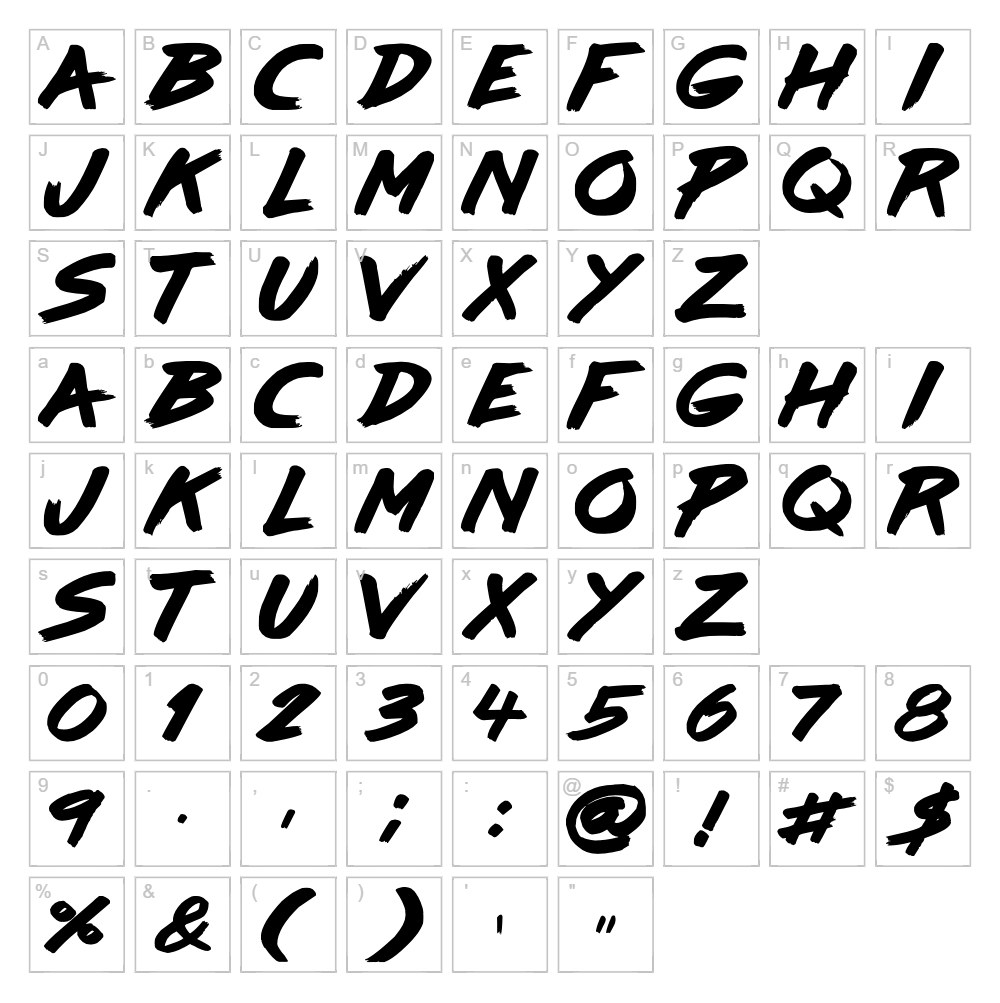
Character Map
Download Lazer 84 Font
Downloads as a ZIP file. Check the license notes on this page before commercial use.
Font Files
- Lazer84.ttf
Font Details
- License:Donationware
- Author:
About Lazer 84
Lazer 84 is a bold brush script font from Sunrise Digital that captures the energy and retro aesthetic of 1980s digital design. With its dynamic, irregular letterforms and organic stroke variations, this font exudes a playful yet edgy personality that feels both nostalgic and contemporary. The hand-painted quality gives each character depth and character, making it stand out in crowded designs. Its confident, free-flowing style makes it perfect for designers seeking an authentic, creative touch with attitude.
Best Uses for Lazer 84
Lazer 84 excels in poster design, album artwork, streetwear graphics, and vintage-inspired branding projects where personality and impact matter most. It's ideal for Cricut vinyl decals, t-shirt designs, and custom merchandise that needs bold visual presence without feeling too formal. The font also works beautifully for event promotion, music industry graphics, and gaming or entertainment logos that embrace a retro-modern edge.
What Fonts Pair Well With Lazer 84?
Lazer 84's expressive brush script pairs beautifully with clean, minimalist sans-serif fonts that create visual balance. Consider pairing it with Montserrat or Roboto for headlines and supporting text, or try Playfair Display for a more refined, editorial contrast that lets Lazer 84 remain the focal point.
License & Commercial Use
Lazer 84 is available as donationware and is free for commercial use. You may use this font to create logos, print materials, digital designs, web projects, mobile applications, and merchandise without restriction. Commercial applications such as client work, branded products, and revenue-generating projects are all permitted. Please provide credit to Sunrise Digital when possible. However, reselling, redistributing, or repackaging the font files themselves is strictly prohibited.
Frequently Asked Questions
Is Lazer 84 free for commercial use?
Yes. Lazer 84 is available as donationware and permits commercial use for logos, print, digital, web, app, and merchandise projects. A donation to Sunrise Digital is appreciated but not required.
What file formats does Lazer 84 come in?
Lazer 84 is available in standard font formats including TTF (TrueType) and OTF (OpenType), compatible with Windows, Mac, and most design software including Adobe Creative Suite and Cricut Design Space.
What fonts pair well with Lazer 84?
Clean sans-serif fonts like Montserrat and Roboto work best as supporting typefaces, while Playfair Display offers elegant contrast. See the Font Pairing section above for detailed recommendations.
Can I use Lazer 84 for Cricut projects?
Absolutely. Lazer 84 works seamlessly in Cricut Design Space and is perfect for vinyl decals, iron-on designs, and cut projects. For enhanced SVG capabilities, use the VectorDad Word Art Generator to create ready-to-cut designs with Lazer 84.
How to Install Lazer 84
- Download the Lazer 84 font file from VectorDad.com to your computer.
- Unzip the downloaded folder to access the font files.
- Double-click the font file (TTF or OTF) to open the font preview window.
- Click Install to add Lazer 84 to your system fonts folder.
- Restart your design software and Lazer 84 will appear in your font list, ready to use in all applications.
Use Lazer 84 With VectorDad Tools
Maximize Lazer 84's impact with the VectorDad Word Art Generator, which instantly converts your text into ready-to-cut SVG designs perfect for Cricut projects. Take your creations further with the Curved Text Generator to bend Lazer 84 along custom paths and create dynamic, eye-catching designs for decals, signage, and merchandise.
Make Your Own Font
Like the look of Lazer 84 but want letters in your own style? Draw or trace each character as an SVG, then turn the set into an installable .ttf font with our free font creator. It runs in your browser, with no signup.
Similar Fonts
If you like Lazer 84, you may also like these free fonts:


