
Moebius Font – Free Download (OTF, TTF, SVG)

Character Map
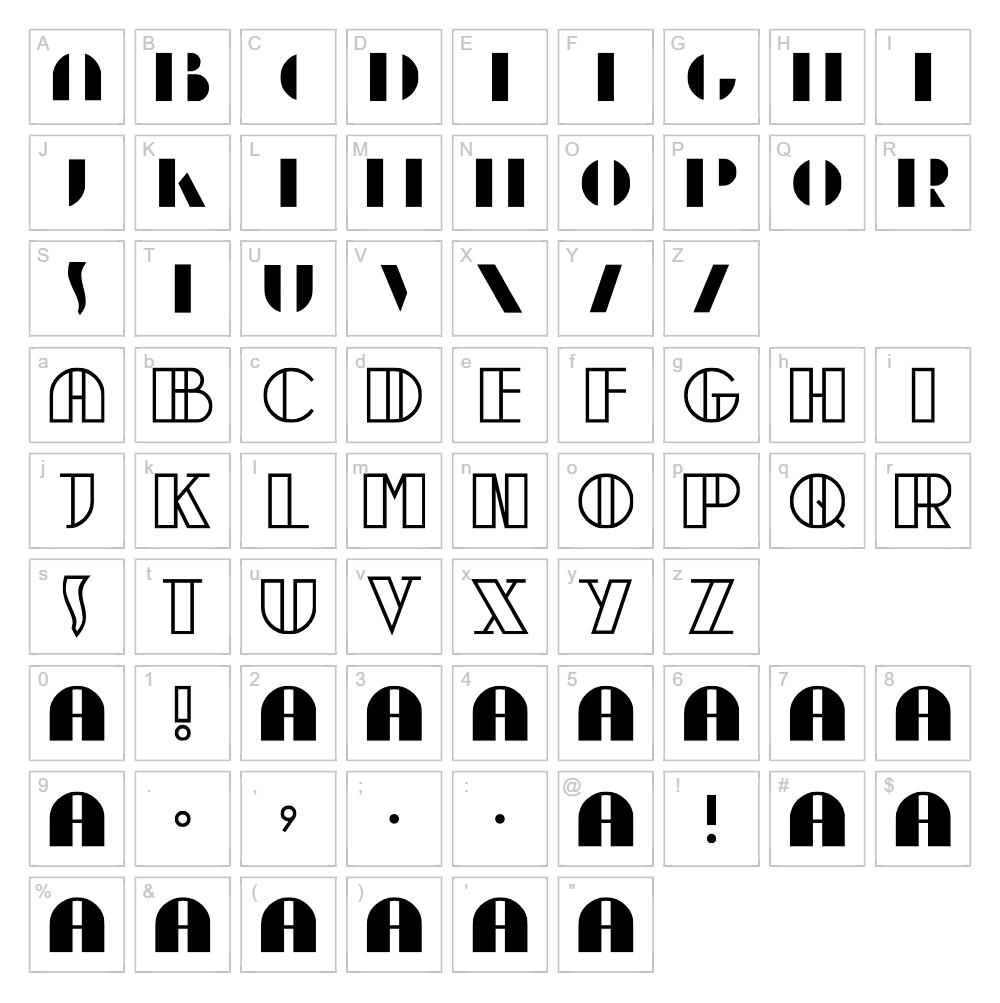
Download Moebius Font
Downloads as a ZIP file. Check the license notes on this page before commercial use.
Font Files
- Moebius.ttf
Font Details
- License:Free for commercial use
- Author:
About Moebius
Moebius is a striking retro display font designed by Peter Wiegel that captures the geometric elegance and psychedelic flair of vintage 1970s design. Its distinctive letterforms feature bold, flowing strokes with subtle curves that create a sense of movement and sophistication. The font blends ornamental characteristics with a modern sensibility, making it instantly recognizable while maintaining excellent readability at larger sizes. Perfect for designers seeking a nostalgic aesthetic with contemporary appeal, Moebius brings personality and character to any creative project.
Best Uses for Moebius
Moebius excels in retro branding, vintage-inspired logo design, and eye-catching poster typography. It's ideal for vinyl decals, t-shirt designs, Cricut craft projects, album artwork, and editorial headlines that demand visual impact. Use Moebius whenever you need to evoke nostalgia, creativity, or bold artistic expression in your designs.
What Fonts Pair Well With Moebius?
Moebius pairs beautifully with clean, minimalist sans-serif fonts that provide balance to its decorative nature. Consider pairing it with Roboto for modern projects, Lora for editorial sophistication, or Montserrat for contemporary branding work. These complementary fonts create visual hierarchy while letting Moebius remain the focal point of your design.
License & Commercial Use
Moebius is 100% free for commercial use, allowing you to use it for logo design, branding, print materials, digital projects, web design, app development, and merchandise without restrictions. You may create marketing materials, packaging, signage, and branded assets without licensing fees. Always provide attribution to Peter Wiegel as the designer. However, you cannot resell or redistribute the font files themselves—share the VectorDad download link instead.
Frequently Asked Questions
Is Moebius free for commercial use?
Yes, absolutely. Moebius is completely free for commercial use, including logos, merchandise, print, digital projects, and web applications. No license fee required.
What file formats does Moebius come in?
Moebius is available in standard font formats including TTF (TrueType) and OTF (OpenType), ensuring compatibility with Windows, Mac, and most design software applications.
What fonts pair well with Moebius?
Moebius pairs well with sans-serif fonts like Roboto, Montserrat, or Lora. These clean typefaces balance Moebius's decorative style and create effective visual hierarchy in layouts.
Can I use Moebius for Cricut cutting projects?
Yes, Moebius works beautifully with Cricut machines. Install it on your computer and use it in Cricut Design Space, or convert your Moebius designs to SVG format for seamless cutting on vinyl, cardstock, and other materials.
How to Install Moebius
- Download the Moebius font file from VectorDad.com
- Unzip the downloaded folder to access the font files
- Double-click the TTF or OTF font file
- Click the "Install" button in the font preview window
- Restart your design software, and Moebius will be available in your font menu
Use Moebius With VectorDad Tools
Maximize Moebius's potential with the VectorDad Word Art Generator, which instantly converts your text into stunning visual designs perfect for printing and cutting. Combine Moebius with the Curved Text Generator to create professional curved typography for Cricut SVG projects, labels, and circular designs.
Make Your Own Font
Like the look of Moebius but want letters in your own style? Draw or trace each character as an SVG, then turn the set into an installable .ttf font with our SVG to TTF font maker. It runs in your browser, with no signup.
Similar Fonts
If you like Moebius, you may also like these free fonts:


