
Newspaper Cutout White On Black Font – Free Download (OTF, TTF, SVG)

Character Map
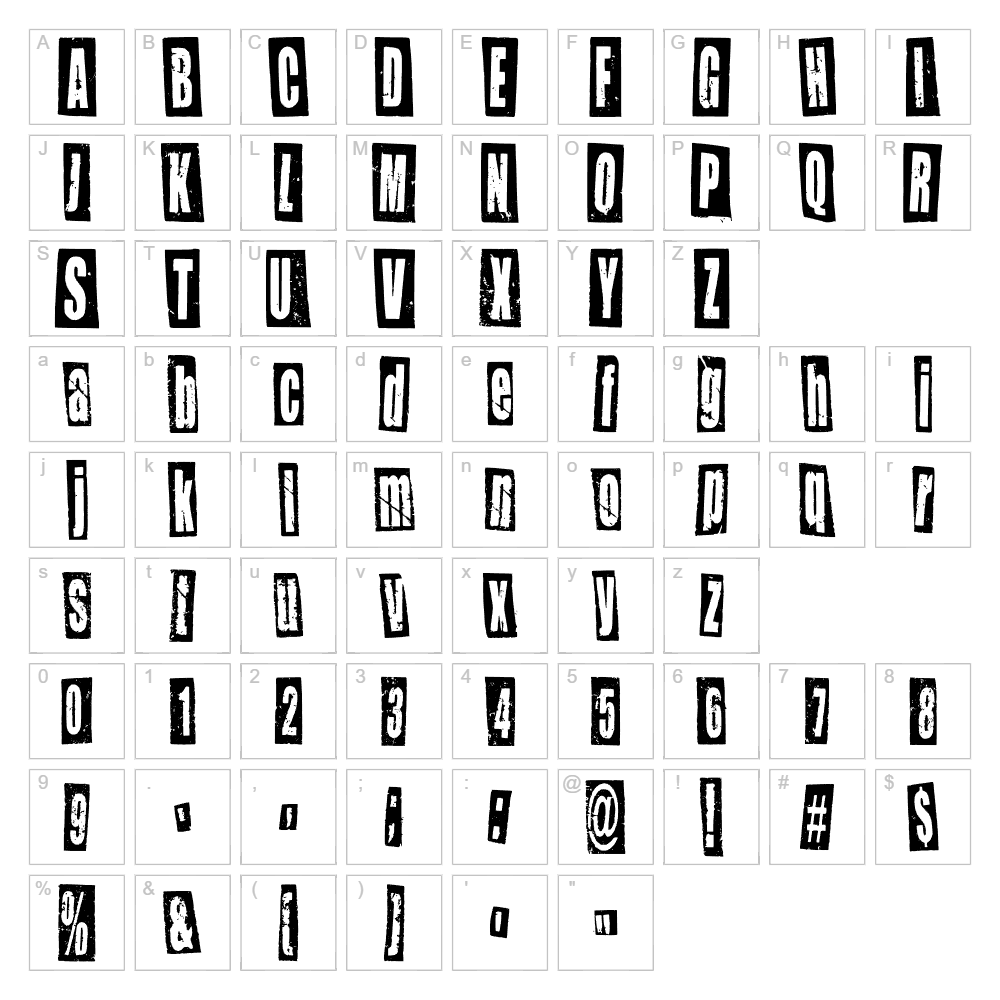
Download Newspaper Cutout White On Black Font
Downloads as a ZIP file. Check the license notes on this page before commercial use.
Font Files
- NewspaperCutoutWhiteOnBlac-Rg.ttf
Font Details
- License:Free for personal use
- Author:
About Newspaper Cutout White On Black
Newspaper Cutout White On Black is a bold, distressed display font designed by onlygfxcom that captures the raw energy of vintage newspaper typography. The font features a distinctive cutout aesthetic with jagged, irregular edges that evoke the look of letters torn directly from newsprint and pasted onto a dark background. Its high-contrast white-on-black appearance and deliberately fragmented letterforms make it perfect for designs that demand attention and convey urgency or edginess. This unique distorted style brings an authentic, DIY punk aesthetic to any creative project.
Best Uses for Newspaper Cutout White On Black
Newspaper Cutout White On Black excels in bold headline designs, poster typography, album artwork, and vintage-inspired branding projects where an eye-catching, rebellious aesthetic is desired. The font is ideal for t-shirt designs, vinyl decals, and Cricut projects that benefit from strong visual contrast and edgy character. It also works beautifully for editorial layouts, zine covers, music event promotions, and any design that needs to evoke a sense of urgency, nostalgia, or artistic rebellion.
What Fonts Pair Well With Newspaper Cutout White On Black?
For body text and supporting typography, pair Newspaper Cutout White On Black with Roboto or Open Sans (both available free on Google Fonts) to balance the distorted display style with clean, readable sans-serif letterforms. Alternatively, Playfair Display, an elegant serif font, creates striking contrast when used alongside this edgy display face, allowing you to combine vintage sophistication with modern grit in a single design.
License & Commercial Use
Newspaper Cutout White On Black is 100% free for commercial use. You may use this font in logo design, branding projects, printed materials, digital publications, websites, mobile apps, merchandise, and all other commercial applications without purchasing a license. When using the font, attribution to onlygfxcom is appreciated but not strictly required. However, you are not permitted to resell, redistribute, or repackage the font file itself as your own product.
Frequently Asked Questions
Is Newspaper Cutout White On Black free for commercial use?
Yes, Newspaper Cutout White On Black is 100% free for all commercial applications, including logo design, printed materials, merchandise, websites, and digital projects. No license purchase is required.
What file formats does Newspaper Cutout White On Black come in?
The font is typically available in standard formats compatible with both Mac and Windows systems, including TTF and OTF files. Check the download package to confirm which formats are included.
What fonts pair well with Newspaper Cutout White On Black?
Clean sans-serif fonts like Roboto and Open Sans work well for body text, while serif fonts like Playfair Display create elegant contrast. Choose pairings based on whether you want to balance the distressed aesthetic or amplify its edgy character.
Can I use Newspaper Cutout White On Black for Cricut projects?
Absolutely. This font is perfect for Cricut cutting projects, vinyl decals, and heat transfer designs. For best results with Cricut's software, convert the font to SVG format using the VectorDad Word Art Generator.
How to Install Newspaper Cutout White On Black
- Download the font file from VectorDad to your computer and locate the ZIP folder.
- Unzip the folder to extract the font files (TTF or OTF format).
- Double-click the font file to open the font preview window on your system.
- Click the Install button to add the font to your system's font library.
- Restart your design applications (Adobe Creative Suite, Cricut Design Space, Canva, etc.) and the font will appear in your font menu.
Use Newspaper Cutout White On Black With VectorDad Tools
Maximize this font's potential by using the VectorDad Word Art Generator to instantly convert your text into SVG-ready designs perfect for Cricut and laser cutting projects. For curved, circular text effects, try the Curved Text Generator to wrap Newspaper Cutout White On Black around logos, badges, and custom vinyl decal designs.
Make Your Own Font
Like the look of Newspaper Cutout White On Black but want letters in your own style? Draw or trace each character as an SVG, then turn the set into an installable .ttf font with our SVG to TTF font maker. It runs in your browser, with no signup.
Similar Fonts
If you like Newspaper Cutout White On Black, you may also like these free fonts:


