
Patti Font – Free Download (OTF, TTF, SVG)

Character Map
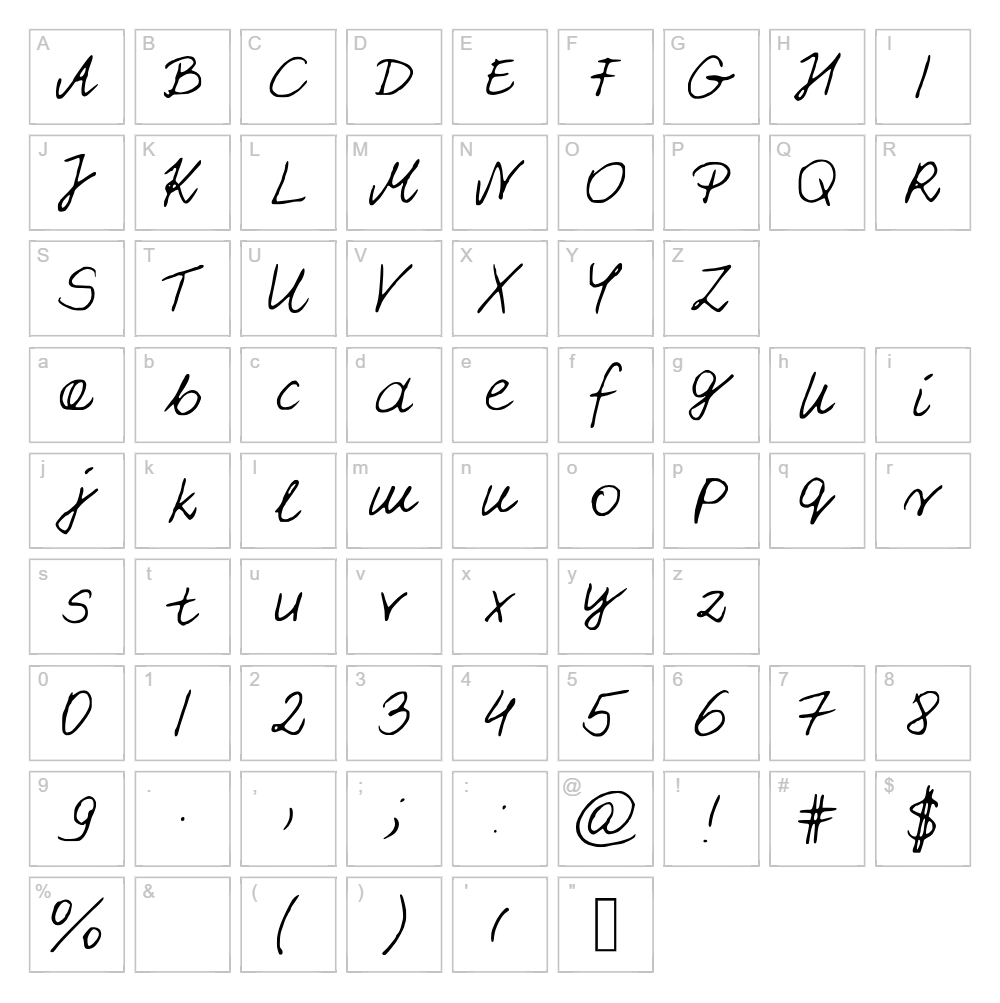
Download Patti Font
Downloads as a ZIP file. Check the license notes on this page before commercial use.
Font Files
- PattiFont.ttf
Font Details
- License:Free for personal use
- Author:
About Patti
Patti is a charming handwritten script font designed by Patrycja A, Sz that captures the natural flow and warmth of authentic pen strokes. With its graceful letterforms and organic character spacing, Patti brings a personal, artistic touch to any creative project. The font balances readability with stylistic flair, making it equally effective at small sizes for body text or enlarged for eye-catching headlines. Its friendly personality and smooth curves make it a standout choice for designers seeking a handcrafted aesthetic without sacrificing legibility.
Best Uses for Patti
Patti excels in branding, greeting card designs, wedding invitations, and creative packaging where a personal handwritten feel adds emotional resonance. It's perfect for Cricut crafters creating vinyl decals, custom t-shirt designs, and personalized home décor projects. The font also works beautifully for editorial layouts, social media graphics, and blog headers where a warm, approachable tone is desired.
What Fonts Pair Well With Patti?
Patti pairs beautifully with clean sans-serif fonts like Roboto or Open Sans from Google Fonts, which balance its organic energy with modern simplicity. For a more sophisticated combination, pair it with the serif font Lora, which complements Patti's elegance while maintaining strong readability in body copy.
License & Commercial Use
Patti is 100% free for commercial use, meaning you can confidently use it in logos, branding projects, printed materials, digital designs, web pages, mobile applications, and merchandise without licensing fees. You are welcome to create products for sale using this font in your designs. The only restriction is that you cannot resell or redistribute the Patti font file itself. Please credit designer Patrycja A, Sz when possible, though it is not required.
Frequently Asked Questions
Is Patti free for commercial use?
Yes, Patti is completely free for commercial use. You can use it in client projects, logos, print materials, merchandise, and digital products without any licensing restrictions or fees.
What file formats does Patti come in?
Patti is available in standard font formats including OTF and TTF, compatible with Windows, Mac, and web applications. These formats work across design software like Adobe Creative Suite, Cricut Design Space, Silhouette Studio, and more.
What fonts pair well with Patti?
Roboto, Open Sans, and Lora are excellent pairings for Patti. Sans-serif fonts create modern contrast, while serif options like Lora add sophistication while maintaining readability alongside Patti's handwritten style.
Can I use Patti for Cricut cutting projects?
Absolutely! Patti works beautifully in Cricut Design Space for creating custom vinyl decals, personalized gifts, t-shirt designs, and home décor projects. Its clear letterforms ensure clean cuts even at smaller sizes.
How to Install Patti
- Download the Patti font file from VectorDad.com to your computer.
- Unzip the downloaded folder to access the font files.
- Double-click the font file (OTF or TTF) to open the font preview window.
- Click the "Install" button to add Patti to your system fonts.
- Restart your design application, and Patti will appear in your font menu ready to use.
Use Patti With VectorDad Tools
Elevate your Patti designs using the VectorDad Word Art Generator, which lets you create stunning text effects and convert them to SVG files perfect for Cricut projects. The Curved Text Generator allows you to bend and shape Patti text along custom paths, adding dynamic dimension to vinyl decals and cutting designs.
Make Your Own Font
Like the look of Patti but want letters in your own style? Draw or trace each character as an SVG, then turn the set into an installable .ttf font with our SVG to TTF font maker. It runs in your browser, with no signup.


