
Photograph Signature Font – Free Download (OTF, TTF, SVG)

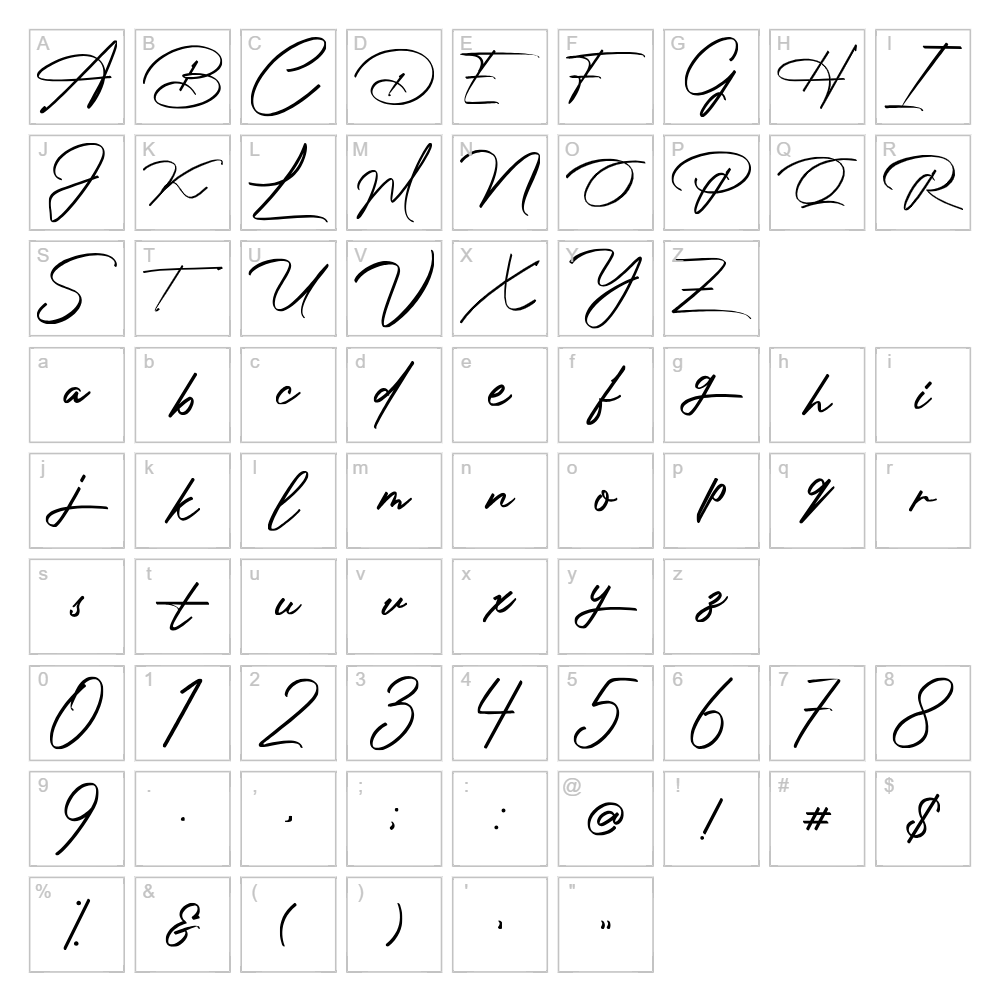
Character Map
Download Photograph Signature Font
Downloads as a ZIP file. Check the license notes on this page before commercial use.
Font Files
- Photograph Signature.ttf
Font Details
- License:Free for personal use
- Author:
About Photograph Signature
Photograph Signature is an elegant handwritten script font designed by Typeline Studio that captures the fluid, personal nature of authentic pen and ink signatures. With its refined stroke variations and natural flow, this typeface conveys sophistication and individuality, making it ideal for designers seeking a genuine, human touch in their projects. The letters connect seamlessly with organic spacing that mimics real handwriting, while maintaining excellent legibility across various sizes. What sets Photograph Signature apart is its ability to feel both casual and professional, bridging the gap between formal calligraphy and everyday cursive writing.
Best Uses for Photograph Signature
Photograph Signature excels in branding projects, personal invitations, wedding stationery, and signature-based logo designs where authenticity matters. It's perfectly suited for Cricut crafting projects, vinyl decals, t-shirt designs, and personalized merchandise that demand a handcrafted aesthetic. This font also works beautifully for editorial headers, greeting cards, and digital packaging mockups where a personal, intimate voice enhances the overall design message.
What Fonts Pair Well With Photograph Signature?
For a sophisticated contrast, pair Photograph Signature with Montserrat, a clean, geometric sans-serif that provides excellent readability for body text while letting the signature font shine as a headline. Lora, a traditional serif font available on Google Fonts, creates a timeless, editorial pairing that works well for wedding invitations and formal documents. For a modern approach, combine it with Open Sans, a friendly, versatile sans-serif that balances the script's elegance without competing for attention.
License & Commercial Use
Photograph Signature is free for personal and commercial use, including logo design, print materials, digital publications, web projects, mobile applications, and merchandise production. You may use this font to create products for sale, design client work, and build branded assets without restriction. When possible, credit Typeline Studio as the designer—though not required by the license terms. However, you are not permitted to resell, redistribute, or repackage the font files themselves, nor claim ownership of the typeface design.
Frequently Asked Questions
Is Photograph Signature free for commercial use?
Yes, Photograph Signature is completely free for commercial projects including logos, packaging, merchandise, and client work. You can use it for any business purpose without purchasing a license or seeking additional permissions.
What file formats does Photograph Signature come in?
Photograph Signature is available in standard font formats including .ttf (TrueType) and .otf (OpenType), ensuring compatibility with Windows, macOS, Cricut Design Space, Adobe Creative Suite, and most design applications.
What fonts pair well with Photograph Signature?
Photograph Signature pairs beautifully with clean sans-serifs like Montserrat and Open Sans for modern designs, or with traditional serifs like Lora for elegant, editorial applications. The key is choosing a neutral, highly legible companion font that doesn't compete with the script's personality.
Can I use Photograph Signature for Cricut projects?
Absolutely. Photograph Signature works perfectly with Cricut Design Space and other cutting software for vinyl decals, custom apparel, personalized gifts, and home décor projects. For best results with intricate script details, use the font at larger sizes and ensure your cutting blade is sharp.
How to Install Photograph Signature
- Download the Photograph Signature font file from VectorDad.com to your computer.
- Unzip the downloaded folder to access the font files (.ttf or .otf).
- Double-click the font file to open the font preview window.
- Click the "Install" button to add Photograph Signature to your system font library.
- Restart your design application, and Photograph Signature will appear in your font list and be ready to use across all programs.
Use Photograph Signature With VectorDad Tools
Create stunning word art with Photograph Signature using the VectorDad Word Art Generator, which lets you design custom text effects perfect for Cricut projects and vinyl cutting. Take your designs further with the Curved Text Generator to bend Photograph Signature along custom paths, adding dynamic, professional-quality effects to your crafting and design work.
Make Your Own Font
Like the look of Photograph Signature but want letters in your own style? Draw or trace each character as an SVG, then turn the set into an installable .ttf font with our SVG to TTF converter. It runs in your browser, with no signup.


