
Plano Font – Free Download (OTF, TTF, SVG)

Character Map
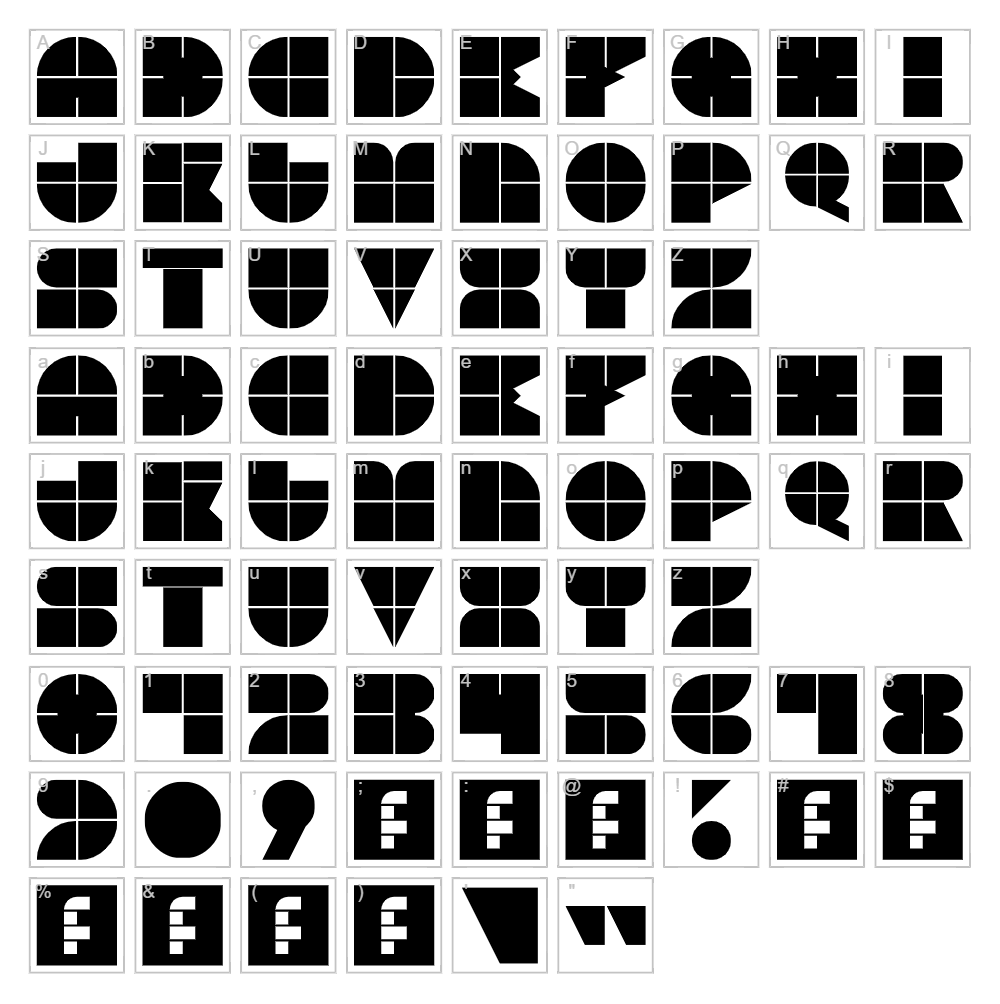
Download Plano Font
Downloads as a ZIP file. Check the license notes on this page before commercial use.
Font Files
- Plano.ttf
Font Details
- License:Free for commercial use
- Author:
About Plano
Plano is a striking display font from Blast Design that commands attention with its bold, geometric letterforms and modern aesthetic. The typeface features clean lines and confident strokes that convey sophistication and contemporary style, making it instantly recognizable across any design application. Plano's versatile character set balances visual impact with legibility, allowing it to work equally well as a headline statement or a branding cornerstone. Its distinctive personality elevates any project while maintaining the professional polish that designers demand.
Best Uses for Plano
Plano excels in logo design, branding systems, and eye-catching headlines where a modern, confident typeface is essential. This font is perfect for t-shirt designs, vinyl decals, and Cricut projects that need strong visual presence, as well as print collateral like posters, packaging, and signage. It also works beautifully in digital design, social media graphics, and editorial layouts where contemporary typography can enhance your creative message.
What Fonts Pair Well With Plano?
Plano pairs exceptionally well with Lato, a clean sans-serif that provides excellent contrast for body copy while complementing Plano's modern sensibility. For a softer balance, try pairing it with Merriweather, a elegant serif that creates sophistication when used for secondary text. Another excellent match is Open Sans, which offers a neutral, accessible companion that lets Plano shine as your primary display font.
License & Commercial Use
Plano is 100% free for commercial use, meaning you can use it freely in logos, branding projects, print materials, digital designs, websites, mobile applications, and merchandise without restrictions. You may use Plano for client projects, business applications, and any commercial venture without purchasing a license. However, you must provide credit to Blast Design as the font designer, and you are not permitted to resell, redistribute, or repackage the font files for profit.
Frequently Asked Questions
Is Plano free for commercial use?
Yes, Plano is completely free for commercial use. You can use it in logos, branding, print projects, digital designs, merchandise, and any business application without licensing fees or restrictions.
What file formats does Plano come in?
Plano is available in standard font formats including TTF (TrueType) and OTF (OpenType), ensuring compatibility across Windows, macOS, and design software like Adobe Creative Suite, Cricut Design Space, and more.
What fonts pair well with Plano?
Plano pairs beautifully with Lato for a clean contemporary look, Merriweather for sophisticated contrast, and Open Sans for a neutral, highly readable companion. These combinations work across print, digital, and branding applications.
Can I use Plano in my Cricut Design Space projects?
Absolutely. Once installed on your computer, Plano becomes available in Cricut Design Space and can be used for vinyl decals, t-shirt designs, signage, and all other Cricut cutting projects without any additional steps.
How to Install Plano
- Download the Plano font file from VectorDad.com to your computer.
- Unzip the compressed folder to access the font files.
- Double-click the Plano font file (TTF or OTF) to open the font preview window.
- Click the Install button to add Plano to your system fonts.
- Plano is now available in all your design applications—restart your software if it was already open to see the font in your library.
Use Plano With VectorDad Tools
Maximize Plano's impact with the VectorDad Word Art Generator, which instantly converts your text into scalable SVG designs perfect for Cricut projects and vinyl cutting. Take your designs further with the Curved Text Generator, allowing you to bend and curve Plano text along custom paths for dynamic, professional-looking projects.
Make Your Own Font
Like the look of Plano but want letters in your own style? Draw or trace each character as an SVG, then turn the set into an installable .ttf font with our free font creator. It runs in your browser, with no signup.
Similar Fonts
If you like Plano, you may also like these free fonts:


